How to Remove the Dealer Lot From Car Photos
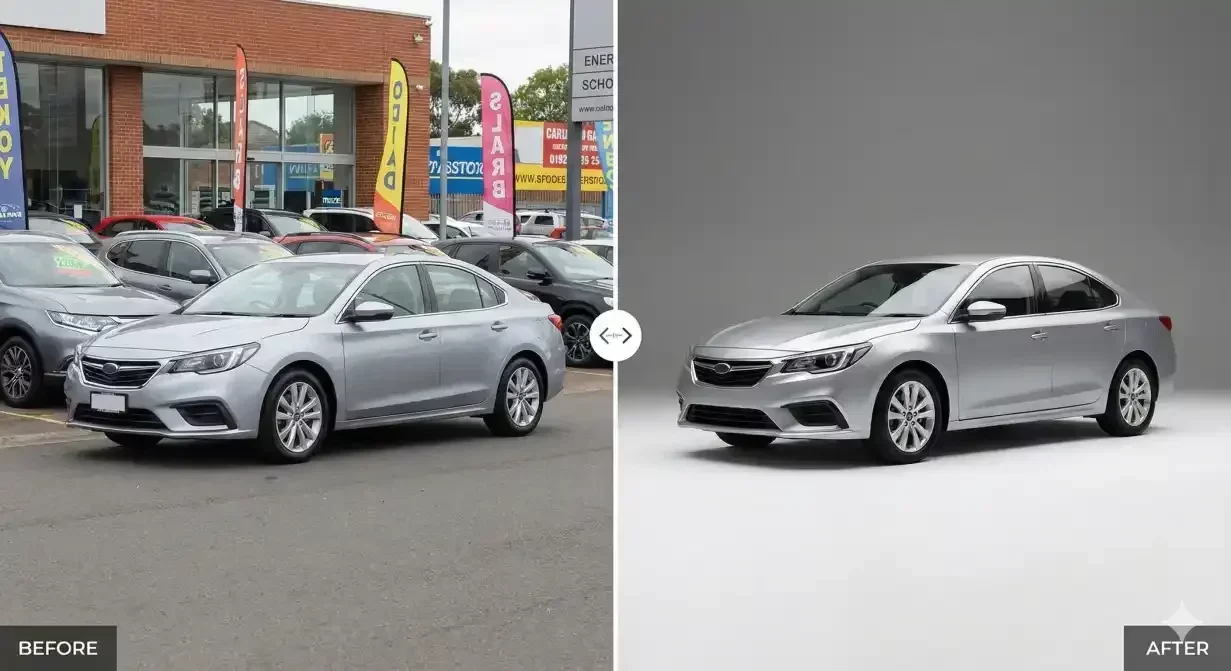
The quickest way to remove background from car photo files is to run them through an editor trained on cars. Place the car on one clean scene, then check the edges and the shadow before you publish. The lot disappears, and the car stays exactly as it was shot.
That's the job car background removal is built for. Below is the full process, from shooting the car to exporting a set that's ready to list, plus the mistakes that make a background swap look fake.
Why the lot in your photos costs you trust
Lot photos come with whatever is behind the car. Other inventory, signage, trash cans and power lines all end up in frame. The light changes through the day, and every salesperson shoots with a different phone.
The result is an inventory grid that looks fragmented. One car sits against a bright sky, the next against a gray building, and a third shows a competitor's truck in the reflection. Buyers notice, even if they can't say why, and a messy grid reads as a messy operation.
When you remove background from car photo sets after the shoot, you fix this without controlling every variable on the lot. Every car ends up in the same clean scene, no matter where or when it was photographed.
Why a generic remove bg tool struggles with cars
A quick car remove bg search turns up dozens of free tools. Many were built for people and products, and cars are harder.
A car has edges that confuse general-purpose tools. Side mirrors, wheel spokes and antenna tips are thin and detailed. The windows are transparent, so the lot shows through the glass even after the background is gone. And without a ground shadow, the car looks like it's floating.
Generic tools often leave a halo around the mirrors or cut into the car itself. A car background remover trained on vehicles handles those spots more reliably, because it has learned what a car's outline looks like. If you're weighing tools, the best car photo editor app roundup compares the car-specific options with the generic removers.
How background removal works on a car photo
Whatever tool you use, three things happen in order.
First, the AI works out which pixels are the car and which are the background. That includes the hard parts: the mirrors, the gaps between the spokes and the tip of the antenna.
Second, it builds a mask that separates the two. General-purpose removal tools work the same way and do best when the subject contrasts strongly with its background. That's why low-contrast spots, like a dark tire against dark asphalt, are where masks tend to slip.
The mask decides whether the result looks professional or obviously edited. A poor one shows up as rough edges, missing details or a hard line where the car meets the new scene.
Third, the original background is replaced with the scene you choose. That might be a solid color, a showroom, an outdoor setting or a branded backdrop, or a transparent car cutout when you need the car on its own. To look believable, the new scene has to match the direction and color of the light in the original photo.
How to remove background from car photos, step by step
Uploading and clicking a button only gets you part of the way. The cleanest results come from a routine that starts before you open the editor.
Step 1: shoot a clean source photo
Removing the background hides the lot, but it can't fix a blurry or badly framed car. Clean the car, shoot each angle from the same distance and height, and avoid heavy backlight that blows out the windows.
A fixed set of 12 car photography angles keeps every set complete and in the same order. Name or organize the files by stock number or VIN before uploading, so edited photos never end up on the wrong listing.
Step 2: upload each car as one set
Shoot all the angles for a car, then process them together. Applying one background to the whole set keeps the hero shot, the side profiles, the rear and the interior in the same scene.
Editing one photo at a time is where hours disappear. Batch the set, review it, and move on to the next car.
Step 3: pick one background and keep it
The background says something about your dealership. A showroom feels polished, an outdoor scene feels open, and a solid color keeps all the attention on the car. Deciding between a white or outdoor car background once saves you from second-guessing every listing.
Whatever you choose, use it everywhere. Mixing backgrounds at random brings back the fragmented look you were trying to remove. Check the photo rules for each place you list, too. Google's vehicle ads image guidelines, for example, recommend clean images with minimal background and can disapprove photos with cluttered ones.
Step 4: check the edges before you export
Automated tools aren't perfect, so zoom in on the spots where errors hide:
- Side mirrors and door handles, where complex shapes confuse the mask
- Wheel wells and tire edges, especially if the original had low contrast there
- Windows, which can keep traces of the old background
- The point where each tire meets its shadow
If something's off, regenerate that photo or adjust it before it goes live. Buyers zoom in, and one bad edge makes them question the whole listing.
Step 5: export for each platform
Cars.com, AutoTrader, CarGurus, Facebook Marketplace and your own website can each expect different sizes and compression. Export at the size each one needs, and keep the stock number or VIN in the file name so every photo lands on the right listing.
Mistakes that make a background swap look fake
Inconsistent source photos
If some photos are sharp and well lit while others are blurry or dark, the edit won't even them out. Set one capture standard for your team and hold everyone to it.
Over-editing
The goal is a clean listing, not a fantasy. Photos that look synthetic make buyers wonder what you're hiding. Remove the distractions and leave the car's real condition alone.
A floating car
Removing the background also removes the shadow that grounds the car. A good tool adds a realistic one, but check it. A car that seems to hover above the floor reads as fake at a glance.
How to tell it's working
Give it a few weeks, then look at four things.
First, the time from shooting a car to a live listing. If photos used to wait for a designer or an outside editor, that gap should shrink noticeably.
Second, how often photos get redone because of background problems or a manager's rejection. That number should drop close to zero.
Third, scroll your own listings like a buyer would. Every car should look like it belongs to the same dealership.
Fourth, listen to buyers. Fewer questions about a car's condition usually means the photos are doing their job.
How Car Background AI handles the lot
Car Background AI is built for dealers who need clean listing photos without design skills. Car background removal traces the mirrors, the wheel spokes and the antenna, and keeps the car's real edges around the glass.
The car then lands on a showroom, outdoor or solid-color scene with a ground shadow that sits where it should. Lighting and color are evened out across the set, so a car shot at noon matches one shot at 4 PM.
You upload a whole car at once and apply the same background to every photo, in the browser on a phone or desktop. For the full studio look without a physical booth, the virtual car studio approach builds on the same steps.
Final thoughts
You can't control what's behind every car on your lot, but you can remove it. Shoot clean, process each car as one set, use one background everywhere, and check the edges before anything goes live.
Start small. Take the three worst-photographed cars on your lot and run them through a car background remover built for vehicles. Check the window edges, the antenna and the shadow under each car. If they don't hold up, close the tab.
10 free generations. No card required.
Frequently asked questions
What does it mean to remove the background from a car photo?
It means separating the car from its surroundings and replacing them with a clean scene. Dealers use it to turn cluttered lot photos into consistent listing images without a studio.
Can removing the background fix a bad lot photo?
Only the background. It hides a messy setting, but it can't repair a blurry, badly framed or poorly lit car. Shoot the car sharp and fully in frame first.
Is a free car remove bg tool good enough?
For a single car, sometimes. Generic tools often leave halos around mirrors, lose the gaps between spokes and skip the ground shadow. A car-trained tool handles those edges more reliably across a full inventory.
Should every listing use the same background?
Yes. One background across your inventory makes the listing grid look uniform and keeps attention on the cars. Check each marketplace's photo guidelines before you settle on a style.
Does removing the background change the car itself?
It shouldn't. A good edit replaces only the scene behind the car and adds a ground shadow. The paint color, condition and shape should stay exactly as photographed.
جرّب مجانًا على سيارتك التالية
ارفع صورة من ساحة المعرض واستلمها بخلفية استوديو أو صالة عرض. 10 عمليات توليد مجانية دون بطاقة دفع.
جرّب مجانًا
يستخدمه أكثر من 1,000 معرض سيارات.

Tamas Magda
شريك مؤسس ومسؤول النمو والشراكات في Car Background AI
شارك Tamas Magda في تأسيس Car Background AI (carbackground.ai)، محرر صور السيارات بالذكاء الاصطناعي الذي يستبدل خلفيات صور مخزون المعارض. يقود الشراكات والنمو وهيكلة الأعمال، ويعمل مع فريق التطوير على خارطة طريق المنتج، ومع المعارض على ما تحتاج إليه إعلاناتها على الإنترنت فعلًا. يحمل خبرة في بناء المشاريع الناشئة في آسيا والمحيط الهادئ وفي الشرق الأوسط وشمال إفريقيا، ويكتب عن عرض المركبات للبيع، ومسارات عمل الصور في المعارض، واستخدام الذكاء الاصطناعي في صور الإعلانات دون تغيير السيارة نفسها.
الكاتب Tamas شريك مؤسس في Car Background AI وله مصلحة مالية في الشركة. والمقالات التي تذكر Car Background AI تعكس هذه العلاقة.