How to Use a Car Background Remover to Clean Up Lot Photos in Minutes
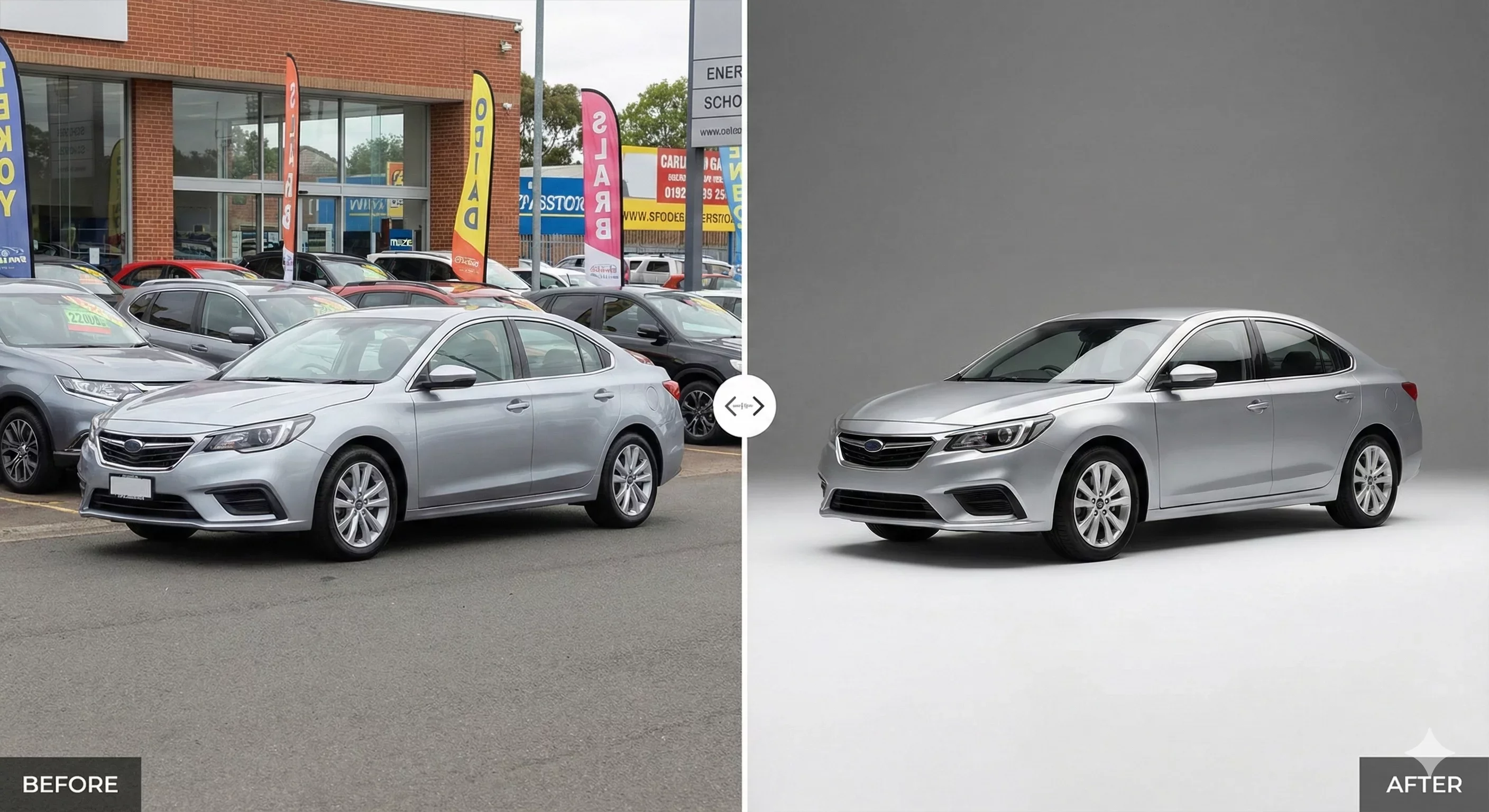
A car background remover is the fastest way to transform cluttered lot photos into clean, professional listings that build buyer trust. If your dealership struggles with inconsistent backgrounds, mixed lighting conditions, and photos that look different from one vehicle to the next, background removal tools can standardize your entire inventory in a fraction of the time manual editing requires.
This guide walks through how to use a car background remover effectively, from preparing your source photos to exporting marketplace-ready images. Whether you process ten cars a week or a hundred, the workflow principles remain the same: capture consistently, remove distractions, apply a clean background, and publish with confidence.
Why Dealers Need a Car Background Remover
Every dealership faces the same visual challenge. Cars arrive on the lot, and someone needs to photograph them before they can be listed. The reality of lot photography means working around other vehicles, signage, trash cans, power lines, and whatever else happens to be in frame. Weather changes, lighting shifts throughout the day, and different staff members shoot with different phones using different settings.
The result is an inventory grid that looks fragmented. One car sits against a sunny sky, another against a gray building, a third has a competitor's vehicle visible in the reflection. Buyers scrolling through listings notice this inconsistency, even if they cannot articulate it. The visual chaos signals disorder, and disorder undermines trust.
A car background remover addresses this problem at the source. Instead of trying to control every variable during capture, you standardize during post-processing. The tool isolates the vehicle from its original background and places it against a clean, consistent scene. Every car in your inventory can share the same professional presentation, regardless of where or when it was photographed.
How Car Background Removal Actually Works
Modern car background remover tools use AI to detect the boundaries of a vehicle and separate it from the surrounding environment. The process involves several technical steps that happen automatically:
First, the AI identifies what constitutes the car versus what constitutes the background. This means recognizing the vehicle's outline, including complex areas like side mirrors, wheel spokes, and antenna tips. Early background removal tools struggled with these edge cases, often leaving halos or cutting into the vehicle itself. Current automotive-specific tools handle these challenges more reliably because they are trained specifically on vehicle imagery.
Second, the tool creates a mask that defines exactly which pixels belong to the car and which belong to the background. The quality of this mask determines whether your final image looks professional or obviously edited. Poor masking shows up as rough edges, missing details, or unnatural transitions between the car and the new background.
Third, the original background is removed and replaced with whatever scene you select. This might be a solid color, a showroom environment, an outdoor setting, or a custom backdrop featuring your dealership branding. The replacement background needs to match the lighting direction and color temperature of the original photo to look believable.
Step-by-Step Workflow for Dealers
Using a car background remover effectively requires more than just uploading photos and clicking a button. The best results come from a structured workflow that begins before you even open the editing tool.
Prepare Your Source Photos
Capture quality matters. While background removal can fix environmental distractions, it cannot fix fundamental problems with the source image. Before shooting, ensure the vehicle is clean and properly positioned. Shoot at a consistent distance and angle for each position in your standard shot sequence. Avoid extreme backlighting that blows out windows or harsh shadows that obscure details.
Organize your files by stock number or VIN before uploading. This simple step prevents mix-ups when processing multiple vehicles and makes it easier to match edited photos back to the correct listing.
Upload and Process in Batches
Most dealers photograph vehicles in sets, capturing all required angles before moving to the next car. Process your photos the same way. Upload the complete set for one vehicle, apply your background and enhancement settings, review the results, then move to the next set.
Batch processing offers significant time savings over editing individual images. When you select a background template and apply it to an entire vehicle set at once, you ensure consistency across all angles. The hero shot, side profiles, rear view, and interior photos all share the same visual treatment.
Select Appropriate Backgrounds
The background you choose communicates something about your dealership. Showroom-style environments suggest professionalism and attention to detail. Clean outdoor scenes feel open and honest. Solid colors put all focus on the vehicle itself.
Whatever you choose, apply it consistently across your inventory. Mixing backgrounds randomly, using showroom for some cars and outdoor for others without a clear pattern, recreates the visual fragmentation you are trying to eliminate. Pick a standard and stick with it.
Consider your marketplace requirements as well. Some platforms have specific guidelines about background types. Facebook Marketplace, for instance, may have different expectations than Cars.com or your own website. A good car background remover lets you save multiple templates so you can quickly apply the right treatment for each destination.
Review Before Export
Automated tools are not perfect. Before exporting your final images, zoom in and check the edges around the vehicle. Look specifically at:
Side mirrors and door handles, where complex shapes can confuse masking algorithms
Wheel wells and tire edges, which often show artifacts if the original photo had low contrast in these areas
Window reflections, which may retain traces of the original background
Ground contact points, where the car meets its shadow
If you spot problems, most tools allow you to refine the mask manually or regenerate with different settings. Catching issues before publishing protects your credibility with buyers who will scrutinize your photos closely.
Export for Your Target Platforms
Different marketplaces have different image specifications. Cars.com, AutoTrader, CarGurus, Facebook Marketplace, and your own website may all require different file sizes, aspect ratios, or compression levels. A professional car background remover should offer export presets that automatically format your images for each destination.
Pay attention to file naming conventions as well. Consistent naming that includes stock number or VIN makes it easier to upload photos to the correct listing and reduces the risk of attaching the wrong images to a vehicle.
Common Mistakes to Avoid
Even with good tools, dealers sometimes undermine their results through avoidable errors.
Inconsistent source quality creates inconsistent outputs. If some photos are sharp and well-lit while others are blurry or underexposed, background removal will not magically fix the underlying problems. Establish capture standards for your team and enforce them.
Over-editing triggers buyer skepticism. The goal is professional presentation, not fantasy. If your photos look synthetic or too perfect, buyers may wonder what you are hiding. Trust-safe editing means removing distractions and optimizing clarity without misrepresenting the vehicle's actual condition.
Ignoring shadows creates floating cars. When you remove a background, you also remove the shadow that grounds the vehicle in physical space. Good car background remover tools add realistic shadows automatically, but you should verify they look natural. A car that appears to hover above the ground reads as fake immediately.
Processing photos one at a time wastes hours. If you have the option to batch process, use it. The time savings compound across every vehicle you list, freeing your team to focus on selling rather than editing.
Measuring the Impact on Your Dealership
After implementing a car background remover in your workflow, track metrics that indicate whether the investment is paying off. Relevant indicators include:
Time from capture to published listing. If your previous workflow involved sending photos to an external editor or waiting for someone with Photoshop skills to process them, measure how much faster you can now publish. Faster listing means more days on market with full visibility.
Rework frequency. Count how often photos need to be redone because of background issues, inconsistent presentation, or manager rejections. A good system reduces this friction to near zero.
Visual consistency across inventory. Scroll through your own listings as a buyer would. Does every car look like it belongs to the same professional catalog? If yes, you have achieved the operational consistency that builds brand trust.
Lead quality feedback. While harder to quantify, pay attention to whether buyers mention your photos or express less skepticism about vehicle condition. Professional presentation reduces the trust gap before the first conversation.
How CarBG Fits This Workflow
CarBG is built specifically for dealers who need to process vehicle photos at scale without design expertise. The platform handles background removal and replacement automatically, using AI trained on automotive imagery to deliver clean edges around mirrors, wheels, and other complex shapes.
Beyond basic background removal, CarBG includes lighting optimization and color enhancement to correct for the variable conditions of lot photography. The template library offers showroom, outdoor, and solid-color backgrounds that can be applied consistently across your inventory with one click.
Bulk processing means you can upload an entire vehicle set and apply your standards to all images simultaneously. Export presets format your photos for major marketplaces, and the mobile-friendly interface lets lot staff capture and enhance photos without returning to a desktop.
Final Thoughts
A car background remover transforms the chaotic reality of lot photography into the consistent, professional presentation buyers expect. The technology handles the tedious work of isolating vehicles and replacing distracting backgrounds, freeing your team to focus on what matters: getting cars listed fast and building the visual trust that generates quality leads. Start with one vehicle set, apply a consistent background, check the edges, and export. Once you see how much cleaner your listings look, standardizing the rest of your inventory becomes the obvious next step. Try CarBG free on your next batch of lot photos.