
Automobile Background: Choosing the Right Backdrop for Listings
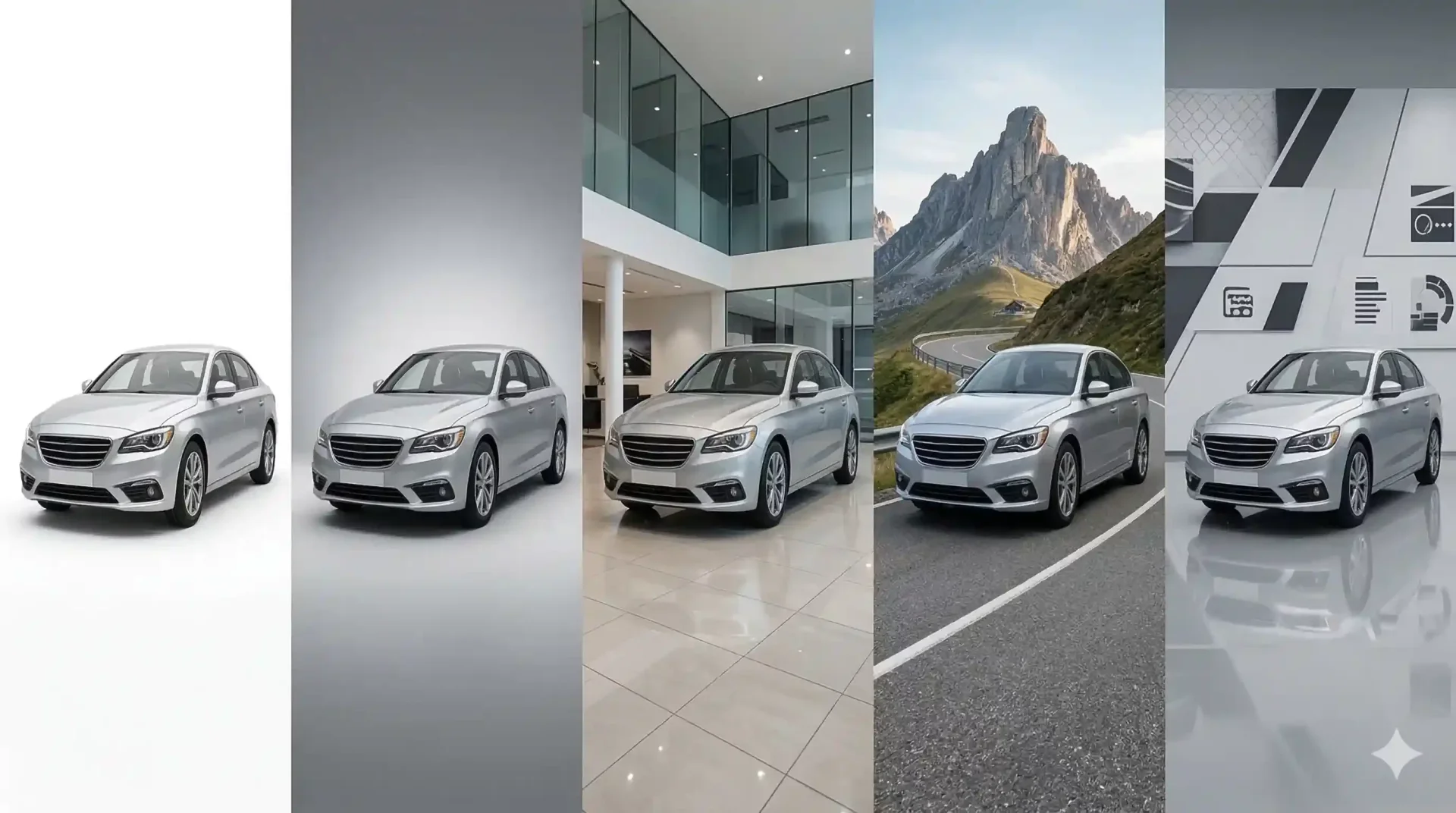
The automobile background behind your inventory photos is the first thing buyers notice, even before they register the vehicle itself. A clean, professional backdrop signals that a dealership takes presentation seriously. A cluttered lot photo with dumpsters, parked trucks, and random signage sends the opposite message. Choosing the right automobile background for your listings is one of the simplest changes a dealer can make to improve click-through rates, build buyer confidence, and create a cohesive brand presence across every marketplace.
This guide compares the most effective car backdrop styles, shows how each performs on different platforms, and helps you build a template library that keeps every listing looking consistent.
Types of automobile background for dealer inventory
Each backdrop style communicates something different to the buyer. The right choice depends on your brand positioning, your primary sales channels, and the type of vehicles you sell.
Car background white: the universal default
A car background white setup is the safest choice for any marketplace. It eliminates all distractions, renders cleanly on mobile screens, and works equally well for sedans, trucks, SUVs, and luxury vehicles. White backgrounds are the standard in e-commerce product photography for a reason: the product is the entire focus.
The downside is that white can feel sterile across an inventory page of 30+ vehicles. Adding a subtle floor shadow or gradient (white to light gray) gives each image a sense of dimension without introducing distracting elements.
Gray gradient: depth without distraction
A gradient that transitions from light gray at the top to slightly darker gray at the bottom creates visual depth while maintaining a clean, professional look. This style works on every marketplace and is particularly effective for dark-colored vehicles that can get lost against a pure white background.
Showroom interior
A rendered or photographed showroom interior as your automobile background positions every vehicle as if it is on display in a premium indoor space. This car backdrop works well for dealer websites and email campaigns where you want to project a high-end image. It is less effective on casual platforms like Facebook Marketplace where it can feel overly polished.
Outdoor scenic
Mountain roads, open highways, and natural landscapes create lifestyle appeal. These car backdrops work best for trucks, SUVs, and adventure-oriented vehicles where the setting reinforces the use case. For sedans and economy cars, outdoor scenes can feel mismatched, so use them selectively.
Custom car backgrounds with dealership branding
Adding your logo, brand colors, and a signature floor style creates custom car backgrounds that reinforce brand recognition across every listing. Buyers who see the same branded backdrop on 30 vehicles subconsciously associate that consistency with reliability. This option works best on your own website and social media where brand building matters most.
CarBG is developing automated dealer branding that applies your logo and colors across every image. This feature is in the making and will simplify the process of maintaining brand consistency at scale.
How each automobile background performs across marketplaces
Marketplace | Best backdrop | Avoid | Why |
|---|---|---|---|
Cars.com | White studio, gray gradient | Busy outdoor scenes | Grid display favors clean images. Clutter competes for attention at thumbnail size. |
CarGurus | White studio, gray gradient | Heavy branding | Gallery swipe view rewards simplicity. Your logo is already on your profile. |
AutoTrader | Showroom, gray gradient | Inconsistent mix | Inventory pages display many vehicles at once. Consistency is the priority. |
Facebook Marketplace | Outdoor scenic, white studio | Overly corporate | Casual browsing context. Lifestyle images blend naturally into the feed. |
Dealer website | Branded, showroom | Generic stock backdrops | Your website is your brand home. Custom backgrounds reinforce identity. |
Instagram / social ads | Outdoor scenic, branded | Plain white (looks flat) | Visual platforms reward imagery with personality and dimension. |
Building your car backdrop template library
A well-organized template library prevents staff from making ad-hoc backdrop decisions that create inconsistency. Structure yours with these principles.
Limit your active templates to three. One primary (white studio or gray gradient for standard listings), one secondary (outdoor scenic for trucks and SUVs), and one branded option for your dealer website. More templates mean more decisions, and decisions slow your inventory processing workflow.
Store templates at 1920 x 1080 resolution minimum. Low-resolution car background images create a visible mismatch when placed behind a high-resolution vehicle photo. Label each file with its style and resolution: studio-white-1920x1080.webp.
Document your template assignments. Create a one-page reference that maps vehicle type to backdrop: sedans and coupes get Template A, trucks and SUVs get Template B, luxury gets Template C. Share it with everyone who touches the photo process. This eliminates the "which background should I use?" question entirely.
Car background images: resolution and format considerations
The technical quality of your car background images matters just as much as the aesthetic choice. A beautiful showroom backdrop rendered at 800 x 600 pixels will look blurry and amateurish behind a sharp 12MP vehicle photo.
Always match or exceed the resolution of your vehicle photos. If you shoot at 4000 x 3000 (standard 12MP), your backdrop template should be at least 1920 x 1080 for web use and ideally 2400 x 1600 for marketing materials.
Export in WebP format for web listings (smallest file size at high quality) and JPEG as a universal fallback. Keep file sizes under 200KB per listing image. PNG is only necessary if your backdrop includes transparency elements, which is rare for standard inventory listings.
Review your templates quarterly. Screen resolutions increase over time, and marketplace display standards evolve. A backdrop that looked crisp two years ago may already feel soft on current devices.
Common mistakes when choosing an automobile background
The most frequent error is using too many templates. When different staff members pick different backdrops for similar vehicles, the inventory page looks scattered rather than cohesive. Solve this by documenting template assignments and limiting active options to three.
Another common mistake is choosing a backdrop that competes with the vehicle for attention. A dramatic sunset or busy cityscape may look impressive on one image, but across 30 listings it becomes distracting. The car should always be the hero. Backgrounds exist to support the vehicle, not overshadow it.
Finally, ignoring mobile rendering leads to poor results. Over 60% of car buyers browse listings on phones. A car backdrop with fine details or subtle gradients may look great on a desktop monitor but turns muddy on a 6-inch screen. Always preview your backgrounds at mobile sizes before committing to a template.
Measuring the impact of your automobile background choices
Changing your backdrop is only valuable if you track the results. Monitor these metrics for 60-90 days after implementing standardized car backdrops.
- Marketplace click-through rate: compare the 30 days before and after switching to consistent automobile backgrounds. A lift in CTR confirms buyers respond to the visual improvement.
- Time-to-first-inquiry: shorter times indicate your photos are doing a better job of converting browsers to leads.
- "Send more photos" requests: a decline means your listing images are comprehensive enough that buyers feel informed.
- Inventory page bounce rate: inconsistent backgrounds often cause high bounce rates. Standardization should improve this metric.
- Social media engagement: if you share inventory on Instagram or Facebook, track likes and saves per post to see which car backdrop style resonates with your audience.
Final thoughts
Your automobile background is a trust signal that shapes buyer perception across every listing and every marketplace. The most effective approach is also the simplest: pick two to three backdrop styles that match your brand and primary platforms, lock them into a template library, and apply them consistently to every vehicle. Start with a white studio or gray gradient for your primary, add one lifestyle option for trucks, and test the difference against your current lot photos. Try the free image enhancer on your next intake batch to see the improvement firsthand.
Frequently asked questions
What is the best automobile background for marketplace listings?
White or light gray studio backgrounds perform best across Cars.com, CarGurus, and AutoTrader. They eliminate distractions, render well on mobile screens, and keep the vehicle as the clear focal point. For Facebook Marketplace, clean outdoor or lifestyle backgrounds can match the platform casual browsing style better.
How many car backdrop templates should a dealer use?
Two to three active templates is the sweet spot. One primary studio-style backdrop for standard listings, one lifestyle option for trucks and SUVs, and optionally one branded template for your dealer website. More templates create decision fatigue without improving listing quality.
Should I use custom car backgrounds with my dealership logo?
Branded backgrounds work well on your own dealer website and social media where brand recognition matters. On third-party marketplaces like Cars.com or CarGurus, clean and unbranded backdrops typically perform better because the focus should be entirely on the vehicle. Use branded backdrops strategically, not universally.
What resolution should car background images be?
Backdrop templates should be at least 1920 x 1080 pixels for standard web listings. For marketing materials and hero images, use 2400 x 1600 or higher. Always match or exceed the resolution of your vehicle photos to avoid a visible mismatch where the car looks sharp but the background appears blurry.
Does a car background white setup work for all vehicle colors?
White works for most colors, but very light-colored vehicles (white, silver, light beige) can get lost against a pure white backdrop. For these vehicles, a light gray gradient adds just enough contrast to define the vehicle edges without introducing visual clutter. Dark-colored vehicles pop beautifully on white.
How often should I update my automobile background templates?
Review your template library quarterly. Check that your backdrop resolution still meets current marketplace display standards, that your branded template reflects any logo or color updates, and that the styles still align with your brand positioning. Screen resolutions and platform requirements evolve, and your templates should keep pace.
75 E 3rd street, Sheridan, WY, 82801, USA
