AI Lighting Optimization for Car Photos: Fix Dark Interiors and Mixed Shadows
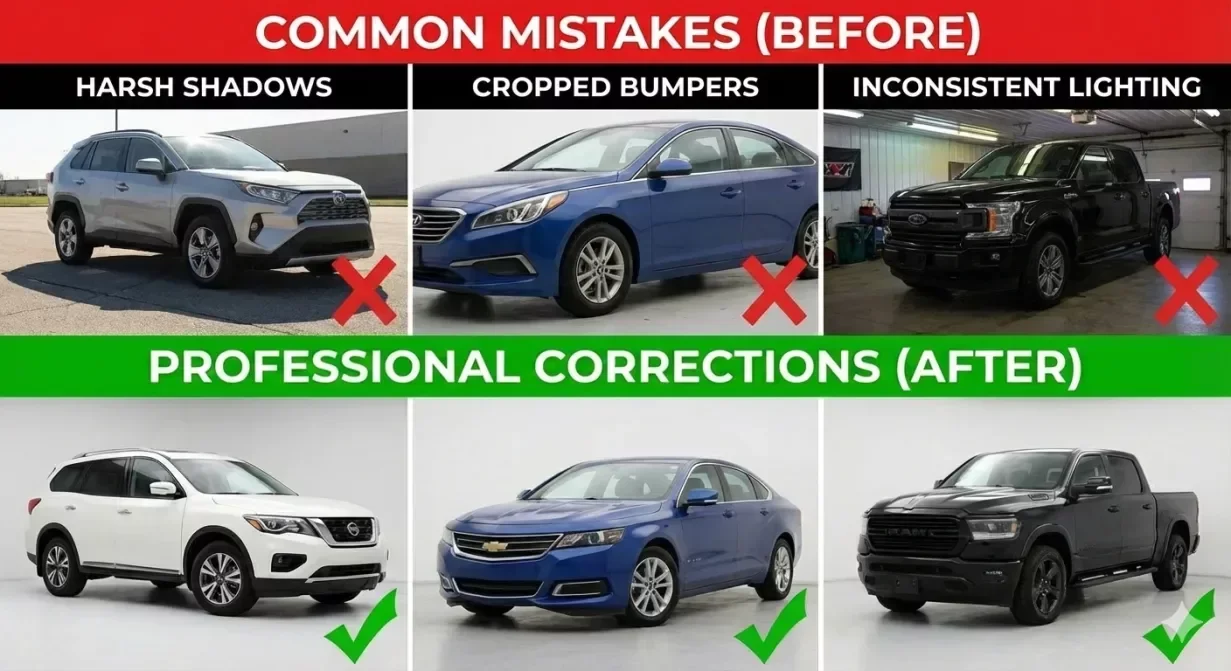
AI lighting optimization transforms inconsistent Car background photos into professionally lit images without manual editing. Dark interiors, harsh shadows, and mixed lighting conditions are the most common quality problems in dealership photography. This guide shows how to identify lighting issues and apply AI-powered corrections.
Why Lighting Problems Dominate Dealer Photo Issues
Lot photography happens under uncontrolled conditions. Morning light differs from afternoon. Overcast days produce flat images while sunny days create harsh shadows. The result is inventory photos with wildly inconsistent exposure.
These inconsistencies undermine professional perception. One vehicle looks bright and inviting; the next appears dark and suspicious.
Common Lighting Problems
Dark Interior Syndrome
Interior photos are underexposed because cameras meter for bright exterior visible through windows. Dashboards disappear into shadow while windows blow out.
Mixed Shadow Patterns
Partial shade creates photos where one side is properly exposed while the other falls into shadow.
Harsh Midday Contrast
Direct sunlight creates extreme contrast with bright highlights and dark shadows. Details lost at both extremes.
Overcast Flatness
Cloudy conditions eliminate shadows but also dimension. Vehicles look flat and lifeless.
How AI Lighting Optimization Works
Intelligent Exposure Balancing
AI identifies underexposed and overexposed regions and adjusts each independently. Dark interiors brighten while windows remain controlled.
Shadow Recovery
Modern AI extracts detail from shadows that appear black to the eye.
Consistency Across Sets
AI applies similar corrections across all photos in a vehicle set, producing uniform appearance.
Applying AI Lighting Optimization Effectively
Start with Reasonable Source Quality
AI cannot create information that was never captured. Capture with reasonable exposure even when planning AI correction.
Process Complete Sets Together
Run all photos from one vehicle through optimization simultaneously for consistent results.
Watch for Over-Correction
Aggressive optimization can produce unnatural results. Target natural appearance, not maximum correction.
Lighting Optimization Checklist
- Interior dashboard and controls clearly visible
- No pure black shadow areas hiding detail
- No blown-out white areas lacking detail
- Consistent exposure across all photos in set
- Natural shadow presence maintains dimensionality
- Overall appearance natural, not over-processed
How CarBG Handles Lighting Optimization
CarBG includes AI lighting optimization that automatically corrects exposure problems during processing.
The enhancement tools balance professional results with natural appearance.
Final Thoughts
AI lighting optimization solves the most common quality problem in dealer photography. Apply optimization to complete vehicle sets, verify interior results, and maintain natural appearance. Try CarBG lighting optimization on your most challenging photos.
The CarBG Angle (FAQ Bits)
Can AI fix completely dark interior photos?
AI can recover significant detail from underexposed interiors, but extremely dark photos have limits. Capture with reasonable exposure.
Will lighting optimization make my photos look fake?
Good AI optimization produces natural results. Over-aggressive settings can create artificial HDR look, but properly configured tools enhance without artifacts.
Should I still try to capture good lighting originally?
Yes. AI enhancement works best on reasonably captured photos. Better source quality produces better results.
Does lighting optimization affect color accuracy?
Exposure correction can shift color perception slightly. Verify colors appear correct after optimization.
How long does AI lighting optimization take?
Processing is typically seconds per image in batch mode. A complete vehicle set processes in under a minute.
How does AI handle mixed lighting in one photo?
AI analyzes different regions independently and applies targeted corrections.

Tamas Magda
Co-founder, Growth and Partnerships at Car Background AI
Tamas Magda is co-founder of Car Background AI (carbackground.ai, CarBG), an AI car photo editor that replaces backgrounds on dealership inventory photos. He leads partnerships, growth, and business architecture, working with the development team on the product roadmap and with dealers on what their online listings actually need. He brings a background in venture building across APAC and MENA, and writes about vehicle merchandising, dealer photo workflows, and using AI on listing images without altering the car itself.
Tamas is a co-founder of Car Background AI and has a financial interest in the company. Articles that mention Car Background AI reflect that relationship.