Why Car Background Edits Look Fake After Processing and How to Fix Them
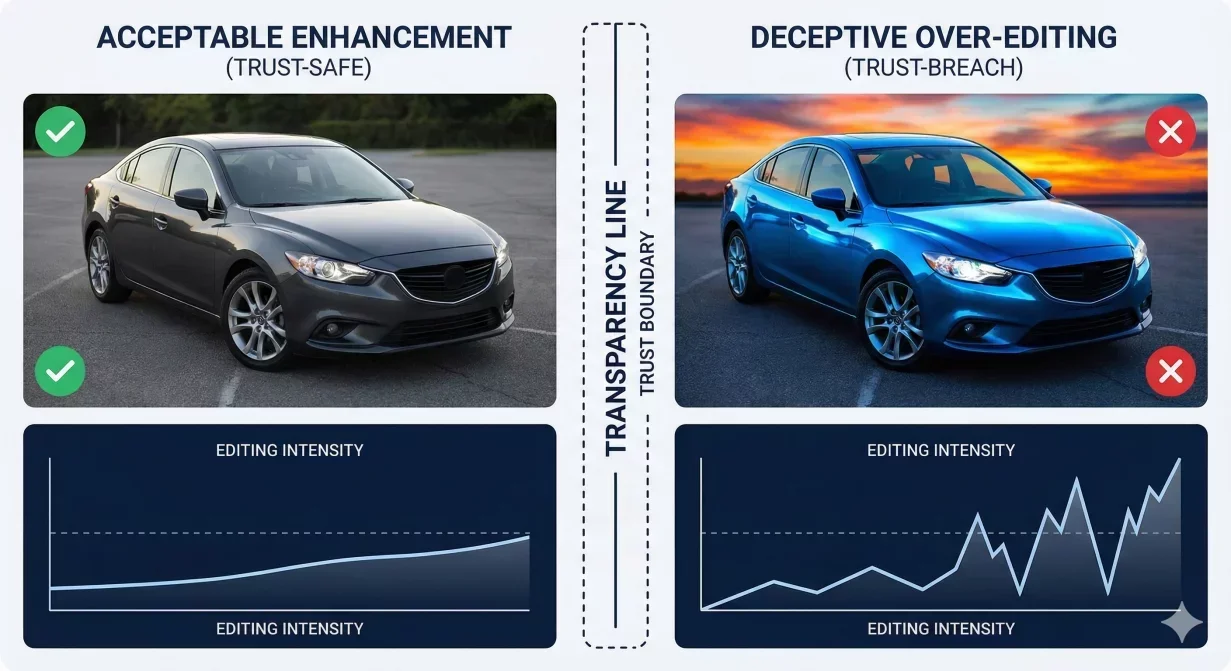
Car background photos that look fake after editing defeat the purpose of professional presentation. Buyers distrust obviously manipulated images. They question what the vehicle really looks like and may avoid engaging entirely. This guide explains why photos appear fake and how to maintain natural appearance while still improving quality.
Why Fake-Looking Photos Damage Trust
Buyers have developed sensitivity to image manipulation. Years of exposure to over-edited social media photos, obvious Photoshop fails, and deceptive advertising have trained people to spot artificial images—even subconsciously.
When car photos trigger this detection, buyers assume deception. If the dealer manipulates photos, what else might they misrepresent? The beautiful edited image becomes evidence against the seller rather than for the vehicle.
This matters especially in automotive where buyers already approach with skepticism. Used car purchases carry inherent uncertainty. Fake-looking photos amplify rather than reduce buyer concerns.
Signs That Make Photos Look Fake
Over-Saturated Colors
Paint that glows with unnatural intensity. Grass that is too green. Interior colors that pop unrealistically. Over-saturation screams manipulation because real objects do not look that vivid.
HDR Glow Effect
Halos around objects where light and dark meet. An overall hyperreal appearance where shadows are too light and highlights are too controlled. This distinctive HDR look immediately signals heavy processing.
Impossible Lighting
Shadows going multiple directions. Lighting that does not match the supposed environment. Flat illumination that eliminates natural dimension. Lighting inconsistencies break the illusion of reality.
Plastic Skin Effect
Surfaces that appear smoothed or plastic-like. Paint without natural texture. Interiors that look rendered rather than photographed. Over-smoothing removes the texture that makes images feel real.
Visible Cutout Edges
Halos, fringing, or unnatural boundaries between vehicle and background. When the edge between car and environment looks artificial, the entire image feels constructed.
Mismatched Shadows
Vehicle shadow that does not match background lighting. Shadow intensity or direction that conflicts with the scene. Shadow inconsistencies break spatial believability.
Unnatural Reflections
Reflections on paint or chrome that do not match the supposed environment. Missing reflections where they should exist. Reflection errors reveal that the vehicle was not actually in the depicted location.
Root Causes of Fake Appearance
Excessive Enhancement
The most common cause. Each adjustment seems beneficial individually, but cumulative effect crosses into artificial territory. A little saturation boost, plus exposure adjustment, plus clarity enhancement, plus shadow lift equals obviously processed.
Inappropriate Background Choice
Backgrounds that do not match vehicle type, lighting, or quality. A lot-photographed economy car on a luxury showroom floor. A sunny vehicle on a cloudy background. Mismatches create cognitive dissonance.
Low-Quality Processing
Budget tools or aggressive automation produce telltale artifacts. Poor edge quality, primitive shadow generation, and crude color adjustment create obviously fake results.
Inconsistent Treatment
Different editing approaches across the set. One photo receives heavy enhancement while another is lightly touched. Inconsistency makes editing obvious even when individual photos might pass.
How to Maintain Natural Appearance
Apply Minimum Effective Enhancement
Ask what is the minimum adjustment needed to achieve acceptable quality. Start conservative and increase only if necessary. When in doubt, back off. Slight under-enhancement beats obvious over-processing.
Preserve Natural Shadows
Shadows provide depth and realism. Do not eliminate shadows entirely lighten them just enough to reveal detail while maintaining natural dimensionality. Flat lighting looks fake; dimensional lighting looks real.
Match Background Lighting
If using background replacement, choose backgrounds with lighting that matches the vehicle. Sunny vehicle needs sunny background. Overcast capture needs neutral background. Matching prevents the cognitive dissonance that signals manipulation.
Maintain Texture
Real surfaces have texture. Paint has orange peel or flake. Leather has grain. Plastic has slight sheen variation. Over-smoothing removes these textures and creates the plastic look. Preserve texture for realism.
Consistent Treatment Across Set
Apply identical enhancement to all photos of one vehicle. Uniform treatment is less detectable than varied treatment. Batch process with consistent settings.
Verify Against Reality
When possible, compare edited photos to the actual vehicle. If edited photos look noticeably different from reality, reduce enhancement until they match. The goal is truthful representation, not transformation.
The Trust-Safe Enhancement Philosophy
Trust-safe enhancement improves photo quality while maintaining accurate representation. It removes technical deficiencies (poor lighting, distracting backgrounds) without changing what the vehicle actually looks like.
Ask: Would a buyer feel deceived seeing this car in person after seeing the photos? If yes, enhancement has gone too far. Photos should set accurate expectations, not create disappointment.
Checklist for Natural Appearance
- Colors look vivid but not glowing
- Shadows exist and provide dimension
- No HDR glow or halos
- Textures visible on surfaces
- Background lighting matches vehicle
- Edges look natural, not cut-out
- Reflections are consistent with environment
- Overall impression is professional, not manipulated
How CarBG Maintains Natural Results
CarBG enhancement is calibrated for automotive trust. The system improves technical quality while maintaining natural appearance. Enhancement intensity is tuned to avoid the over-processing that triggers buyer skepticism.
Background templates and shadow generation are designed for believable results. The goal is professional presentation that builds trust rather than raising questions.
Final Thoughts
Photos that look fake after editing damage trust more than unedited photos would. Apply minimum effective enhancement, preserve natural shadows and textures, match background lighting, and verify against reality. The goal is professional presentation that accurately represents the vehicle. Try CarBG for trust-safe enhancement that improves quality without artificial appearance.
The CarBG Angle (FAQ Bits)
How do I know if my photos look fake?
Ask someone unfamiliar with the editing to evaluate. If they comment that photos look edited or artificial, trust that perception. Also compare to the actual vehicle significant mismatch indicates over-processing.
Is any editing acceptable without looking fake?
Yes. Correcting technical issues (exposure, white balance, background clutter) is expected and acceptable. Problems arise with excessive enhancement that transforms rather than corrects.
Why do my background replacements look fake?
Usually lighting mismatch or edge quality issues. Choose backgrounds with lighting that matches the vehicle. Ensure clean edges without halos or fringing. Match shadow intensity to background lighting.
Should I avoid all enhancement to stay natural?
No. Unenhanced lot photos may look unprofessional compared to competitors. The goal is appropriate enhancement that improves quality while maintaining accuracy not zero enhancement.
Do buyers really notice over-edited photos?
Yes, even when they cannot articulate why. People have intuitive sense for artificial images. Trust erodes even when buyers do not consciously identify specific manipulation.
How much enhancement is too much?
When the photo no longer accurately represents what buyers will see in person. Enhancement that would cause disappointment upon viewing the actual vehicle has gone too far.

Tamas Magda
Co-founder, Growth and Partnerships at Car Background AI
Tamas Magda is co-founder of Car Background AI (carbackground.ai, CarBG), an AI car photo editor that replaces backgrounds on dealership inventory photos. He leads partnerships, growth, and business architecture, working with the development team on the product roadmap and with dealers on what their online listings actually need. He brings a background in venture building across APAC and MENA, and writes about vehicle merchandising, dealer photo workflows, and using AI on listing images without altering the car itself.
Tamas is a co-founder of Car Background AI and has a financial interest in the company. Articles that mention Car Background AI reflect that relationship.