Car Dealership Photography: The Complete Workflow From Lot Capture to Published Listing
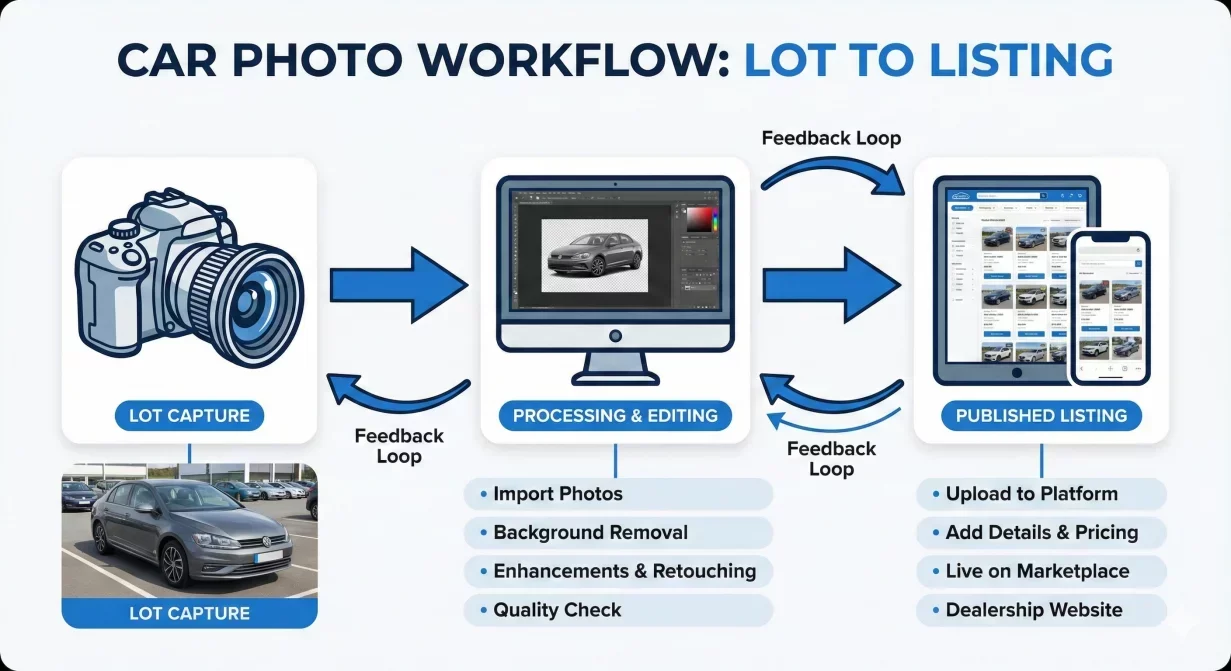
Car dealership photography is not a creative exercise. It is an operational workflow that must produce consistent, marketplace-ready images as fast as vehicles arrive on your lot. This guide maps the complete process from capture to published listing, identifying the decision points, bottlenecks, and quality gates that determine whether your photos help sell cars or create friction.
Every step in this workflow affects every subsequent step. Cutting corners during capture creates problems during processing. Skipping quality checks publishes errors that damage buyer trust. Understanding the full sequence helps you optimize the entire system rather than isolated pieces.
The five phases of dealer photography workflow
At a glance
- Vehicle preparation
- Capture
- Processing
- Quality assurance
- Export and publishing
- Time analysis: where hours actually go
- Common workflow failures
- Building your optimized workflow
- How Car Background AI fits the workflow
- Final thoughts
- Frequently asked questions
Effective car dealership photography moves through five distinct phases. Each has specific inputs, outputs, and success criteria. Problems in your current process typically trace to breakdowns at phase transitions rather than within phases themselves.
Phase 1: Vehicle preparation
Photography begins before anyone picks up a camera. Vehicle preparation determines whether your source photos can become professional listings or will require rework regardless of editing skill.
- Wash and detail: Clean vehicles photograph dramatically better than dirty ones. Dust on paint, water spots on windows, and debris in interiors all show in photos and suggest neglect to buyers. Establish minimum cleanliness standards before any vehicle enters the photo queue.
- Interior staging: Remove personal items from trade-ins. Ensure floor mats are positioned correctly. Straighten seats and adjust mirrors to neutral positions. Small staging details prevent buyer questions and reshoot requests.
- Positioning: Move the vehicle to your designated photo location. This might be a specific lot area with clean background, a staging lane, or simply the best available spot. Consistent positioning reduces per-vehicle setup time.
- Documentation check: Verify you have stock number or VIN ready for file organization. Confirm the vehicle should actually be photographed versus held for reconditioning or other processes.
Phase 2: Capture
The capture phase produces raw photos that subsequent phases will process. Capture quality sets the ceiling for final output quality. No amount of editing transforms a bad capture into a good listing photo.
- Equipment setup: Whether using phones or cameras, consistent settings matter. Same device, same settings, same operator produces more consistent results than random variation across these factors.
- Shot sequence execution: Follow your standard shot list for every vehicle. Typical sequences include eight to sixteen angles: hero three-quarter front, front direct, sides, rear, interior wide, dashboard, seats, and relevant details. Skipping angles creates incomplete listings that require return visits.
- Quality verification: Check captures on-device before leaving the vehicle. Verify focus, exposure, and framing meet minimum standards. Recapturing immediately is far cheaper than discovering problems later.
- File transfer: Move photos from capture device to processing system promptly. Establish consistent transfer method whether automatic cloud sync, manual upload, or physical file transfer. Lost or delayed files break workflow continuity.
Phase 3: Processing
Processing transforms raw captures into standardized, professional images. This phase applies background replacement, lighting correction, color enhancement, and other treatments that create visual consistency across inventory.
- Organization: Group photos by vehicle before processing begins. Processing works most efficiently when complete vehicle sets move through together rather than individual photos from mixed vehicles.
- Template application: Apply your standard background and enhancement settings to the vehicle set. Consistency comes from applying identical treatment to all photos rather than customizing each individually.
- Batch execution: Process all photos for one vehicle simultaneously. This ensures the hero shot, profiles, and details share identical visual treatment. Sequential single-photo processing introduces variation.
- Initial review: Scan processed results for obvious problems before proceeding. Catching major issues here prevents them from reaching quality checks where correction is more disruptive.
Phase 4: Quality assurance
Quality assurance prevents substandard photos from reaching buyers. This phase catches problems that processing created or failed to fix. Skipping QA saves time but publishes errors that damage credibility.
- Edge inspection: Examine vehicle edges for artifacts, halos, or clipping. Check mirrors, antennas, and wheel areas specifically. These complex shapes most commonly show processing errors.
- Consistency check: View all photos in the set together. Does each image share the same visual treatment? Inconsistency within a vehicle set is as damaging as inconsistency across inventory.
- Completeness verification: Confirm all required angles are present and correctly sequenced. Missing photos require returning to capture, which may be impossible if the vehicle has moved or conditions changed.
- Standards compliance: Verify photos meet your documented quality standards. This is where clear standards prove their value; without them, QA becomes subjective and inconsistent.
Phase 5: Export and publishing
The final phase delivers processed, verified photos to their destinations. Export specifications and publishing procedures determine whether your quality work displays correctly or gets compromised by incorrect formatting.
- Format preparation: Export photos at specifications required by each destination platform. Different marketplaces need different dimensions, file sizes, and compression levels. Batch export presets prevent manual specification errors.
- File organization: Name and organize exported files for easy matching to listings. Consistent naming conventions that include stock number or VIN prevent upload errors and wrong-vehicle attachments.
- Platform upload: Add photos to listings on each relevant platform. Whether manual upload or automated feed, verify photos attach to correct vehicles and display in intended sequence.
- Final verification: View published listings as buyers will see them. Confirm photos display correctly, sequence is appropriate, and no problems occurred during upload or platform processing.
Time analysis: where hours actually go
Understanding time consumption across workflow phases reveals optimization opportunities. Most dealers underestimate total time per vehicle because they track only some phases.
- Vehicle preparation: Five to fifteen minutes depending on condition and standards. Trade-ins requiring detail work extend this significantly.
- Capture: Five to ten minutes for a complete shot sequence when working efficiently. Inexperienced staff or difficult conditions extend this.
- Processing: With appropriate tools, five to ten minutes per vehicle for batch processing including organization and template application. Manual editing extends this to hours.
- Quality assurance: Two to five minutes per vehicle for systematic review. Rushed QA saves time but passes problems to buyers.
- Export and publishing: Five to fifteen minutes depending on destination count and system integration. Manual upload to multiple platforms takes longer than automated feeds.
- Total realistic time: Twenty-five to fifty minutes per vehicle for complete workflow execution with quality verification. Dealers claiming faster times typically skip phases or accept lower quality.
Common workflow failures
Certain failure patterns appear repeatedly across dealerships. Recognizing these helps you identify where your workflow needs attention.
- Capture-processing gap: Photos sit for days between capture and processing because no one owns the handoff. Vehicles may sell before photos publish, or conditions change requiring recapture.
- Quality gate bypass: Time pressure leads staff to skip QA and publish directly from processing. Errors reach buyers, damage trust, and often require more time to fix than verification would have taken.
- Inconsistent standards: Different staff members apply different standards at different times. Without documented criteria and enforcement, quality varies unpredictably.
- Single point of failure: One person handles all photography. When they are absent, vehicles queue without photos. Cross-training and documented procedures prevent individual dependencies.
- Tool limitations: Inadequate tools create bottlenecks that no process improvement can overcome. Staff working around tool limitations waste time that better tools would eliminate.
Building your optimized workflow
Transform this framework into your specific workflow by making explicit decisions at each phase.
- Document standards: Write down what acceptable looks like at each phase. Include visual examples where possible. Standards only work when they are specific enough to apply consistently.
- Assign ownership: Designate who handles each phase and who owns phase transitions. Unclear ownership creates gaps where work stalls.
- Time goals: Set target times for each phase and total per-vehicle time. Measure actual performance against targets. Improvement requires measurement.
- Quality metrics: Track error rates, rework frequency, and QA rejection reasons. These metrics reveal which phases need attention and whether changes improve outcomes.
- Regular review: Periodically audit workflow execution against documented procedures. Drift happens; audits catch it before it becomes entrenched.
How Car Background AI fits the workflow
Car Background AI accelerates the processing phase with batch processing, template libraries, and automated enhancement. The platform replaces hours of manual editing with minutes of automated processing while maintaining quality through automotive-specific AI.
Integration points include: batch upload from capture systems, template application that ensures consistency, and export presets formatted for major marketplace requirements. The processing bottleneck that limits many dealer workflows largely disappears.
Final thoughts
Car dealership photography succeeds when treated as a complete operational workflow rather than isolated tasks. Each phase builds on the previous one; problems anywhere propagate forward. Document your standards, assign clear ownership, measure performance, and invest in tools that eliminate bottlenecks. When every phase works efficiently and connects smoothly to the next, vehicles move from lot arrival to published listing in hours rather than days. Start with Car Background AI to transform your processing phase, then optimize the surrounding workflow.
Frequently asked questions
How long should car dealership photography take per vehicle?
Complete workflow from preparation through published listing typically requires twenty-five to fifty minutes per vehicle when executed efficiently with appropriate tools. This includes vehicle prep, capture, processing, quality verification, and publishing. Dealers claiming significantly faster times usually skip phases or accept lower quality standards.
What is the most common photography workflow problem?
The capture-to-processing gap causes the most delays. Photos sit unprocessed because no one clearly owns the handoff between capture and editing. Establishing explicit ownership and same-day processing targets eliminates this common bottleneck.
Should one person handle all dealership photography?
Single-person dependency creates risk when that person is absent. Cross-train multiple staff members on at least capture and basic processing. Document procedures so anyone can execute the workflow adequately even if not optimally.
How do I measure photography workflow performance?
Track time from vehicle arrival to published listing, error rates requiring rework, QA rejection frequency, and listing completeness. These metrics reveal bottlenecks and improvement opportunities. What gets measured gets managed.
When should I invest in better photography tools?
When tool limitations constrain performance despite good processes and trained staff. If your team executes workflows well but cannot achieve quality or speed targets, tools are likely the constraint. Better tools often pay for themselves through time savings within weeks.
How do I maintain workflow quality during busy periods?
Never skip quality verification regardless of time pressure. Errors published during busy periods damage trust just as much as errors published during slow periods. If volume exceeds capacity, address staffing or tools rather than accepting lower quality.

Tamas Magda
Co-founder, Growth and Partnerships at Car Background AI
Tamas Magda is co-founder of Car Background AI (carbackground.ai, CarBG), an AI car photo editor that replaces backgrounds on dealership inventory photos. He leads partnerships, growth, and business architecture, working with the development team on the product roadmap and with dealers on what their online listings actually need. He brings a background in venture building across APAC and MENA, and writes about vehicle merchandising, dealer photo workflows, and using AI on listing images without altering the car itself.
Tamas is a co-founder of Car Background AI and has a financial interest in the company. Articles that mention Car Background AI reflect that relationship.