How to Optimize Car Listing Photos for Cars.com, CarGurus, AutoTrader, and More
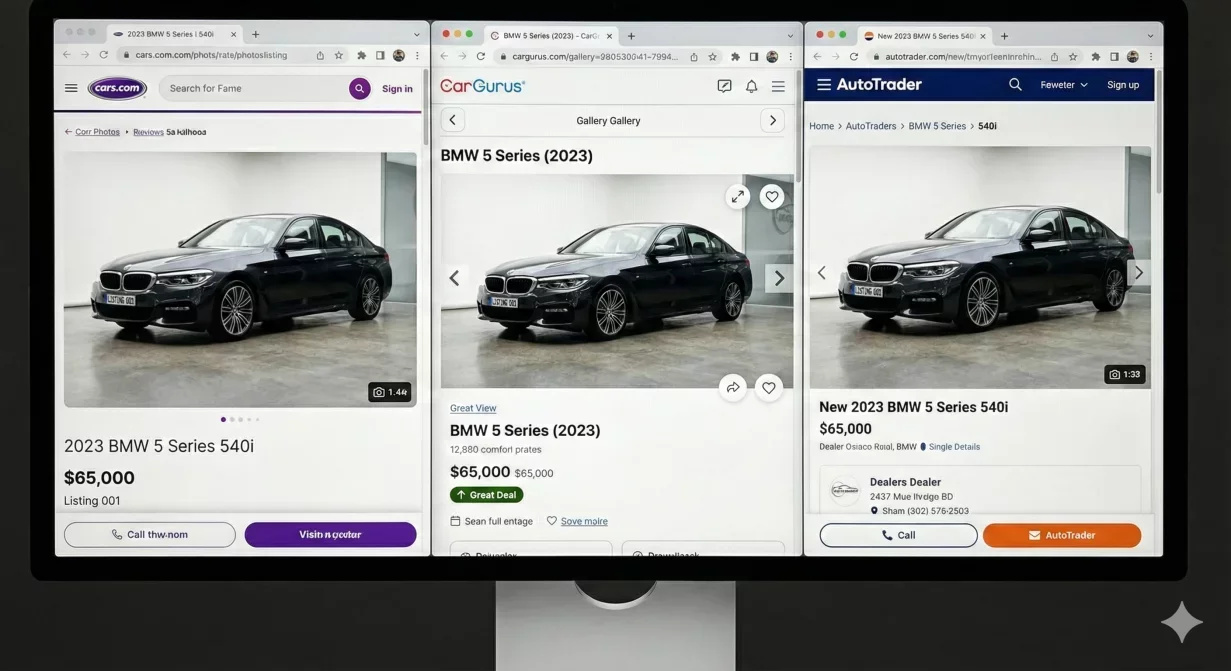
Car background listing photos that look great on your desktop may display poorly on marketplace platforms. Each platform has specific requirements for dimensions, file size, aspect ratio, and thumbnail presentation. This guide provides the exact specifications and optimization strategies for Cars.com, CarGurus, AutoTrader, Facebook Marketplace, and your dealer website.
Optimizing for each platform ensures your photos display correctly, load quickly, and present your inventory in the best possible light across every channel where buyers discover vehicles.
At a glance
- Why marketplace specific optimization matters
- Cars.com specifications and best practices
- CarGurus specifications and best practices
- AutoTrader specifications and best practices
- Facebook Marketplace specifications and best practices
- Dealer website optimization
- Creating a multi-platform export workflow
- Safe zones and cropping prevention
- How Car Background AI handles marketplace export
Why marketplace specific optimization matters
Dealers often upload the same photos to every platform without considering how each platform displays them. This approach creates several problems that hurt listing performance.
Auto-cropping removes critical vehicle portions when aspect ratios do not match. A photo that shows the complete vehicle on your website may cut off bumpers or badges when displayed as a thumbnail on CarGurus. Buyers see incomplete vehicles and may assume you are hiding damage.
Compression artifacts appear when platforms re-compress already-compressed images. If you upload heavily compressed photos, the platform additional compression creates visible quality degradation. Starting with appropriate quality levels prevents double-compression damage.
Loading speed affects both user experience and search ranking within platforms. Oversized files slow page loads, hurting engagement. Undersized files lack detail when buyers zoom. Correct sizing balances quality and performance.
Thumbnail presentation determines whether buyers click. Most buyers first encounter your photos as small thumbnails in search results. If the vehicle is not clearly visible at thumbnail size, you lose clicks to competitors with better-optimized images.
Cars.com specifications and best practices
Cars.com is one of the largest automotive marketplaces. Their display conventions shape buyer expectations across the industry.
Technical specifications
- Recommended dimensions: 1280 pixels minimum on longest edge, 2000 pixels optimal for zoom functionality. Maximum file size: typically under 5MB, though smaller files load faster.
- Aspect ratio: Cars.com displays photos at approximately 4:3 ratio. Photos matching this ratio display without cropping. Wider ratios lose vertical space; taller ratios lose horizontal space.
- File format: JPEG with quality level 80-90 percent balances file size with visual quality. PNG files work but create larger sizes without meaningful quality benefit for photographs.
Display considerations
Cars.com thumbnails appear in search results at small sizes. Ensure your hero shot clearly shows the vehicle at thumbnail scale. Complex backgrounds or off-center vehicles may not register clearly in small preview formats.
Gallery view allows zoom functionality. Higher resolution source files enable better zoom quality. Do not sacrifice resolution for file size; let compression handle size reduction.
Mobile display dominates Cars.com traffic. Test how your photos appear on phone screens, not just desktop monitors. Mobile users see less detail and appreciate clean, uncluttered compositions.
CarGurus specifications and best practices
CarGurus emphasizes data-driven presentation and comparison shopping. Photo quality contributes to deal rating perceptions.
Technical specifications
- Recommended dimensions: 1200 pixels minimum, 1920 pixels optimal. CarGurus accepts various aspect ratios but displays most consistently at approximately 16:9 for hero images.
- File size: Keep under 3MB for optimal loading. CarGurus displays many vehicles per page; efficient file sizes improve overall page performance.
- File format: JPEG preferred. Quality level 75-85 percent provides good balance for CarGurus display contexts.
Display considerations
CarGurus search results show smaller thumbnails than some competitors. Simple compositions with centered vehicles perform better than complex backgrounds in this dense display format.
Deal rating badges overlay on photos. Avoid placing critical vehicle elements in corners where badges might obscure them.
Comparison features place your photos directly beside competitors. Consistency across your inventory matters because buyers see multiple vehicles simultaneously. Inconsistent presentation makes your inventory look disorganized relative to consistent competitors.
AutoTrader specifications and best practices
AutoTrader serves both consumer and dealer audiences with flexible photo display options.
Technical specifications
- Recommended dimensions: 1280 to 2000 pixels on longest edge. AutoTrader accepts larger files but displays at standardized sizes.
- Aspect ratio: AutoTrader accommodates various ratios but displays hero images optimally at approximately 4:3. Wide panoramic ratios may crop unpredictably.
- File format: JPEG at 80-90 percent quality. AutoTrader CDN handles distribution; start with quality that survives their processing without excessive degradation.
Display considerations
AutoTrader tile-based search results benefit from clean, consistent presentations. Vehicles that stand out against clean backgrounds perform better than those lost in cluttered environments.
Featured listing placements receive more prominent display. If you pay for premium placement, ensure photo quality matches the investment. Premium positions with poor photos waste advertising spend.
AutoTrader dealer pages allow custom branding. Consistent vehicle backgrounds across your inventory reinforce brand recognition when buyers browse your full listing set.
Facebook Marketplace specifications and best practices
Facebook Marketplace differs from automotive-specific platforms in audience expectations and display conventions.
Technical specifications
- Recommended dimensions: 1200 pixels minimum. Facebook handles various sizes but optimizes for approximately 1200x628 pixels for marketplace listings.
- Aspect ratio: Facebook Marketplace displays best at approximately 1.91:1 wide format. Square photos work but lose impact in the feed-style display.
- File format: JPEG preferred. Facebook compresses heavily regardless of source quality, so starting at high quality helps survive their processing.
Display considerations
Facebook users scroll quickly through mixed content. Your vehicle photos compete with non-automotive listings, personal posts, and advertisements. Stand-out presentation matters more on Facebook than on automotive-specific platforms.
Mobile-first design dominates Facebook usage. Photos must communicate clearly at small mobile sizes. Clean backgrounds and centered vehicles perform significantly better than complex compositions.
Facebook algorithm favors engagement. Photos that generate clicks improve your listing visibility within Facebook recommendation system. Quality photos create a positive feedback loop.
Dealer website optimization
Your own website gives you complete control over display. Use this control wisely to create optimal viewing experiences.
Technical specifications
- Recommended dimensions: 2000 to 3000 pixels on longest edge for full-quality display with zoom functionality. Create multiple size variants for responsive display.
- Responsive images: Implement srcset attributes to serve appropriate sizes for different devices. Mobile visitors should receive smaller files; desktop visitors can handle larger ones.
- File format: JPEG for photographs, WebP for browsers that support it. Modern formats reduce file sizes significantly without quality loss.
Display considerations
Page load speed affects SEO ranking and user experience. Optimize images aggressively for your website even if you use higher-quality versions for marketplaces.
Gallery functionality varies by website platform. Understand how your platform displays galleries and optimize photos accordingly. Lightbox zoom features require higher resolution than static display.
Branded presentation matters most on your own website. This is where template backgrounds and consistent styling have maximum impact on brand perception.
Creating a multi-platform export workflow
Processing photos once and exporting for multiple platforms requires systematic approach.
Master file strategy
Process and verify photos at maximum quality first. This master file becomes source for all platform-specific exports. Never work backward from compressed versions.
Store master files organized by vehicle identifier. When platform requirements change or you add new channels, you can re-export from masters without reprocessing.
Platform specific export presets
Create saved presets for each platform specifying dimensions, compression level, and file naming conventions. Presets eliminate per-export decisions and ensure consistency.
Name presets clearly: Cars-com-hero, CarGurus-gallery, Facebook-listing. Anyone processing photos can select the correct preset without platform knowledge.
Batch export execution
Export all platform versions from each vehicle set before moving to the next vehicle. This keeps files organized and ensures complete coverage. Spot-checking one platform exports before processing the entire batch catches configuration errors early.
Safe zones and cropping prevention
Different platforms crop photos differently for thumbnails and previews. Understanding safe zones prevents critical elements from being cut off.
Keep the vehicle fully within the center 80 percent of the frame. Edge content may crop on various platforms. Side mirrors extending to frame edges are particularly vulnerable.
Verify hero shots at actual thumbnail sizes used by each platform. What looks good full-size may not survive reduction to 150-pixel thumbnails in search results.
Avoid placing text or critical identifiers in corners. Badges, overlays, and other platform elements often occupy corner positions.
How Car Background AI handles marketplace export
Car Background AI includes export presets configured for major marketplace requirements. The platform handles dimension, compression, and format optimization automatically based on your selected destination.
Batch export applies correct specifications across complete vehicle sets. Process once with your standard template, then export marketplace-ready files for each platform without manual specification adjustments.
Final thoughts
Car listing photos optimized for each marketplace platform display correctly, load quickly, and present your inventory professionally across every channel. Understanding platform-specific requirements enables systematic workflows that produce consistent results without per-platform manual adjustment. Configure your export presets once, process through your standard workflow, and deliver marketplace-ready files every time. Try Car Background AI marketplace export to see how automated optimization simplifies multi-platform distribution.
Frequently asked questions
What image size should I use for car listing photos?
For most marketplaces, 1280 to 2000 pixels on the longest edge provides optimal display with zoom capability. Larger files offer no visible benefit but slow loading. Smaller files may appear pixelated when buyers zoom for detail.
Do I need different photos for each marketplace?
You need different exports, not different source photos. Process photos once at high quality, then export platform-specific versions with appropriate dimensions and compression. Same photos, different output specifications.
Why do my photos look worse on marketplace platforms?
Double compression is the usual cause. If you upload already-compressed photos, platform processing compresses again, degrading quality. Upload higher-quality source files so platform compression produces acceptable results.
How do I prevent thumbnails from cutting off parts of the vehicle?
Keep the complete vehicle within the center 80 percent of your frame. Platform thumbnails crop edges unpredictably. Buffer space around the vehicle gives cropping algorithms room to work without cutting into the car.
Should I use PNG or JPEG for car listing photos?
JPEG for all marketplace uploads. PNG files are larger without visible quality benefit for photographs. Marketplaces often convert to JPEG anyway, so starting with JPEG avoids unnecessary conversion.
What aspect ratio works best across platforms?
4:3 ratio works well across most automotive platforms. Facebook prefers wider ratios around 1.91:1. If you must choose one ratio, 4:3 provides good compatibility with minimal cropping on most platforms.
How do I test my photos on different platforms?
Create test listings on each platform you use. Upload sample photos and verify display at thumbnail, gallery, and full-size views. Test on both mobile and desktop. Catch display problems before they affect real inventory.

Tamas Magda
Co-founder, Growth and Partnerships at Car Background AI
Tamas Magda is co-founder of Car Background AI (carbackground.ai, CarBG), an AI car photo editor that replaces backgrounds on dealership inventory photos. He leads partnerships, growth, and business architecture, working with the development team on the product roadmap and with dealers on what their online listings actually need. He brings a background in venture building across APAC and MENA, and writes about vehicle merchandising, dealer photo workflows, and using AI on listing images without altering the car itself.
Tamas is a co-founder of Car Background AI and has a financial interest in the company. Articles that mention Car Background AI reflect that relationship.