Car Photo Editing Like a Pro for Faster Dealer Sales
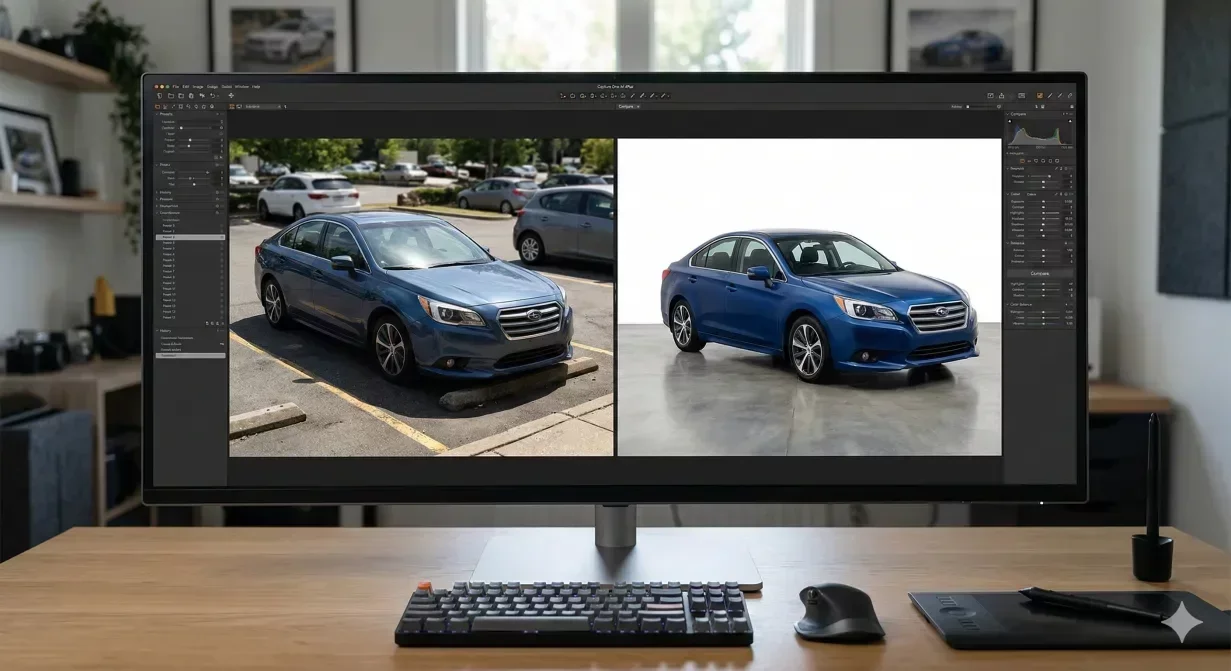
Car photo editing is the process of correcting and cleaning up vehicle photos after capture so a listing looks consistent and professional: fixing exposure and color, removing background clutter or replacing the backdrop, and cropping to a standard frame. For dealers, the goal is a repeatable sequence that turns raw lot shots into upload-ready listing images.
Car photo editing is the step between a decent lot shot and a listing photo that actually earns clicks. Most dealers know their photos could be better. Fewer know exactly which edits matter, which ones waste time, and which order to follow for a repeatable, efficient workflow. This guide walks through the full editing sequence – from background removal to export settings – with time and cost comparisons between manual and AI-powered approaches.
If you want to see the difference immediately, upload a test photo to Car Background AI and compare the output against your current listing images. The gap is usually more obvious than expected.
At a glance
- Start with the right raw photo
- Car background removal and replacement
- Color correction and enhancement
- Lighting fixes for dark interiors and harsh shadows
- Cropping and framing for marketplace specs
- AI tools vs manual editing: time and cost
- Export settings for web and marketplace listings
Start with the right raw photo
No amount of car photo editing can rescue a fundamentally bad capture. Before opening any editing tool, verify that the source photo meets three minimum standards: the vehicle is in focus across the entire body, the framing includes the complete car with 10% padding on all sides, and the exposure is within a recoverable range (not completely blown out or pitch dark).
If your team follows a standardized shooting process – consistent angles, locked exposure, belt-line camera height – the editing workload drops dramatically. The best professional car photo editing workflows start upstream at capture, not downstream in Photoshop.
Car background removal and replacement: the biggest impact edit
Background replacement is the single highest-impact edit in car photo editing. A cluttered lot backdrop makes even a pristine vehicle look neglected. A clean, consistent background signals professionalism and makes the vehicle the focal point of the listing.
Manual background removal in Photoshop typically takes 15 to 30 minutes per image for a skilled editor. The challenge is not the broad masking – it is the edge detail around mirrors, wheels, antennas, and window transparency. Generic AI removal tools (Remove.bg, PhotoRoom) handle simple objects well but frequently clip wheel spokes, merge mirror edges with the background, or create halos around antennas.
Automotive-specific tools like Car Background AI are trained on vehicle silhouettes and handle these edge cases by default. The processing time drops from minutes to seconds, and batch capabilities mean you can process an entire inventory set in one pass rather than editing each image individually.
Checklist: evaluating background removal quality
After any background replacement, check these eight points before publishing. For a deeper dive into edge issues, see our guide on fixing edge artifacts in car background removal.
- Wheel spokes should be fully preserved with no clipping.
- Side mirrors should have clean, defined edges with no background bleed.
- Antennas and roof rails should be intact.
- Windows should show appropriate transparency, not solid fill.
- The shadow beneath the vehicle should look natural, grounded, and consistent with the new background lighting.
- There should be no visible halo or fringe around the vehicle outline.
- The replacement background should match the vehicle's lighting direction.
- Reflective surfaces (chrome, glossy paint) should not contain remnants of the original background.
Color correction and enhancement without over-saturating
Color correction serves two purposes in car photography editing: accuracy and consistency. First, the vehicle's paint color in the listing should match what a buyer sees in person. Second, every vehicle in your inventory should have consistent color rendering, regardless of when or where it was photographed.
The most common mistake is over-saturation. Boosting vibrancy makes a vehicle pop on screen, but if the buyer shows up and the red is actually a muted burgundy, you have created a trust problem. Professional car photo editing keeps saturation adjustments within 10 to 15% of the original. Focus instead on white balance correction (ensuring whites look white, not yellow or blue) and contrast adjustment (ensuring paint shows its true depth). Our color enhancement guide walks through the full balancing process step by step.
Tools like Car Background AI apply color enhancement automatically, calibrated specifically for automotive paint finishes. The algorithm enhances without pushing colors beyond what the camera captured, keeping listings trust-safe for buyers.
Lighting fixes for dark interiors and harsh shadows
Lighting issues are the second most time-consuming problem in manual car editing. Dark interiors photographed in bright daylight create extreme contrast ranges that flatten detail. Harsh overhead sun produces deep shadows under bumpers and in wheel wells that make the vehicle look damaged even when it is not.
In manual editing, fixing these issues involves selective exposure adjustment: lifting shadows in specific areas while holding highlights in others. This requires masking, which is tedious and inconsistent when done across hundreds of images by different editors.
AI lighting optimization normalizes exposure across the entire image in a single pass. It lifts dark areas, tames highlights, and produces an evenly lit result that looks like the vehicle was photographed in a professional studio. For dealerships processing high volume, this single capability often justifies the switch from manual to AI-powered car photo editing.
Cropping and framing for marketplace specs
Each marketplace has different image specifications, and listing images that do not meet them get cropped unpredictably or rejected outright. Getting the framing right during editing prevents rework and ensures the vehicle displays correctly across every platform.
Platform | Recommended aspect ratio | Minimum resolution | Key requirement |
|---|---|---|---|
Cars.com | 4:3 | 640 x 480 | Horizontal orientation required |
CarGurus | 4:3 | 640 x 480 | No text overlays |
AutoTrader | 4:3 | 640 x 480 | No dealer watermarks |
Facebook Marketplace | 1:1 or 4:3 | 600 x 600 | Square crops for mobile display |
Craigslist | Any | 300 x 300 | Under 5MB file size |
The safe practice is to capture with extra padding (10% on each side), then crop to the tightest required aspect ratio. This gives you a single source image that can be cropped to any platform's specs without cutting off bumpers, mirrors, or wheels.
AI tools vs manual car photo editing: time and cost
The comparison is not close for dealership-volume workflows. Manual editing delivers maximum creative control but cannot scale.
Factor | Manual editing (Photoshop) | AI car photo editing (Car Background AI) |
|---|---|---|
Background removal per image | 15 – 30 minutes | 2 – 5 seconds |
Lighting correction per image | 5 – 15 minutes | Included automatically |
Color enhancement per image | 5 – 10 minutes | Included automatically |
Batch processing 50 images | 25 – 50 hours | Under 5 minutes |
Consistency across batch | Varies by editor | Identical settings every time |
Skill required | Advanced Photoshop proficiency | Upload and select template |
Cost per image (labor/tool) | $3 – $10 (outsourced editing) | Under $1 |
Manual editing still has a role for marketing hero shots where creative direction matters. For inventory listing photos – the 20-image sets that every vehicle needs – AI processing is faster, cheaper, and more consistent.
Export settings for web and marketplace listings
The final step in car photo editing is exporting at the right format and compression for web display. Over-compressing destroys detail in paint and chrome. Under-compressing creates files too large for fast page loading.
For marketplace listings, export as JPEG at 80 to 85% quality. This balances visual quality with file size, typically producing images between 100KB and 300KB. Resolution should be at least 1920 x 1440 (4:3) for the primary hero image and 1024 x 768 minimum for supporting angles. For a complete export reference by platform, see our car picture editor export settings guide. Name files descriptively – 2024-toyota-camry-front-three-quarter.jpg rather than IMG_4829.jpg – for both SEO and internal organization.
WebP format is gaining marketplace support and delivers 25 to 30% smaller files at equivalent visual quality. If your platforms accept it, WebP is the better choice. PNG should be reserved for images requiring transparency (cutout images for composite layouts). Avoid TIFF and BMP for web use entirely.
Final thoughts
Professional car photo editing follows a repeatable sequence: verify the source, replace the background, correct color, fix lighting, crop to spec, and export for web. Each step builds on the previous one, and skipping steps creates inconsistency that buyers notice. For dealerships processing volume, AI tools compress this entire sequence into seconds. Try Car Background AI on one vehicle photo set – the workflow difference becomes obvious on the first batch.
Frequently asked questions about car photo editing
What is the best order for editing car photos?
The optimal sequence is: background removal first, then lighting correction, then color enhancement, then cropping, then export. This order matters because background removal affects how subsequent edits render. Correcting color on an image with a cluttered background produces different results than correcting color on an image with a neutral backdrop, since the removed background's color cast is no longer influencing the overall image tone.
How do I avoid over-editing car photos for listings?
The trust-safe rule is to enhance clarity without misrepresenting condition. Keep saturation adjustments under 15%. Do not remove dents, scratches, or wear marks that a buyer would notice in person. Do not composite parts from other vehicles. Professional car photo editing improves presentation – lighting, background, color accuracy – without altering the vehicle itself. If a buyer arrives and the car looks noticeably different from the listing photos, you have over-edited.
Can I use free photo editors for car photography editing?
Free tools like GIMP and Canva can handle basic edits, but they lack automotive-specific features. Background removal in generic tools often clips wheel spokes or merges mirrors with the background. Batch processing is limited or absent. For a single personal listing, free tools may suffice. For dealership volume (20+ vehicles monthly), the time cost of manual editing in free tools typically exceeds the subscription cost of an automotive-specific AI editor.
How long should car photo editing take per vehicle?
With an AI workflow, processing a full set of 20 images per vehicle takes under 5 minutes including upload and download time. Manual editing in Photoshop for the same set ranges from 3 to 8 hours depending on the editor's skill level and the complexity of the backgrounds. The gap widens as volume increases: processing 50 vehicles manually is a multi-week project, while AI batch processing handles it in an afternoon.
What car photo editing mistakes hurt listing performance the most?
Three mistakes consistently reduce clicks: inconsistent backgrounds across the photo set (some edited, some raw lot shots), over-saturated colors that look artificial on mobile screens, and leaving cluttered or distracting elements in the frame (price stickers, people, other vehicles). All three are preventable with a standardized editing pipeline that processes every image through the same settings.
Is car image editing the same as car photo editing?
In practice, yes. "Car image editing" and "car photo editing" describe the same workflow: adjusting vehicle photographs for quality, consistency, and marketplace readiness. Some tools use "image" language (car image editor) while others use "photo" language (car photo editor). The capabilities are identical. What matters is whether the tool is optimized for automotive-specific challenges like vehicle silhouettes, reflective surfaces, and marketplace export requirements.

Tamas Magda
Co-founder, Growth and Partnerships at Car Background AI
Tamas Magda is co-founder of Car Background AI (carbackground.ai, CarBG), an AI car photo editor that replaces backgrounds on dealership inventory photos. He leads partnerships, growth, and business architecture, working with the development team on the product roadmap and with dealers on what their online listings actually need. He brings a background in venture building across APAC and MENA, and writes about vehicle merchandising, dealer photo workflows, and using AI on listing images without altering the car itself.
Tamas is a co-founder of Car Background AI and has a financial interest in the company. Articles that mention Car Background AI reflect that relationship.