Car Photo Editing Rework: Common Causes and How to Eliminate Revision Loops
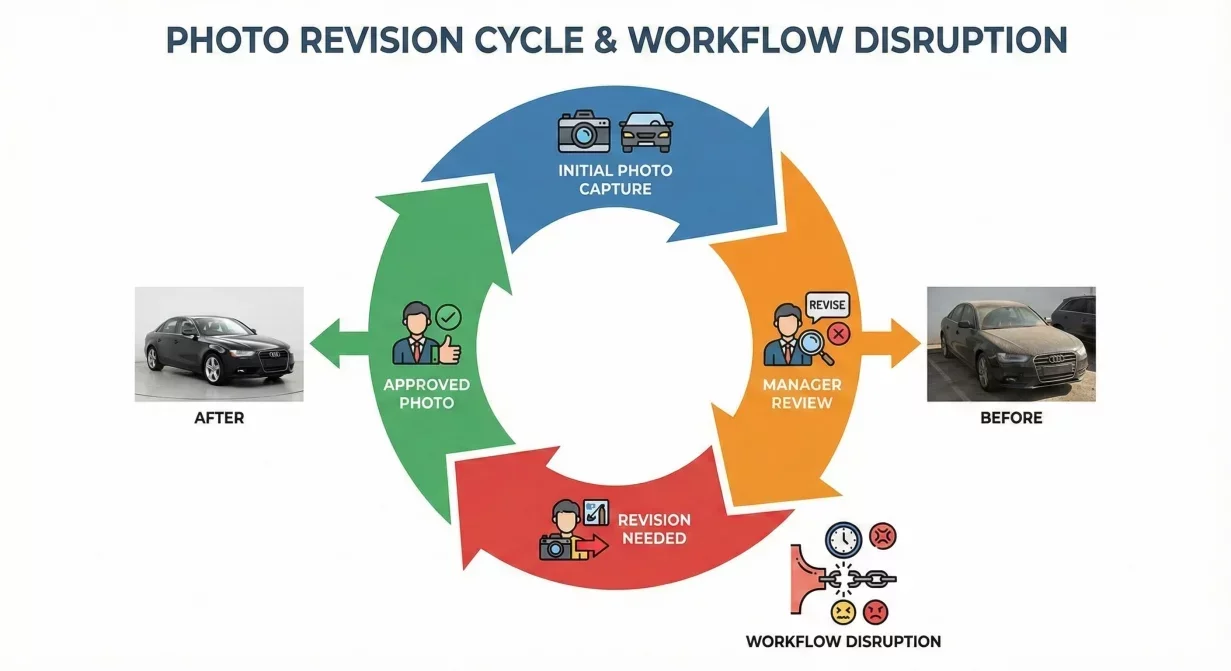
Car photo editing rework consumes time that should go toward processing new inventory. Every photo that needs re-editing represents wasted initial effort and delayed listing publication. This guide identifies why revision loops happen and provides systematic prevention strategies.
Rework is not inevitable. Understanding root causes enables prevention systems that eliminate most revision cycles before they start.
The True Cost of Rework
Rework costs exceed the obvious time spent re-editing. A complete accounting reveals why prevention deserves investment.
Direct editing time: Re-processing consumes the same time as initial processing, sometimes more when trying to salvage partially-completed work.
Context switching: Returning to a completed vehicle interrupts work on current vehicles. Mental context switching adds overhead beyond the edit itself.
Delayed listings: Vehicles awaiting rework are not visible to buyers. Every day of delay is a day without potential leads.
Morale impact: Repeated rework frustrates staff. Frustration reduces engagement and attention, potentially causing more errors.
Relationship friction: When rework stems from manager rejection, repeated cycles create tension between editors and reviewers.
Rework Category 1: Capture Quality Issues
Many rework cycles trace to source photos that should not have reached editing in the first place.
Common Capture Problems
Out of focus: Soft images cannot be sharpened to acceptable quality. Background replacement and enhancement cannot fix fundamental blur.
Severe exposure errors: Extremely over or underexposed photos lose information that processing cannot recover. Clipped highlights and crushed shadows are permanent.
Missing angles: Incomplete shot sequences discovered during editing require returning to capture, which may be impossible if the vehicle has moved or conditions changed.
Staging problems: Objects in frame, doors left open incorrectly, or price stickers visible require either editing around problems or recapture.
Prevention Systems
Capture quality gate: Verify each photo meets minimum standards before leaving the vehicle. Check focus, exposure, and framing on-device immediately after capture.
Shot sequence checklist: Use physical or mental checklist to confirm complete angle coverage before moving to next vehicle.
Staging inspection: Walk around vehicle checking for distracting elements before photography begins. Thirty seconds of inspection prevents hours of correction.
Transfer review: Brief review during file transfer catches problems before editing investment begins.
Rework Category 2: Processing Errors
Technical problems introduced during editing require correction before publication.
Common Processing Problems
Edge artifacts: Halos, fringing, or rough edges around vehicle outline from background removal.
Missing elements: Mirrors, antennas, or other thin components clipped by masking errors.
Shadow problems: Missing, misplaced, or unrealistic shadows that create floating appearance.
Color shifts: Unintended color changes that misrepresent vehicle paint.
Inconsistent treatment: Different photos in a vehicle set receiving different processing, creating visual discontinuity.
Prevention Systems
Tool upgrade: If your editing tools consistently produce artifacts, invest in better tools. Fighting inadequate tools wastes more than tool cost.
Template consistency: Use identical templates for all photos in each vehicle set. Manual adjustment of individual photos introduces variation.
Processing review: Check results immediately after processing, before exporting. Catching problems early allows efficient correction.
Zoom verification: Review at full zoom, not just thumbnail. Edge artifacts invisible at small sizes become obvious when buyers click for larger views.
Rework Category 3: Standard Misalignment
Photos that technically meet quality requirements but do not match expectations of reviewers or brand standards.
Common Misalignment Problems
Background style disagreement: Editor chooses background that reviewer does not like. Subjective preference conflicts.
Enhancement level disputes: Photos deemed too enhanced or not enhanced enough. No objective standard applied.
Cropping preferences: Framing that satisfies one reviewer but not another. Inconsistent expectations.
Changing requirements: Standards that shift over time or between reviewers. What was acceptable yesterday is rejected today.
Prevention Systems
Document standards explicitly: Write down exactly what acceptable photos look like. Include visual examples. Standards cannot be applied consistently if they exist only in someone's head.
Pre-approve templates: Agree on templates and settings before production use. Photos meeting approved templates should not require re-evaluation.
Eliminate subjective review: Replace opinion-based review with standards-based verification. Does the photo meet documented criteria? Yes means approved; no means specific correction needed.
Consistent reviewer criteria: If multiple people review, ensure they apply identical standards. Train reviewers together using same reference materials.
Rework Category 4: Downstream Requirement Changes
Photos that were correct when processed but need modification due to changed requirements.
Common Requirement Changes
New marketplace added: Additional platform needs different specifications than existing exports provide.
Platform specification change: Marketplace updates their requirements; existing photos no longer comply.
Brand standard update: New brand guidelines require different presentation than previous standard.
Manager preference change: New manager wants different look than predecessor approved.
Prevention Systems
Comprehensive export setup: Configure exports for all current and likely future platforms from the beginning. Adding presets is easier than reprocessing archives.
Preserve source files: Keep unprocessed originals so reprocessing does not require recapture. Storage is cheap; recapture is expensive.
Stable standards commitment: Resist arbitrary standard changes. Changes should require clear justification beyond preference shifts.
Change impact assessment: Before implementing changes, assess whether archived photos need updating. Plan for transition rather than discovering needs later.
Building a Rework Prevention System
Comprehensive prevention addresses all categories systematically.
Quality Gates at Each Transition
Establish verification points between workflow phases. Problems caught earlier cost less to fix.
- Post-capture: Verify focus, exposure, completeness before leaving vehicle
- Post-transfer: Quick review before editing begins
- Post-processing: Check results before export preparation
- Post-export: Verify files meet destination specifications
Standards Documentation
Document everything that could cause disagreement:
- Acceptable capture quality criteria
- Approved templates and settings
- Processing quality standards with visual examples
- Export specifications for each platform
Feedback Loop for Pattern Identification
Track rework reasons to identify recurring problems:
- Log why each rework happens
- Review logs weekly for patterns
- Address root causes of frequent issues
- Update prevention systems based on learnings
How CarBG Reduces Rework
CarBG minimizes processing-related rework through automotive-specific AI that handles edge quality, shadow generation, and color consistency reliably. Template-based batch processing eliminates variation between photos in vehicle sets.
Consistent processing means photos that meet your approved template standards require no individual review adjustments. Processing no longer introduces the artifacts that manual editing often creates.
Final Thoughts
Car photo editing rework is preventable, not inevitable. Each rework category has identifiable causes and effective prevention systems. Invest in quality gates, document standards, use reliable tools, and track patterns to eliminate revision loops systematically. The time saved goes directly toward processing new inventory rather than repeating work on old. Process your photos through CarBG and experience editing that produces publish-ready results the first time.
Frequently Asked Questions(FAQs)
How much rework is acceptable?
Target less than five percent of photos requiring rework after initial processing. Higher rates indicate systemic problems worth investigating. Some rework is inevitable; frequent rework signals prevention opportunities.
Who should be responsible for preventing rework?
Prevention responsibility belongs to whoever performs each phase. Capture quality is the photographer's responsibility. Processing quality is the editor's responsibility. Review consistency is management's responsibility. Each role prevents its category of rework.
Should I skip quality checks to move faster?
No. Quality checks are faster than rework. A thirty-second verification prevents thirty-minute corrections. Skipping checks does not save time; it shifts time from prevention to correction and adds delays.
How do I handle managers who keep changing standards?
Request documented standards that remain stable. Present the cost of rework caused by changing requirements. Suggest that new standards apply going forward without retroactive application to archived photos.
What if rework comes from legitimate quality issues?
Legitimate issues indicate earlier quality gates are not catching problems. Strengthen upstream verification. If problems pass through gates, the gates need refinement. Rework should be exception, not routine.
How do I track rework patterns effectively?
Simple logging works: date, vehicle, rework reason, time spent. Review weekly for recurring reasons. Address any cause appearing more than twice monthly. Tracking does not need to be elaborate to be useful.

Tamas Magda
Co-founder, Growth and Partnerships at Car Background AI
Tamas Magda is co-founder of Car Background AI (carbackground.ai, CarBG), an AI car photo editor that replaces backgrounds on dealership inventory photos. He leads partnerships, growth, and business architecture, working with the development team on the product roadmap and with dealers on what their online listings actually need. He brings a background in venture building across APAC and MENA, and writes about vehicle merchandising, dealer photo workflows, and using AI on listing images without altering the car itself.
Tamas is a co-founder of Car Background AI and has a financial interest in the company. Articles that mention Car Background AI reflect that relationship.