
How AI Car Photo Editing Works: The Technology Explained
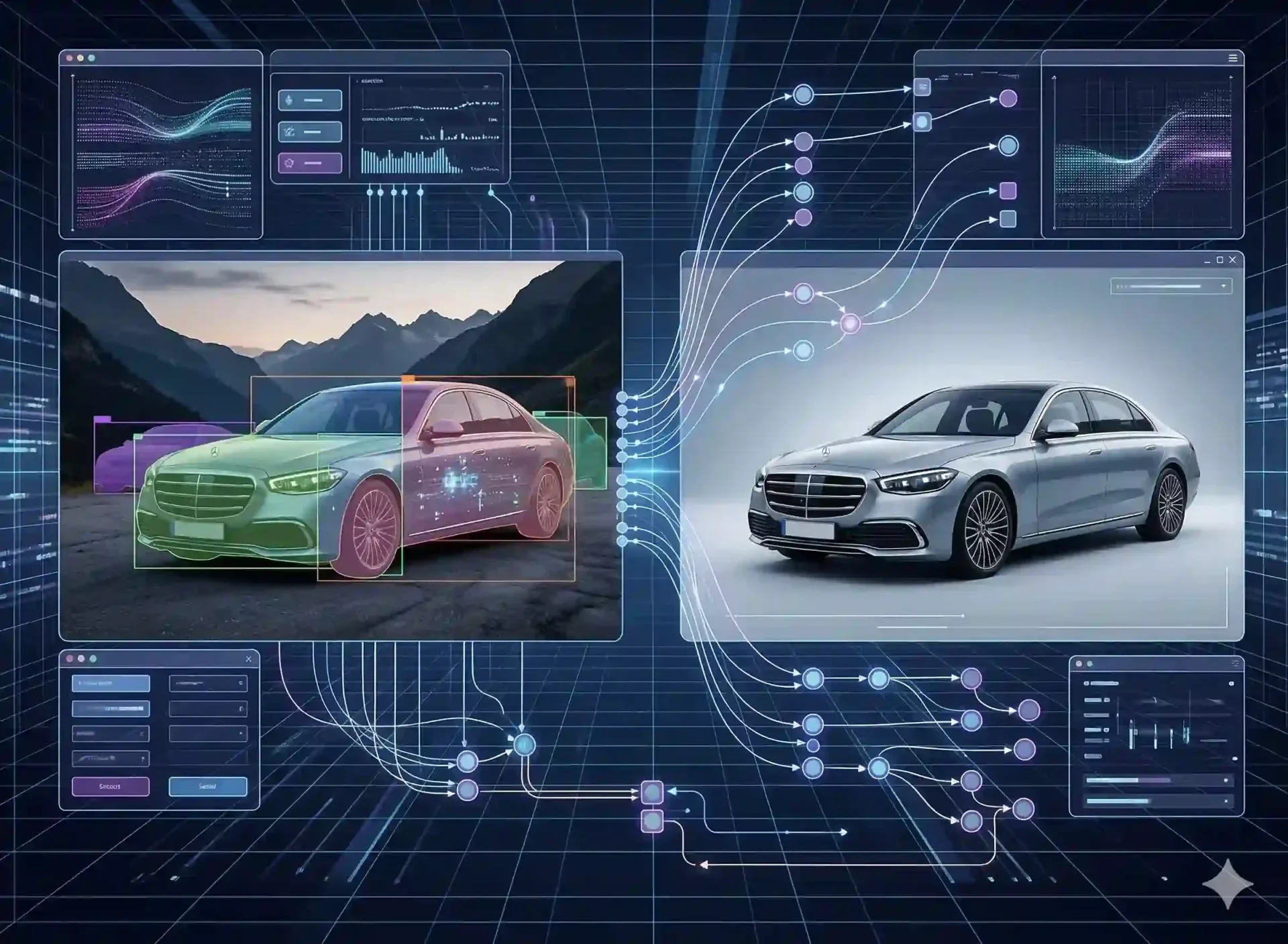
AI car photo editing has moved from novelty to production standard for dealerships processing any meaningful volume of inventory. Yet most dealers who use these tools treat them as a black box: upload a photo, get a result, hope for the best. Understanding what happens between upload and output changes how you capture, what you expect from the tool, and how you troubleshoot when results fall short.
This guide explains the technology behind AI car photo editing in plain language – how the AI detects a vehicle, how it separates the car from the background, how it fixes lighting problems, and why tools built specifically for cars produce better results than generic photo editors. No jargon beyond what helps you use the tool more effectively. CarBG is built on these principles, and understanding them makes the output better.
What AI car photo editing actually does under the hood
Every AI car photo editing tool performs the same fundamental sequence, regardless of the interface or brand name. The process has four stages: detection (finding the vehicle in the image), segmentation (separating the vehicle from everything else), transformation (replacing the background, adjusting lighting, enhancing color), and compositing (reassembling the final image with realistic shadows and edge blending).
Each stage uses a different type of machine learning model trained on a different type of data. The quality of the final result depends on how well each stage performs and how smoothly they hand off to each other. A tool with excellent detection but poor edge blending will produce clean masks with obvious halos. A tool with great compositing but weak detection will miss parts of the vehicle entirely. Understanding these stages helps you evaluate results and troubleshoot problems.
Vehicle detection and silhouette masking
The first step in the pipeline is identifying where the vehicle exists in the image. The AI scans the photo and draws a bounding box around what it recognizes as a car, truck, SUV, or motorcycle. This is object detection – the same technology that powers autonomous driving perception systems, adapted for still images.
Once the vehicle is located, a more precise model generates a pixel-level mask – the silhouette. This mask defines exactly which pixels belong to the vehicle and which belong to the background. The mask quality determines everything downstream. A precise mask means clean edges around mirrors, intact wheel spokes, and properly handled window transparency. A rough mask means halos, clipped antennas, and merged edges where the car meets the background.
Why edges are the hardest part
The boundary between a vehicle and its background is not a clean line. Wheel spokes have gaps that show the background behind them. Side mirrors extend into space at angles that create thin, complex shapes. Windows are semi-transparent, showing both the interior and the background simultaneously. Antennas are thin enough that a single pixel of error makes them disappear or grow a halo.
Generic background removal tools handle simple shapes well (a person against a wall, a product on a table) but consistently struggle with vehicle-specific edge cases. Car-specific AI tools train their segmentation models on hundreds of thousands of vehicle images, teaching the model to expect spoke patterns, mirror shapes, and antenna proportions. This specialized training is the primary reason automotive-focused tools outperform general-purpose alternatives on car photos.
Background removal versus background replacement in AI car photo editing
These terms are often used interchangeably, but they describe different operations with different quality requirements.
Background removal strips everything outside the vehicle mask, producing a transparent (PNG) or solid-color output. The result is a clean cutout of the vehicle that can be placed on any background manually. This is useful for graphic design, compositing, and applications where the final background will be chosen later.
Background replacement goes further. After removing the original background, the AI composites the vehicle onto a new scene – a showroom floor, an outdoor setting, or a branded dealer backdrop. This step requires additional processing: the AI must match the lighting direction of the new background to the vehicle, generate a realistic ground shadow, and blend the edges so the car appears to exist naturally in the new environment rather than being pasted on top of it.
For dealership listings, background replacement is the standard workflow. The goal is not a transparent cutout but a finished, marketplace-ready image where the vehicle sits convincingly on a clean backdrop. The quality of this replacement – particularly shadow realism and lighting match – is what separates tools that produce professional results from tools that produce obvious composites.
How AI lighting correction and color normalization work
Lighting correction is the second major capability of AI car photo editing, and for many dealership workflows it delivers as much value as background replacement.
The problem it solves is simple: vehicles photographed on a lot are subject to whatever lighting conditions exist at the time. Morning shade produces cool blue tones. Midday sun creates harsh contrast with deep shadows. Late afternoon adds warm orange casts. Covered lots with fluorescents introduce green tones. When these photos appear together on an inventory page, the inconsistency undermines the professional impression.
AI lighting correction works by analyzing the image's exposure histogram and color distribution, then adjusting both to match a target profile. Underexposed areas (wheel wells, under-bumper shadows) are lifted. Overexposed areas (chrome reflections, hood glare) are recovered. Color temperature is shifted to a neutral daylight reference. The result is an image that looks like it was captured under controlled studio conditions.
Color normalization extends this to ensure that a white car looks the same shade of white across every photo in the set, regardless of when each photo was taken. This is particularly important for dealers with mixed shooting conditions – some photos from the lot, some from the service bay, some from trade-in intake. AI processes the batch to a common color baseline, producing a consistent visual standard across the entire inventory.
Why car-specific AI differs from generic photo tools
Generic AI photo editing tools (Remove.bg, PhotoRoom, Canva's background remover) are trained on broad datasets: people, products, pets, food, furniture. They handle diverse subjects adequately but handle no single subject exceptionally. Vehicle photos expose their limitations because cars present challenges that other subjects do not.
Challenge | Generic tool behavior | Car-specific AI behavior |
|---|---|---|
Wheel spokes | Often clips spokes or fills gaps between them | Preserves spoke patterns and gaps accurately |
Side mirrors | Rough edges, sometimes merges mirror with background | Clean mirror outlines with proper edge definition |
Window transparency | Either keeps all background through glass or fills windows solid | Balanced transparency showing interior through glass naturally |
Antennas and roof rails | Frequently clips or creates visible halos | Preserves thin elements with minimal artifacts |
Ground shadow | Basic drop shadow or none | Realistic ground contact shadow matching background lighting |
Chrome and reflective surfaces | May retain original background reflections in chrome | Neutralizes reflections to match new background |
Batch consistency | Variable quality image-to-image | Uniform output across entire inventory sets |
The performance gap is most visible when processing entire inventory sets. A generic tool may produce acceptable results on 70% of images but require manual correction on the remaining 30%. A car-specific tool like CarBG is trained to handle the full range of vehicle types and conditions, reducing manual intervention to edge cases rather than a routine percentage of every batch.
What AI handles well and where it still needs human input
Understanding the boundary between AI capability and human oversight is essential for building a reliable editing workflow.
What AI handles reliably
Background detection and replacement for standard vehicle poses (three-quarter, side profile, front, rear). Lighting normalization across varied shooting conditions. Color correction and white balance standardization. Shadow generation for clean backdrops. Batch processing with consistent template application. These operations are repeatable, predictable, and scale linearly – processing 500 images takes the same per-image time as processing 5.
Where human review adds value
Unusual vehicle shapes (motorcycles with fairings, lifted trucks with roof accessories, vehicles with open doors or hoods). Images where the vehicle is partially obscured by another object. Severely under- or overexposed originals where detail cannot be recovered. And the overall quality gate: a quick visual scan of the processed batch to confirm that no edge artifacts slipped through and that the color rendering looks accurate.
The practical approach is to let AI handle the bulk of the work and assign a human reviewer to scan the output before publishing. This review takes 2 to 3 minutes for a typical 12-image vehicle set – fast enough to catch problems, light enough to not bottleneck the workflow.
Final thoughts
AI car photo editing is not magic, but it is genuinely powerful when you understand what it does and what it expects from you. Good source photos produce good AI output. Consistent capture conditions produce consistent processed results. And car-specific tools produce better vehicle imagery than generic alternatives because the training data and edge-case handling are purpose-built for automotive silhouettes. Use that understanding to get better results from CarBG – the technology works hardest when you work with it, not despite it.
Frequently asked questions about AI car photo editing
How does AI car photo editing differ from using Photoshop?
Photoshop requires a skilled operator to manually select the vehicle, mask the edges, remove the background, composite a new scene, match the lighting, and add shadows. This process takes 15 to 30 minutes per image for a competent editor. AI car photo editing automates the entire sequence in 2 to 5 seconds per image. The trade-off is creative control: Photoshop allows unlimited customization, while AI applies a consistent, template-based approach. For inventory listings where consistency matters more than custom artistry, AI is the more practical choice.
Can AI car photo editing work on phone photos?
Yes. Modern AI tools process images based on pixel data, not capture device metadata. A photo from an iPhone, a Samsung Galaxy, or a $3,000 DSLR all go through the same detection, segmentation, and compositing pipeline. The quality of the final output depends on the resolution and exposure quality of the source image, not the device that captured it. Phone photos from flagship devices produce results that are indistinguishable from camera-sourced images for marketplace listing purposes.
Why do generic background removers struggle with cars?
Cars present unique segmentation challenges that generic tools are not specifically trained to handle. Wheel spokes create complex patterns with background visible between them. Side mirrors extend at angles that form thin, irregular shapes. Windows are semi-transparent, requiring the AI to distinguish between interior content showing through the glass and background elements that should be removed. Automotive-specific AI tools address these challenges through training datasets composed primarily of vehicle images, teaching the model to expect and correctly handle these patterns.
How accurate is AI lighting correction for car photos?
AI lighting correction reliably normalizes exposure and color temperature within the recoverable range of the source image. It lifts underexposed areas, recovers moderately blown highlights, and shifts color temperature to a neutral baseline. It cannot create detail where none was captured – a completely black shadow or a completely white blown highlight has no pixel data to recover. For the typical range of lot shooting conditions (slight underexposure, mixed color temperature, uneven shadows), AI lighting correction produces results that look consistently studio-lit.
Is AI car photo editing safe for honest representation of vehicles?
AI photo editing for listings focuses on environment optimization, not vehicle alteration. Background replacement, lighting correction, and color normalization change how the vehicle is presented but do not change the vehicle itself. Dents, scratches, wear marks, and other condition indicators remain visible in the processed image. The goal is trust-safe enhancement: making the vehicle look its best in a professional setting without misrepresenting its actual condition to buyers.
How long does AI car photo editing take per vehicle?
Processing a full 12 to 15 image set for one vehicle takes under 60 seconds with a car-specific AI tool, including background replacement, lighting correction, and color enhancement for every image. Upload and download time adds 1 to 2 minutes depending on connection speed and file sizes. Total wall-clock time from upload to marketplace-ready files is typically 2 to 3 minutes per vehicle. For comparison, manual editing of the same set in Photoshop takes 3 to 8 hours depending on editor skill and image complexity.
75 E 3rd street, Sheridan, WY, 82801, USA
