AutoTrader写真完全ガイド:販売店がやりがちな失敗
このAutoTrader写真ガイドでは、販売店の掲載ページの反応を実際に左右するポイントを解説します。AutoTraderが基準とする画像仕様、購入検討者が期待する撮影リスト、そして知らないうちにクリックを逃している失敗です。
要点:横向きで撮影し、4:3でトリミングされる前提で構図を決め、1枚目には斜め前から撮ったきれいなメイン写真を置きます。そのうえで明るさを整え、すっきりした背景で、掲載できる上限の枚数まで写真を使いましょう。
多くの販売店は、AutoTraderの写真要件を形式上は満たしていながら、クリックを逃しています。問題がルール違反であることはまれです。たいていはメイン写真の印象が弱いか、在庫一覧に並ぶ車の背景が1台ごとにばらばらなことにあります。
この記事では、仕様、撮るべきカット、販売店がつまずきやすい点、そして1台ずつではなく展示場の全車でまとめて改善する方法まで、すべてを紹介します。
AutoTraderの写真要件と画像仕様
戦略の前に、まずは基本です。AutoTrader自身の写真に関するガイドラインはわかりやすく、販売店が押さえておくべきことは、ほぼ1つの表に収まります。
項目 | AutoTraderのガイドライン |
ファイル形式 | JPGまたはJPEG(GIFも可。販売店の一括アップロードではZIPも使用可) |
向き | 横向き |
縦横比 | 4:3。AutoTraderは写真を4:3の枠で表示し、合わない画像にはグレーの帯を追加します |
解像度 | 最低でも640×480。今の画面でシャープに表示するなら、長辺1600〜2400pxで撮影 |
ファイルサイズ | 1枚あたり10MB未満に抑える |
写真の枚数 | 契約プランで掲載できる上限まで使う |
メイン写真 | 斜め前からのカット。検索結果で購入検討者の目に入るのがこのカットです |
照明と背景 | むらのない明るさと、すっきり片づいた背景 |
販売店向けに、ひとつ補足があります。ほとんどの店舗は、AutoTraderに手作業でアップロードしているわけではありません。在庫データは販売管理システム(DMS)や写真サービス業者を通じて送られるため、写真の枚数やファイルの扱いに関する実際の上限は、その経路で決まります。上の要件は、そこへ渡す前の時点で画像そのものが満たしておくべき条件です。
AutoTraderの購入検討者が期待する撮影リスト
仕様を満たせば、写真は表示されます。しかし、購入検討者にクリックして電話してもらうには、十分なカット数が欠かせません。購入検討者は、ソファから立ち上がらずに車の周りをひと回りしたような感覚を求めているからです。誰もが載せている6枚で終わらせず、掲載枠を埋めることを目指しましょう。
ひととおりそろえた場合の内訳は、おおむね次のとおりです。
- 外装:斜め前からのメイン写真、斜め後ろ、左右の真横、正面と真後ろ、さらにエンブレムやトリムのディテール
- ホイール:各ホイールとタイヤのアップ。購入検討者が重視するのに、多くの売り手が省いているカットです
- 内装:ダッシュボード、電源を入れた状態のメーター、前席、後席、センターコンソール、インフォテインメント画面
- 機関部:エンジンルーム、開けた状態のトランク、給油口まわり
- 車両の状態:オドメーター(走行距離計)と、目に見える傷などを正直に写したアップ
- 書類:直近の整備の領収書、あればウィンドウステッカー
状態を正直に見せることは、見た目以上に大切です。
写真で傷を確認した購入検討者は、それを隠さず見せる掲載ページを信頼します。どんな車かを理解したうえで来店するので、空振りに終わる来店もすぐに減ります。問い合わせが来る掲載ページと素通りされる掲載ページの差は、カットの充実度と正直さで決まります。
販売店がやりがちな失敗
多くの掲載ページは、ここでクリックを取りこぼしています。どれもAutoTraderのルールに明確に違反するものではありません。だからこそ、気づかれないまま放置されるのです。
1. 印象の弱いメイン写真
AutoTraderの検索結果には、掲載ごとに画像が1枚だけ表示されます。たいていは斜め前からのカットです。購入検討者が自社の掲載ページを開くか、その下の掲載ページを開くかは、この1枚で決まります。
販売店は細部まで撮った25枚の写真には力を注ぐのに、メイン写真はカメラから最初に取り込んだものをそのまま使いがちです。暗い写真だったり、競合店の横断幕や大型のゴミ箱が写り込んでいたりすることも少なくありません。
最も見栄えがよく、すっきりした外装のアングルを1枚目に置きましょう。その後の写真が意味を持つのは、メイン写真がクリックを獲得できたときだけです。
2. 雑然として統一感のない背景
これが最大の問題です。展示場の隅で、タイヤや汚れた壁の横で撮った車は、写真がどれだけシャープでも素人っぽく見えます。さらに深刻なのは、一覧に並んだときです。40台の車がそれぞれ少しずつ違う場所で撮影されていると、在庫ページは雑然として安っぽく見えてしまいます。
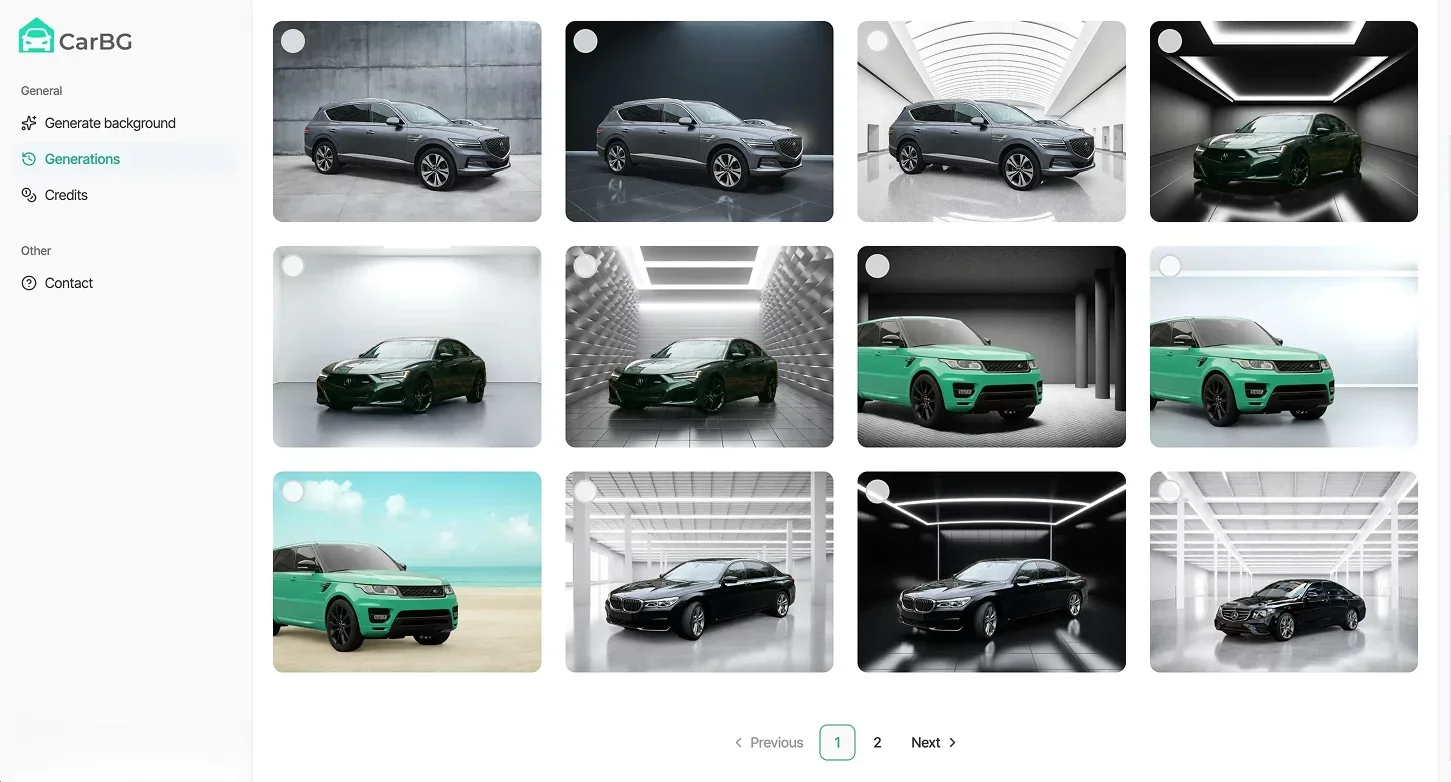
この問題を解決するために作られたのが、Car Background AIです。このツールの背景削除機能を使えば、雑然とした展示場を消して、すべての車を同じすっきりした背景にのせられます。どの掲載ページも、前の1台と同じ見た目にそろいます。
さらに、入庫分をまるごと車の写真の一括編集にかければ、在庫一覧全体の見た目がそろいます。それこそが、安心して買える店だと伝わる見た目です。
3. 向きと縦横比の誤り
スマホで縦向きに撮った写真や中途半端なトリミングは、気づきにくい致命傷です。AutoTraderは画像を4:3の枠に収めるため、比率が合わない写真には左右にグレーの帯がつきます。グレーの帯がついた写真が並ぶと、正しい構図で撮った競合店の隣で雑な印象を与えます。
横向きで撮影し、車の周りに少し余白を残して、4:3でトリミングされることを前提に構図を決めましょう。そうすれば、大事な部分が切れることはありません。
4. 実車とかけ離れた過剰な加工
AutoTraderは、車の見え方をゆがめるような画像の加工をしないよう売り手に求めています。購入検討者も強いフィルターを見抜くのがうまくなっており、そうした掲載ページを割り引いて見るようになっています。
線引きはシンプルです。
背景の差し替えは販売店の見せ方として認められた手法なので、背景をきれいにするのは問題ありません。一方で、ボディの色を変える、へこみを隠す、色味を実物以上に強調するといった加工はしてはいけません。
車の状態は正直に見せ、売り込みは見せ方に任せましょう。露出をそろえ、仕上がりをシャープにしたいときは画像編集AIが使えます。ただし、車そのものには決して手を加えないことが大切です。
5. むき出しのナンバーとブランディング不足
プロらしく見えるかどうかを分ける小さなポイントが2つあります。まず、写り込んだナンバープレートは、顧客のナンバーが偽造に悪用されるおそれがあるうえ、掲載には何の役にも立ちません。必ず隠しましょう。
また、ロゴのない車は、購入検討者が検索を重ねる中で店の名前を覚えてもらうチャンスを逃しています。すべての画像に統一した販売店のブランディングを施せば、在庫写真がひとつのセットとして機能し始めます。しかも同じツールで、同じ処理の中でナンバーも隠せます。
展示場の全車で基準を満たすには
1台分なら、ここまでまとめるのは簡単です。本当の仕事は、毎週すべての車でそれを続けることです。
当社と取引のある販売店に何が決め手になったのかを尋ねると、繰り返し返ってくる答えは「統一感」です。以前は背景が雑然としていて、車ごとに見た目がばらばらでした。それを解決したのは、展示場の全車に繰り返し使えるワークフローでした。
実際の流れは次のとおりです。
スタッフは上の撮影リストに沿って各車をスマホで撮影し、その画像をCar Background AIに通して、フィードに載せる前にきれいに整え、仕上がりを標準化します。背景は共通の背景に差し替えられ、露出は均一になり、ブランディングも同じ工程で入ります。まとめて処理した写真は、すべて同じ見た目で仕上がります。
手間をかける価値があるのは、見せ方がそのまま反応に結びつくからです。Cox Automotiveの調査では、独自に撮影した写真を複数枚載せた掲載は、ストック画像1枚だけの掲載に比べて、中古車の詳細ページへのクリック率が349%向上しました。
AutoTraderの要件を満たすだけで終わるか、検索結果ページで本当に戦えるか。その差はここにあります。
まとめ
AutoTraderで勝つには、強いメイン写真、十分なカット数、そして在庫全体で崩れない、すっきりと統一された見た目が必要です。その統一感こそが閲覧数と反響を増やし、写真で見たものを信頼したうえで来店する購入検討者を呼び込みます。
迷う理由はありません。まずは、お手持ちの車がこの基準と比べてどう見えるか確かめてみてください。掲載中の車を何台か選び、Car Background AIを無料で試すところから始めましょう。
よくある質問
AutoTraderでは、1台あたり何枚の写真を載せるべきですか?
契約プランで認められた上限まで使い、できるだけ多く載せましょう。同じ検索結果ページでは、写真が数枚しかない掲載は、枚数の多い掲載に比べて成果が出にくくなります。外装、内装、車両の状態まで網羅したほうが有利です。
AutoTraderではどのような写真サイズが必要ですか?
AutoTraderは、640×480以上、JPGまたはJPEG形式、1枚10MB未満の写真を受け付けています。今の画面でシャープに表示するには、長辺1600〜2400ピクセルで撮影し、書き出しましょう。
AutoTraderは写真を決まった形にトリミングしますか?
はい。AutoTraderは画像を横長の4:3の枠に収め、比率が合わない写真にはグレーの帯を追加します。横向きで撮影し、余白を残して構図を決めれば、大事な部分が切れることはありません。
AutoTraderの掲載で、背景を加工した写真を使えますか?
はい。雑然とした背景をすっきりした背景に差し替えるのは、販売店の見せ方として一般的で、広く受け入れられています。ただし、正直さが条件です。車の状態、色、形は決して変えず、変えるのは背景と照明だけにしてください。
AutoTraderの写真にグレーの帯が出るのはなぜですか?
グレーの帯は、写真がAutoTraderの4:3の枠に合わないときに表示されます。多くの場合、縦向きで撮影したか、中途半端にトリミングしたことが原因です。画像を横向き・4:3の比率で書き出し直せば、枠いっぱいに表示されます。

Tamas Magda
Car Background AIの共同創業者(事業成長・提携担当)
Tamas Magdaは、Car Background AI(carbackground.ai、CarBG)の共同創業者です。CarBGは、販売店の在庫車の写真の背景を差し替える、車の写真向けの画像編集AIです。提携、事業成長、事業設計を統括し、開発チームとは製品ロードマップを、販売店とはオンライン掲載に本当に必要なことを一緒に考えています。APAC(アジア太平洋)とMENA(中東・北アフリカ)で新規事業の立ち上げに携わってきた経験を持ち、在庫車の見せ方や販売店の写真ワークフロー、車そのものを変えずに掲載画像にAIを活かす方法について執筆しています。
TamasはCar Background AIの共同創業者であり、同社に金銭的な利害関係があります。Car Background AIに触れる記事には、この立場が反映されています。