
Automobile Background Ideas for Professional Car Photos
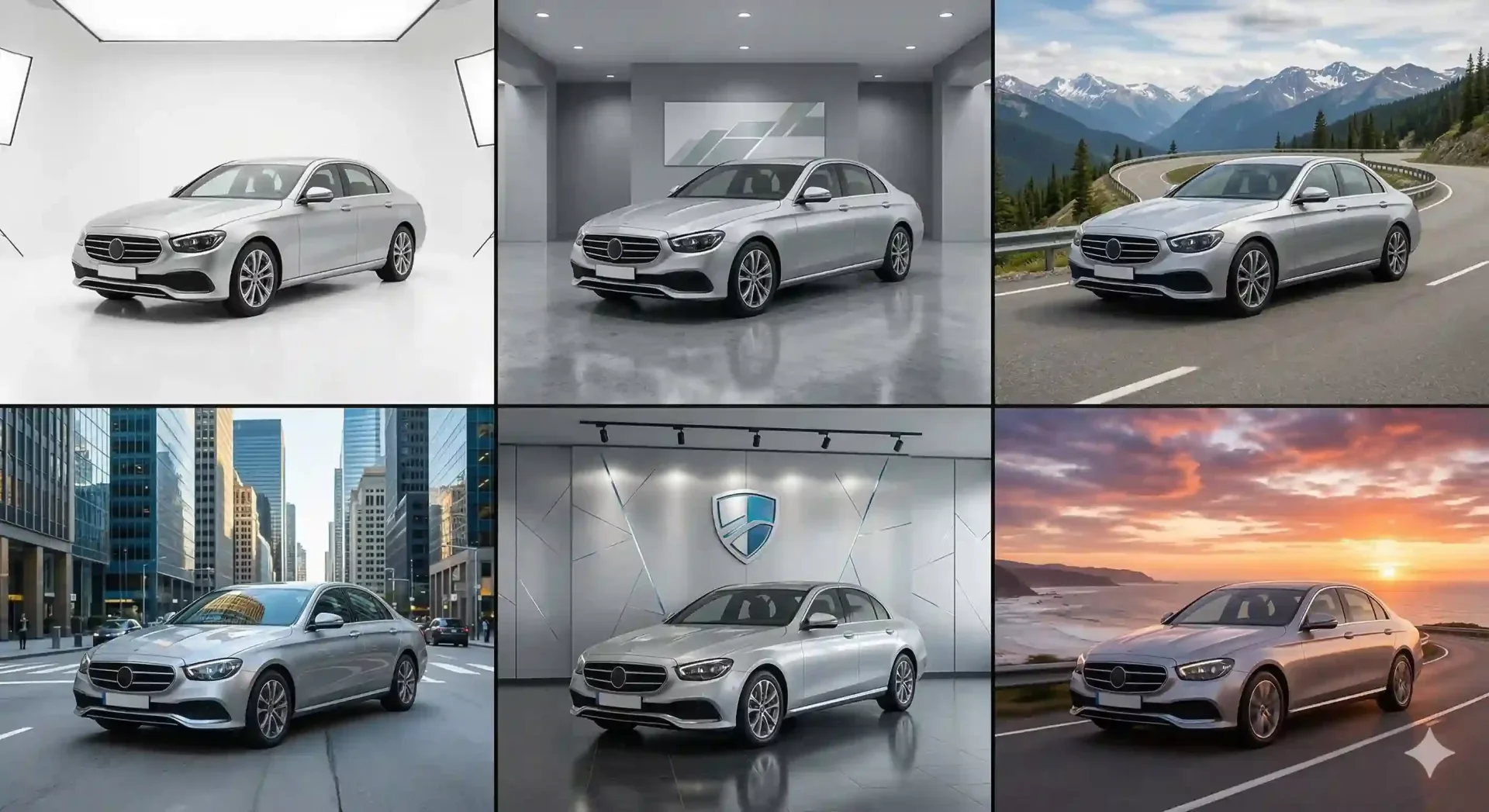
The automobile background in a listing photo shapes how buyers perceive the vehicle before they read a single specification. A sedan on a gravel lot between two trucks tells a different story than the same sedan on a clean showroom floor with soft overhead lighting. The car is identical in both images. The feeling is not. For dealerships competing for clicks in marketplace search results, the background is the fastest lever to pull for better first impressions.
This guide covers every automobile background option available to dealers and photographers – from white studio setups to outdoor locations to AI-generated showroom scenes. Each option is compared on cost, consistency, and scalability so you can choose the approach that fits your operation. If you want to test the difference immediately, CarBG replaces any lot background with a professional alternative in seconds.
Why the automobile background matters as much as the car
Marketplace platforms display inventory as a grid of thumbnails. In that grid, every listing competes for the same click. The vehicle itself is one variable. The background is the other. Research from major automotive marketplaces consistently shows that listings with clean, consistent backgrounds outperform those with cluttered lot environments in views, time-on-page, and inquiry rates.
The reason is cognitive. A neutral or professional background removes visual noise, letting the buyer focus entirely on the vehicle. A busy background – fences, signage, other cars, pavement cracks, sky glare – splits attention and introduces subconscious doubt about the dealership's professionalism. The automobile background is not decoration. It is a trust signal.
Studio and white car photography backgrounds
White and light gray studio backgrounds are the gold standard for professional automotive imagery. They eliminate all distractions, create a gallery-like presentation, and photograph consistently regardless of the vehicle's color or size.
Physical studio setups
A physical white studio requires a dedicated space (minimum 30 by 40 feet), a seamless paper or cyclorama wall, and controlled lighting. The investment ranges from $15,000 to $50,000 for equipment plus ongoing costs for backdrop replacement and dedicated staffing. Throughput is limited to 8 to 15 vehicles per day because each car must be driven in, photographed, and driven out.
Physical studios produce the highest-quality results for premium and certified pre-owned vehicles where the investment in per-unit photography is justified. For standard used inventory at volume, the economics rarely work unless the studio doubles as a customer delivery space.
AI-generated white and studio backgrounds
The more practical approach for most dealerships: shoot on the lot and replace the background with a white or studio template using AI. The visual result is comparable to a physical studio at a fraction of the cost and none of the space requirements. A single template applied across every vehicle creates the same catalog consistency that a physical studio provides. This is the approach that scales – 50 vehicles processed in an afternoon versus 50 vehicles requiring a week of studio scheduling.
Outdoor and location automobile backgrounds
Outdoor backgrounds place the vehicle in a real-world context: a mountain road, a coastal highway, an urban street, a forest clearing. These environments add emotional resonance that studio backgrounds intentionally strip away. A convertible against a sunset highway evokes freedom. An SUV at a trailhead evokes adventure. A luxury sedan on a city street evokes sophistication.
When outdoor backgrounds work
Outdoor automobile backgrounds are most effective for marketing content – social media posts, website hero banners, paid advertising, and brand campaigns. They tell a story about the vehicle's lifestyle appeal rather than its specifications. For dealerships, selecting 3 to 5 marquee vehicles per quarter for location-style car photoshoots generates a steady stream of engaging content that feeds social channels and differentiates the brand from competitors using standard lot photos.
When outdoor backgrounds hurt listings
For standard inventory listings, outdoor backgrounds can backfire. A scenic mountain behind a 2019 Camry looks aspirational but inconsistent when the next vehicle in the grid sits on a white floor. Mixed backgrounds across the inventory page destroy the catalog effect that drives buyer trust. The rule: use outdoor backgrounds for marketing, studio or neutral backgrounds for inventory listings. Never mix the two on the same inventory page.
Showroom and branded dealer automobile backgrounds
Showroom backgrounds split the difference between sterile studio white and distracting outdoor scenes. They typically feature a neutral floor (polished concrete, light tile) with subtle architectural elements – columns, soft ambient lighting, a gentle gradient on the back wall. The effect is professional and premium without being as stark as pure white.
Branded backgrounds
Some dealers take the showroom concept further by incorporating brand elements: the dealership logo discreetly placed in a corner, brand colors in the accent lighting, or a consistent watermark. This is most effective for dealer groups maintaining brand consistency across multiple locations. When every vehicle from every location appears against the same branded backdrop, the group identity is reinforced across every marketplace where the inventory appears.
CarBG's template library includes showroom and branded background options that can be applied consistently across bulk uploads. The branding capability – automatically applying logo and color elements – is in the making, but the showroom templates with consistent styling are available now for dealerships of any size.
Matching the right automobile background to the car type
Not every background works equally well for every vehicle. The visual relationship between the car and its environment affects how buyers perceive the listing.
Vehicle type | Best background style | Why it works |
|---|---|---|
Luxury sedans (BMW, Mercedes, Lexus) | Dark showroom, polished floor | Premium context matches buyer expectations for the segment |
Trucks and SUVs | Neutral outdoor or light gray studio | Practical vehicles look natural in open environments, not confined showrooms |
Sports cars | Dark studio or dramatic outdoor | Low, wide profiles benefit from darker backgrounds that emphasize body lines |
Economy and compact cars | White or light gray studio | Clean, bright backgrounds make smaller vehicles look fresh and approachable |
Certified pre-owned | Branded showroom with dealer identity | Brand reinforcement signals certification trust and dealer backing |
Trade-ins and value inventory | Clean white studio | Neutral background lets the vehicle speak for itself without added context |
The practical advice for most dealers: pick one or two backgrounds that work across your typical inventory mix and apply them consistently. A light gray studio template handles 80% of vehicle types well. Add a showroom template for premium or certified units. This two-template approach keeps the inventory page consistent while allowing subtle differentiation for higher-value stock.
How to replace automobile backgrounds in post-production
There are two paths to replacing a vehicle's background after capture: manual editing in Photoshop, or automated processing through an AI tool.
The manual path
Photoshop background replacement involves selecting the vehicle, creating a precise mask around wheels, mirrors, and windows, placing the new background, adding a ground shadow, and matching the lighting direction and color temperature. A skilled editor takes 15 to 30 minutes per image. The results can be excellent but the process does not scale – 600 images per month (50 vehicles at 12 images each) would require 150 to 300 hours of editing labor. Our guide to fixing fake-looking background edits covers the common pitfalls of manual replacement.
The AI path
AI automobile background replacement automates the entire sequence: vehicle detection, edge masking, background swap, shadow generation, and lighting matching. Processing time is 2 to 5 seconds per image. The same 600 images that take 150+ manual hours are processed in under 30 minutes. The output is consistent across the batch because every image passes through the same pipeline with the same template.
For dealerships, the AI path is the practical choice for inventory processing. Reserve manual Photoshop work for the occasional custom marketing composite where creative direction matters. For the daily listing workflow, consistency and speed are what move vehicles off the lot faster.
Choosing and testing your automobile background template
Selecting the right template is a one-time decision that pays dividends across every subsequent vehicle listing. Here is how to make the choice systematically.
Start by processing three to five representative vehicles from your current inventory – ideally one light-colored, one dark-colored, one truck/SUV, and one sedan – against two or three candidate backgrounds. Review the results at listing thumbnail size (the size buyers actually see them). Check that the vehicle reads clearly against the background regardless of paint color, that the shadows look natural, and that the overall impression is professional but not flashy.
Once you select your template, commit to it for at least one full inventory cycle (30 to 60 days) before switching. Frequent template changes create the same inconsistency problem that prompted the switch from lot photos in the first place. The consistency of the automobile background template across your inventory is more important than finding the theoretically perfect background.
Final thoughts
The automobile background is the single fastest upgrade a dealership can make to its listing quality. It requires no new photography equipment, no studio space, and no specialized skills. Choose a clean, professional backdrop – white studio, neutral showroom, or branded template – apply it consistently across your entire inventory, and the marketplace results follow. CarBG makes the background change the simplest step in your listing workflow rather than the most time-consuming one, which is exactly how it should be for a dealership focused on moving cars.
Frequently asked questions about automobile backgrounds
What is the best automobile background for used car listings?
A light gray or white studio background works best for the majority of used car inventory. It is neutral enough to complement any paint color, professional enough to signal a quality dealership, and simple enough to scale consistently across hundreds of vehicles. Showroom backgrounds with subtle architectural elements work well for premium or certified pre-owned units where a slightly more upscale presentation is justified.
Should I use the same car backdrop for every vehicle?
Yes, for inventory listings. Background consistency is what creates the catalog effect that buyers associate with professional, trustworthy dealerships. Using the same backdrop for every vehicle ensures your inventory page looks unified regardless of when or where each photo was taken. The only exception worth considering is using a slightly different template for premium or certified vehicles to visually distinguish them from standard inventory – but limit this to two templates maximum.
How do I replace a car background without Photoshop?
AI-powered tools handle automobile background replacement without any Photoshop skills. Upload the photo, select a replacement template, and the AI automatically detects the vehicle, removes the original background, places the new one, and adds realistic shadow grounding. The entire process takes seconds per image. For dealerships, this approach is faster, more consistent, and more cost-effective than manual editing at any volume above a handful of vehicles per month.
Do automobile backgrounds affect how fast a car sells?
Background quality directly affects listing engagement, which is the first step in the sales funnel. Clean, consistent backgrounds increase the click-through rate on marketplace search results because they make the vehicle stand out from competitors using unedited lot photos. Higher engagement leads to more inquiries, more showroom visits, and ultimately faster sales. The background does not sell the car by itself, but it determines whether buyers stop scrolling long enough to consider it.
Can I use outdoor backgrounds for dealer inventory listings?
Outdoor backgrounds work for marketing content (social media, website hero images, advertising) but generally hurt inventory listings. The problem is consistency: an outdoor scene for one vehicle and a studio background for another creates visual dissonance on the inventory page. If you want to use outdoor automobile backgrounds, apply the same outdoor scene to every vehicle in the inventory so the page remains visually unified. In practice, neutral studio or showroom backgrounds are easier to standardize and produce better marketplace results.
What makes a good car backdrop for dark-colored vehicles?
Dark vehicles benefit from medium-toned backgrounds (light gray, soft gradient) rather than pure white or very dark scenes. A pure white background can create excessive contrast that makes black or dark blue vehicles look like silhouettes. A very dark background can cause the vehicle to disappear into the scene. A medium gray or soft gradient provides enough contrast to define the vehicle's outline while keeping the overall image balanced and the paint details visible.
How many automobile background templates does a dealership need?
Most dealerships need only one to two templates. A primary template (white or light gray studio) covers the vast majority of inventory. An optional secondary template (showroom or branded backdrop) can differentiate premium or certified vehicles. Adding more than two templates introduces the inconsistency that background standardization is meant to eliminate. Choose your templates based on a test batch of representative vehicles, then commit to them across your full inventory for at least 30 to 60 days before reconsidering.
75 E 3rd street, Sheridan, WY, 82801, USA
