
Color Enhancement for Car Photos: Balance Tones Without Over-Saturating
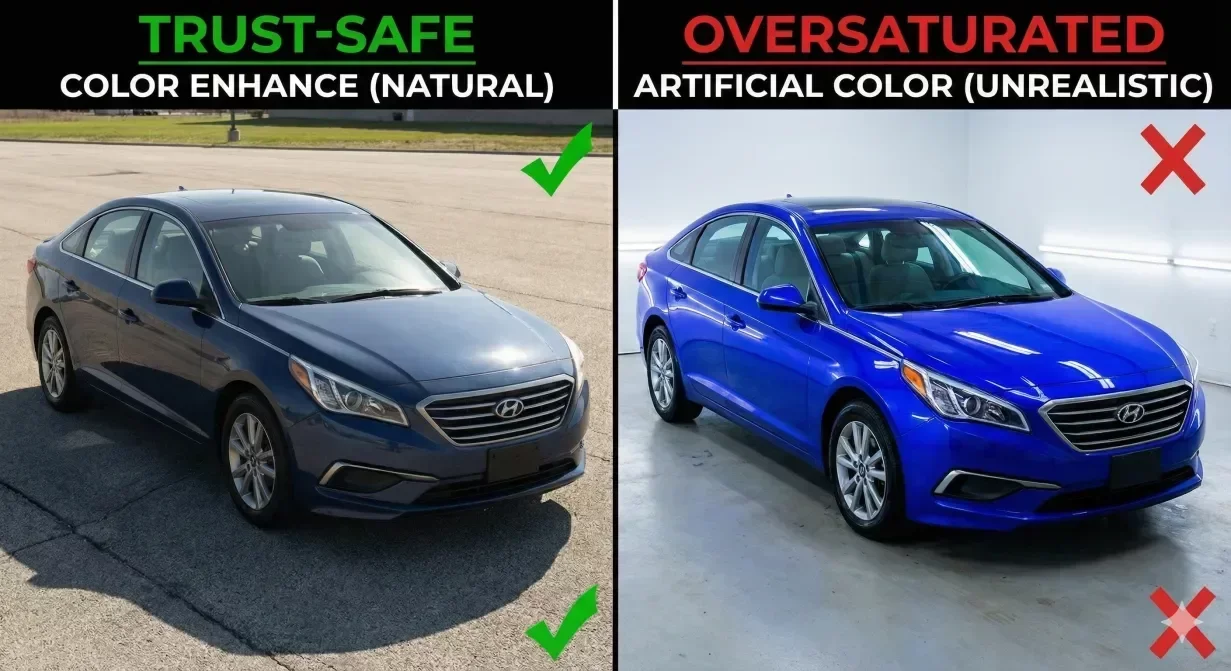
Color enhancement makes Car background photos more appealing while maintaining accuracy. The challenge is improving vibrancy without crossing into over-saturation that looks artificial. This guide shows how to enhance colors naturally.
Why Color Enhancement Matters
Raw photos from lot conditions often appear flat. Overcast lighting mutes colors. Camera auto-settings may not optimize for vehicle paint. Proper color enhancement restores vibrancy buyers expect without misrepresenting condition.
However, excessive enhancement creates obvious problems. Over-saturated photos scream manipulation. Buyers who arrive expecting vibrant online appearance feel deceived when the actual vehicle looks different.
Understanding Color Enhancement Components
Saturation
Controls color intensity. Moderate increases enhance appeal; excessive increases look artificial.
Vibrance
Intelligent saturation affecting muted tones more than already-saturated colors. Generally safer than raw saturation.
White Balance
Controls color temperature. Incorrect white balance creates color casts photos appearing too warm or cool.
Color Enhancement Best Practices
Start with White Balance
Correct white balance before adjusting saturation. A color cast intensifies with saturation increase.
Use Vibrance Over Saturation
Vibrance provides more natural enhancement without pushing already-saturated colors over the edge.
Enhance Moderately
Small adjustments compound across the set. Target 10-20 percent enhancement rather than dramatic transformation.
Maintain Paint Accuracy
Vehicle paint color must remain accurate. A blue car must appear blue, not purple or teal.
Common Color Enhancement Mistakes
The Over-Saturation Trap
Signs: paint that glows, unrealistic grass green, skin tones in reflections appearing orange. If it looks enhanced, it is too enhanced.
Inconsistent Color Temperature
Photos with different white balance appear different colors even for the same vehicle.
Color Accuracy Verification
- White elements appear white, not tinted
- Chrome appears neutral silver
- Paint color matches actual vehicle
- No unnatural glow or excessive vibrancy
- Consistent color across all photos in set
How CarBG Handles Color Enhancement
CarBG includes AI color enhancement calibrated for automotive photography, enhancing vibrancy while maintaining paint accuracy.
The color tools avoid over-saturation while producing appealing results.
Final Thoughts
Color enhancement improves appeal when applied with restraint. Correct white balance first, use vibrance over saturation, enhance moderately. Try CarBG color enhancement for natural improvement.
The CarBG Angle (FAQ Bits)
How much color enhancement is too much?
If enhancement is obvious to viewers, it is too much. Enhanced photos should match real-world appearance.
Should I enhance photos of white or black vehicles?
Yes, but carefully. These colors are sensitive to shifts. Focus on white balance accuracy.
Can color enhancement fix bad lighting?
Color enhancement addresses color issues, not exposure. Fix lighting first, then apply color enhancement.
Why do my enhanced photos look different from the actual car?
Over-saturation is the usual cause. Reduce enhancement intensity and verify white balance.
Should I enhance interior photos differently?
Interior photos may need different treatment but strive for consistent appearance across the set.
How do I remove color casts?
Use white balance adjustment. Identify a neutral element and adjust until it appears truly neutral.
75 E 3rd street, Sheridan, WY, 82801, USA
