
Dealership Photo Editing Tools: How to Choose the Right One
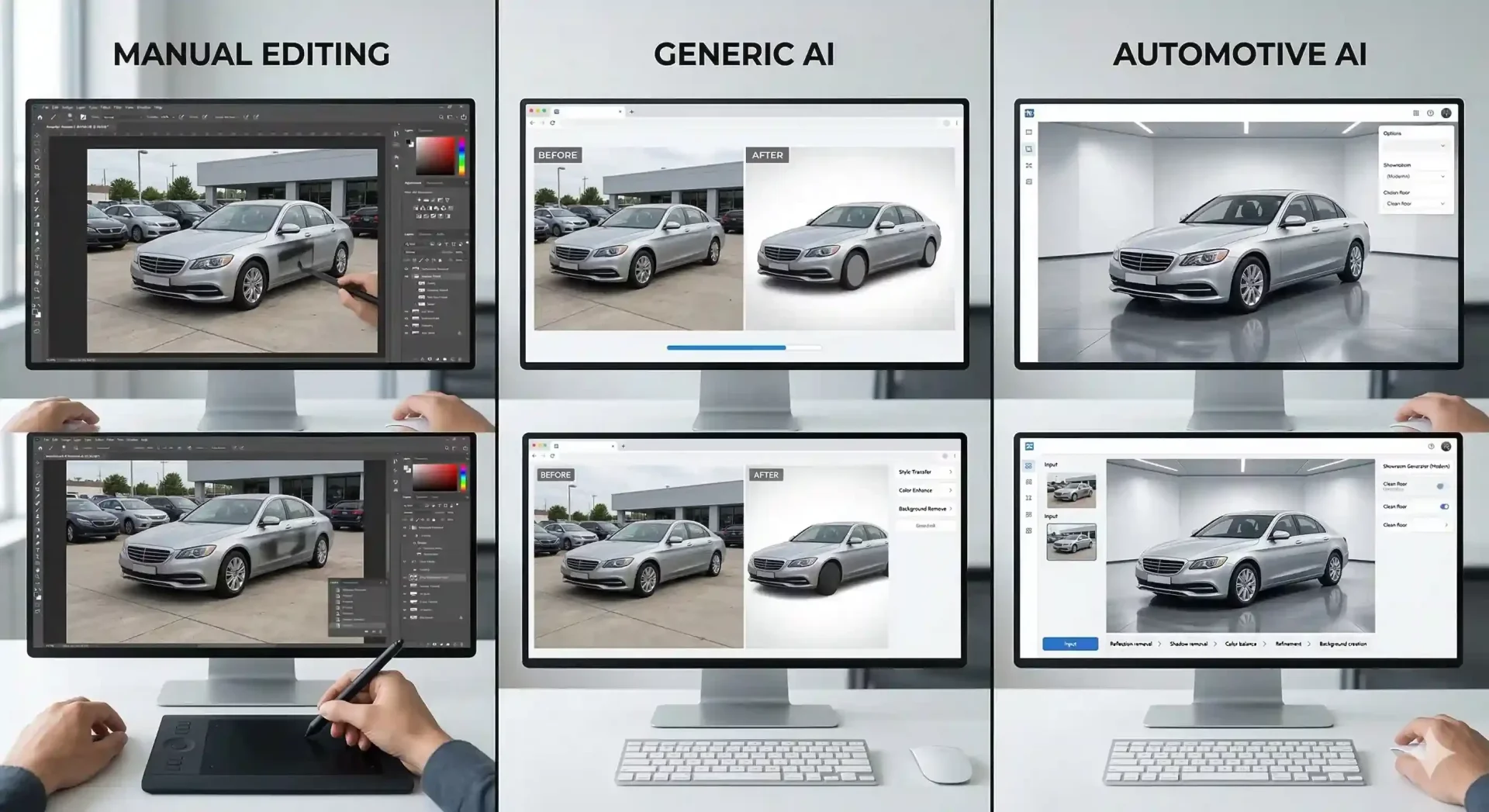
Dealership photo editing is the process that turns inconsistent lot captures into the clean, professional listing images that marketplace buyers expect. The tools you choose for this step determine how much time each vehicle costs, how consistent the output looks across your inventory, and whether your team can scale without adding headcount. Not all tools are equal, and the right choice depends on your volume, your budget, and how much of the process you want to automate.
This guide compares the major categories of dealership photo editing tools – manual editors, generic AI, and automotive-specific AI – with specific evaluation criteria so you can match the right tool to your operation. If you want to test the automotive AI category directly, CarBG offers 10 free credits to process real inventory photos.
What to look for in a dealership photo editing tool
Before comparing specific tools, establish the criteria that matter for dealership workflows. These five factors separate tools built for automotive inventory from tools built for general photography.
Vehicle-specific accuracy. The tool must handle car silhouettes reliably: wheel spokes, mirror edges, window transparency, antennas, and roof rails. Generic tools fail on these details 20 to 30% of the time, creating manual rework that erases the time savings.
Batch processing speed. A dealership listing 50 vehicles monthly processes 600+ images. The tool must handle bulk uploads and simultaneous processing. If each image requires individual attention, the workflow cannot scale.
Output consistency. Every image in a batch must receive the same treatment: same background, same lighting profile, same shadow style. If the tool produces variable quality image-to-image, the inventory page looks inconsistent.
Marketplace compliance. The export must meet platform specifications for resolution, aspect ratio, file format, and file size without additional manual formatting. Ideally, the tool offers presets for major platforms (Cars.com, CarGurus, AutoTrader).
Total cost of ownership. The sticker price is not the real cost. Factor in labor time for manual corrections, the learning curve for your team, and the opportunity cost of slow processing. A free tool that requires 10 hours of correction monthly costs more than a $200 tool that requires 30 minutes.
AI-powered tools for high-volume dealership photo editing
AI tools automate the core editing sequence: vehicle detection, background removal, replacement, lighting correction, color normalization, and shadow grounding. The category splits into two subcategories with meaningfully different performance.
Automotive-specific AI tools
These tools train their AI models on vehicle datasets, which means they handle car-specific edge cases (spokes, mirrors, glass) by design rather than by accident. The output is optimized for marketplace listings with appropriate backgrounds, realistic shadows, and consistent color rendering.
CarBG is built for this category. It processes each image in 2 to 5 seconds with automotive-trained detection, offers a template library of showroom and studio backdrops, and includes lighting optimization and shadow grounding as standard features. The prepaid credit model means dealerships pay per image without subscription lock-in. The bulk processing capability handles entire inventory sets in a single upload.
Other automotive-specific options include Spyne and Motorcut, which offer overlapping capabilities. The differentiators between them are pricing model, template variety, edge-case handling quality, and the specific marketplace export options each provides.
Generic AI background removal tools
Remove.bg, PhotoRoom, and Canva's background remover serve a broad market: e-commerce products, social media content, headshots, and general photography. They handle vehicle photos adequately for basic background removal but consistently struggle with the precision that dealer listings require.
The typical experience: background removal works cleanly on 70% of vehicle images, produces visible artifacts (halos, clipped spokes, filled windows) on the remaining 30%, and offers no automotive-specific features like shadow grounding or showroom templates. For a dealership processing 600 images monthly, that 30% failure rate translates to 180 images requiring manual correction – roughly 30 to 60 hours of rework labor.
Manual and semi-manual editing tools for dealerships
Manual tools provide maximum creative control at the cost of speed and consistency.
Adobe Photoshop
Photoshop remains the industry standard for detailed, custom photo editing. For dealership use, it handles any editing task conceivable: complex masking, precise color grading, custom shadow creation, retouching, and multi-layer compositing. The per-image time for a background replacement and lighting correction is 15 to 30 minutes for a skilled editor.
Where Photoshop falls short for dealerships is scale and consistency. Different editors produce different results. The learning curve is steep – proficient Photoshop use takes months of practice. And the cost at volume (15 to 30 minutes times 600 images = 150 to 300 hours monthly) makes it impractical as the primary editing tool for inventory processing. Photoshop's role in a dealership workflow is best reserved for custom marketing content where creative direction justifies the time investment.
Lightroom and batch editors
Adobe Lightroom and similar tools (Capture One, DxO) excel at batch color correction, exposure adjustment, and consistent preset application across large photo sets. They do not perform background removal or replacement – so they cannot solve the core dealership problem of inconsistent lot backgrounds. However, they complement AI tools well: use Lightroom for initial batch color correction, then pass the corrected images to an AI tool for background replacement and final processing.
Outsourced editing services
Several companies offer human-powered editing services priced per image ($3 to $10 each). The quality ranges from excellent to inconsistent depending on the service. Turnaround times range from same-day rush to 48-hour standard. The advantage is offloading the work entirely. The disadvantages are cost at volume ($1,800 to $6,000 monthly for 600 images), turnaround delays that slow time-to-listing, and variability between different human editors.
How to choose the right tool based on dealership size
The optimal tool depends on your volume, budget, and how much process your team can support.
Dealership size | Monthly vehicles | Recommended tool | Rationale |
|---|---|---|---|
Independent seller | 1 to 5 | Free generic AI or manual | Low volume justifies free tools despite lower quality. Manual correction is manageable. |
Small dealer | 10 to 30 | Car-specific AI (CarBG) | Volume crosses the threshold where generic tools create too much rework. Consistency starts mattering. |
Mid-size dealer | 30 to 100 | Car-specific AI with standardized workflow | Batch processing and template consistency are non-negotiable at this volume. Manual editing is impractical. |
Large dealer / group | 100+ | Car-specific AI + Lightroom for pre-correction | Hybrid workflow: Lightroom for batch color prep, AI for background and final processing. Maximum consistency. |
Automotive agency | 200+ across clients | Car-specific AI with per-client templates | Multi-client template management and bulk processing are essential. Per-image pricing scales with client volume. |
Photography tips that reduce dealership photo editing time
The fastest way to reduce editing time is to improve what happens before the camera opens. These five practices cut downstream editing load by 30 to 50%.
Shoot during overcast mornings. Even, diffused light means less exposure correction in post-processing. The AI spends fewer resources normalizing light that was already consistent at capture.
Use a fixed white balance. Set Daylight (5200K) for outdoor lots. This prevents color drift between images, which means the AI color normalization has less work to do and produces more consistent output.
Clear the perimeter. A clean background around the vehicle makes AI edge detection faster and more accurate. Less background clutter means fewer edge artifacts to review.
Follow a consistent angle sequence. The same 12-shot pattern for every vehicle eliminates unusual angles that the AI may interpret differently. Standard poses process most reliably.
Prep the vehicle. Washing, interior cleaning, and proper positioning take 10 to 15 minutes per vehicle but eliminate issues that no editing tool can fix: dirt on paint, dashboard warning lights, and cluttered cabins. Our dealer-ready photo quality checklist covers the full preparation process.
Building a fast, consistent dealership photo editing workflow
The tools matter, but the workflow matters more. Here is the process that high-performing dealerships follow.
Morning: capture. One or two team members photograph incoming inventory following the standardized shot list and camera settings. Target: 10 to 15 vehicles per morning session.
Midday: upload and process. Transfer the day's captures to the editing tool. Select the standard template. Initiate batch processing. While the AI processes, the team can handle other tasks – processing 150 to 200 images takes 10 to 15 minutes.
Afternoon: review and export. One reviewer scans the processed batch for edge quality, shadow presence, and color accuracy. Flag exceptions for re-processing. Export the approved images and upload to listing platforms. Vehicles arrive in the morning and appear on marketplaces by end of day – same-day listing is the benchmark that separates high-performing dealerships from those losing days to their editing bottleneck.
Final thoughts
Dealership photo editing tools fall on a spectrum from full manual control (Photoshop) to full automation (car-specific AI). The right position on that spectrum depends on your volume. For most dealers processing more than 20 vehicles monthly, automotive-specific AI tools deliver the best balance of quality, speed, and cost. The tool handles the transformation. Your workflow handles the consistency. And your bulk processing pipeline handles the scale. Start with the right tool, build the right process around it, and the listing quality follows.
Frequently asked questions about dealership photo editing
What is the fastest dealership photo editing tool?
Automotive-specific AI tools are the fastest category, processing each image in 2 to 5 seconds including background replacement, lighting correction, and shadow grounding. A full 12-image vehicle set takes under 60 seconds of processing time. For comparison, manual Photoshop editing takes 15 to 30 minutes per image, and outsourced human editing takes 24 to 48 hours for turnaround. At dealership volume, the speed difference compounds – AI processes a 50-vehicle inventory in under an hour while manual methods require days or weeks.
How much does dealership photo editing cost per vehicle?
Costs vary by method. Manual Photoshop editing (in-house or outsourced) runs $36 to $150 per vehicle for a 12-image set at $3 to $10 per image. Generic AI tools are free or low-cost but add 30 to 60 minutes of manual correction per batch. Car-specific AI tools like CarBG cost $2.40 to $4.80 per vehicle (12 images at $0.20 to $0.40 per credit depending on volume tier). The lowest total cost per vehicle comes from car-specific AI when both tool cost and labor cost are included.
Can I use Photoshop for dealership photo editing at volume?
Photoshop can technically handle any volume, but the labor cost makes it impractical as the primary editing tool for most dealerships. Processing 600 images monthly (50 vehicles at 12 images each) at 20 minutes per image requires 200 hours of skilled labor. At even a modest $20 per hour, that is $4,000 monthly in editing labor alone. Most dealerships reserve Photoshop for custom marketing content and use AI tools for the daily inventory processing where speed and consistency are more important than creative control.
Do I need different dealership photo editing tools for different platforms?
No. A good dealership photo editing tool produces images that meet the specifications of all major platforms. Cars.com, CarGurus, AutoTrader, and Facebook Marketplace all accept standard JPEG images at 4:3 aspect ratio with minimum 640 by 480 resolution. Process your images once through the AI tool and export in the standard format – the same files work across every platform without reformatting. The only platform-specific consideration is Facebook Marketplace, which displays well in 1:1 square crop for mobile – so ensure your framing has enough padding to accommodate both 4:3 and 1:1 crops.
What is the difference between car-specific AI and generic AI for dealership photo editing?
Car-specific AI tools are trained on datasets of vehicle images, which teaches them to handle automotive edge cases like wheel spokes, mirror outlines, window transparency, and antenna details. Generic AI tools are trained on diverse subjects (people, products, food) and treat vehicles like any other object. The practical difference shows up in edge quality, shadow realism, and batch consistency. Car-specific tools produce clean results on 90 to 95% of vehicle images, while generic tools typically require manual correction on 25 to 30% of the batch.
How do I maintain photo quality when using AI dealership photo editing across multiple staff?
The AI tool standardizes the editing output, but the capture input must also be standardized. Give every staff member the same shot list, the same camera settings, and the same vehicle preparation checklist. Assign one person as the quality reviewer who scans every processed batch before export. When the process is the same regardless of who captures and who uploads, the AI produces uniform output. Inconsistency in dealer listings almost always traces back to inconsistency in capture process, not in the editing tool.
75 E 3rd street, Sheridan, WY, 82801, USA
