
April 6, 2026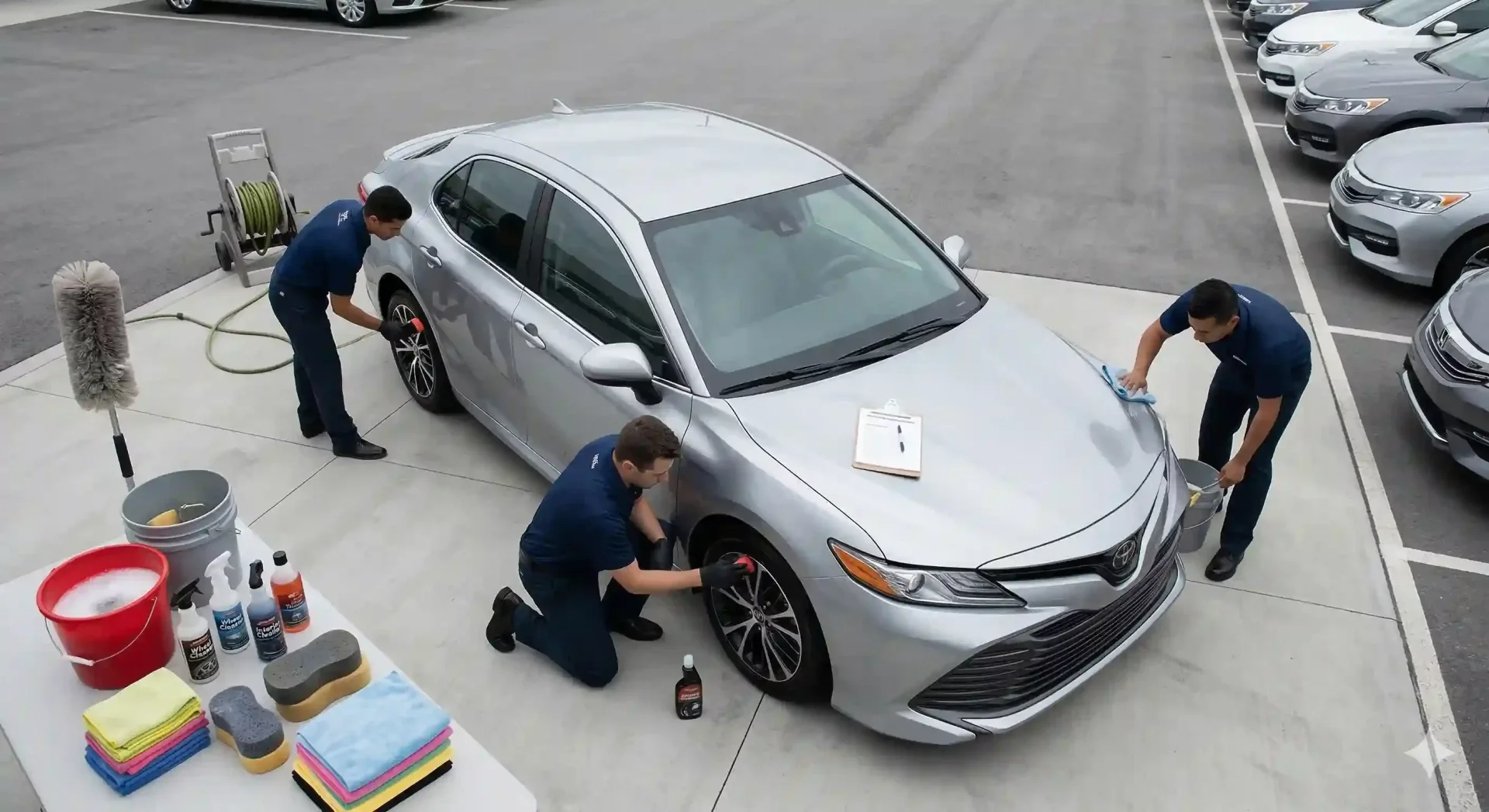
Car Photography Tips: Dealership Photo Prep Checklist
Car photography tips are the unglamorous part of inventory management that separates fast-selling dealerships from slow ones. Before the camera comes out, every vehicle needs physical preparation. A freshly washed sedan photographed on a tidy lot corner will outperform a dusty one shot between two trucks – even if both photos run through the same editing pipeline afterward. Yet most dealerships skip prep entirely, treating the photo step as something to rush through between arrivals and test drives.
This checklist gives your lot team a repeatable, printable process to prepare each vehicle for its listing photo set. Follow it before every shoot, and the photos coming off the lot will be cleaner, more consistent, and faster to edit. That means fewer rework loops, faster time-to-listing, and an inventory page that looks like it belongs to a dealership that cares about details.
Exterior cleaning and detailing before the shoot
The exterior is the first thing a buyer sees in the hero image. Dust, water spots, bird droppings, and fingerprints on handles all show up in high-resolution photos – and they signal neglect even when the vehicle is mechanically sound.
The 10-minute exterior prep
Start with a full rinse to remove loose dirt. Follow with a quick hand wash using automotive soap (dish soap strips wax and dulls paint). Dry with a microfiber towel, working top to bottom to prevent water spots from forming on lower panels. For high-volume operations where a full wash per vehicle is impractical, a waterless wash spray and microfiber wipe-down takes 5 to 7 minutes and handles 80% of surface contaminants.
Pay specific attention to wheels and wheel wells. Brake dust accumulates fast and photographs as a brown haze around the rims. A quick spray with a dedicated wheel cleaner and a 30-second scrub per wheel makes a visible difference in the final image. Tire dressing is optional but adds a finished look that buyers associate with well-maintained vehicles.
Glass and chrome
Clean all glass surfaces inside and out. Windshield haze and interior glass smudges are especially noticeable in car photography because the camera picks up reflections and light scatter that the human eye ignores. Use an automotive glass cleaner (ammonia-free to protect tint) and a clean microfiber. Chrome trim, badges, and exhaust tips benefit from a quick wipe – these reflective surfaces catch light and draw the eye in photos.
Remove distractions from around the vehicle
Background clutter is the number one reason dealership photos look unprofessional. Even if you plan to replace the background with AI afterward, shooting a clean scene produces better edge detection and faster processing. More importantly, not every photo in the set will have its background replaced – detail shots, interior angles, and engine bay photos typically keep their original surroundings.
Walk around the vehicle and clear a 6-foot perimeter. Move adjacent cars if possible, or at minimum reposition the subject vehicle to an open section of the lot. Remove trash cans, cones, sandwich boards, hoses, and any dealership signage that is not part of the brand identity. Check the ground for oil stains, puddles, and debris directly under the car – these show up clearly in photos taken from low angles.
Remove any items on or in the vehicle that should not appear in listings: dealer plates (unless required), window stickers partially peeled, loose paperwork on the dash, air fresheners hanging from the mirror, and personal items left by trade-in owners. A common oversight: leaving the previous owner's parking permit or bumper sticker visible. Buyers notice these and it creates a secondhand impression even on clean vehicles.
Interior preparation for car photography
Interior photos are where buyer trust is won or lost. A spotless exterior paired with a messy cabin raises immediate suspicion about what else was neglected. Consistent car photography techniques for interiors start with a systematic prep routine.
Seats and surfaces
Vacuum all seats, floor mats, and carpet areas. Wipe down the dashboard, center console, door panels, and steering wheel with a non-glossy interior cleaner. Avoid silicone-based products that leave a shiny residue – they look wet and unnatural in photos. Leather seats should be wiped but not conditioned right before shooting, as conditioner can create glare under flash or direct sunlight.
Details that photograph poorly
Reset the infotainment screen to the home or brand logo screen (not a radio station or Bluetooth pairing screen). Set the odometer to display clearly. Ensure all warning lights are off – a check-engine light visible in a dashboard photo will generate buyer questions before the phone even rings. Adjust the steering wheel to a straight, centered position. Push seats to a neutral, mid-track setting so the interior looks spacious and consistent from vehicle to vehicle.
Positioning and parking for optimal car photography angles
Where you park the vehicle determines the background, lighting angle, and composition of every photo in the set. A good parking position eliminates half the editing work before the first shot is taken. For a full breakdown of angles and framing, see our 12-shot car photography angle template.
Choose a spot where the vehicle faces away from the busiest part of the lot. This puts the cleanest background behind the car in the hero (front three-quarter) shot. If your lot has a dedicated photo area – even a simple painted line on the pavement marking where to park – use it consistently for every vehicle.
Turn the front wheels slightly toward the camera (about 15 to 20 degrees). This creates a more dynamic front three-quarter composition and shows the wheel face, which buyers want to see. Ensure the vehicle is level – parking on a slope tilts the car in the frame and looks odd when the background is replaced with a flat showroom floor later.
Final car photography tips: lighting check and visual inspection
Before your team starts shooting, do a 60-second walkthrough to catch issues that are easy to miss in the rush of a busy lot day.
The pre-shoot walkthrough checklist
Walk around the vehicle and check: all doors and trunk are fully closed, no panel gaps from a hood or trunk not latched properly, wipers are in the down position, headlights and taillights are off unless intentionally lit for a night shot, and the antenna (if retractable) is in the up position to avoid the "missing antenna" look in profile shots.
Check the lighting conditions. Are you shooting into the sun? Reposition. Are harsh shadows falling under the bumper? Wait 20 minutes or move the car. Is the sky overcast? Good – this is the ideal condition for car photography on dealer lots because the diffused light eliminates hot spots and deep shadows.
Do a final circle at camera height (belt-line level). Look at the vehicle the way the camera will see it. Spot any missed water spots, a fingerprint on the door handle, a stray leaf on the windshield, or a reflection of another vehicle in the paint. These 60 seconds save 15 minutes of post-processing per vehicle.
What AI post-processing handles after the shoot
A well-prepped vehicle still needs post-processing for marketplace-ready results. The difference is that prepared photos require far less correction, process faster, and produce cleaner output.
AI tools handle background replacement (swapping the lot for a clean showroom or branded backdrop), lighting normalization (evening out exposure inconsistencies between shots), color enhancement (ensuring paint reads true-to-life across the set), and shadow grounding (adding a natural shadow so the car does not appear to float on the new background).
What AI does not handle well: dirt on the vehicle, clutter inside the cabin, improperly positioned wheels, and warning lights on the dashboard. These are physical prep problems that must be solved before the camera comes out. That is exactly why this checklist exists – it draws the line between what prep solves and what technology solves, so your team knows which step owns which problem.
Final thoughts
The best car photography tips come down to discipline before the camera opens. Prep the car, clear the scene, and check twice before shooting once. This checklist turns a chaotic lot day into a repeatable 15-minute process per vehicle that produces cleaner captures, fewer reshoots, and faster time-to-listing. When every vehicle goes through the same preparation sequence, the downstream editing pipeline runs smoother and the inventory page looks like one cohesive catalog. Pair it with CarBG's AI processing for backgrounds and lighting, and your team can move from arrival to published listing in the same afternoon.
Frequently asked questions about car photography preparation
How long does it take to prepare a car for dealership photography?
A thorough prep using this checklist takes 10 to 15 minutes per vehicle. The exterior wash and wipe-down accounts for most of that time. Interior prep adds 3 to 5 minutes. Positioning and the final walkthrough take about 2 minutes combined. For high-volume operations processing 10 or more vehicles per day, assigning one person to prep while another shoots creates an efficient production line that keeps both roles busy without waiting.
What car photography techniques reduce editing time the most?
Three techniques have the biggest impact on downstream editing time. First, clearing the perimeter around the vehicle so the background is as clean as possible before AI removal. Second, shooting during overcast conditions or consistent shade to minimize exposure correction. Third, using a standardized parking position and angle sequence so every vehicle enters the editing pipeline in the same format. Together, these reduce per-vehicle editing time by roughly half compared to unstructured lot shooting.
Should I wash every car before taking dealership photos?
Yes, at minimum a quick exterior wipe-down. Dust and water spots are far more visible in photos than they are to the naked eye on the lot. For trade-ins and vehicles that have been sitting for several days, a full wash is worth the 10 minutes. The cost of a quick wash is negligible compared to the cost of a buyer scrolling past a dirty-looking listing. Some dealerships keep a small wash station near the photo area specifically for this purpose.
What interior details matter most for car photography?
The three interior elements buyers scrutinize most in photos are the dashboard condition (including the infotainment screen state), the seat surfaces (stains, tears, or excessive wear), and the steering wheel (which signals overall cabin care). Resetting the infotainment to the brand logo screen, ensuring no warning lights are visible, and positioning the steering wheel straight all take under a minute but significantly improve the professional impression of interior shots.
Can AI fix a poorly prepared car photo?
AI can fix backgrounds, lighting, and color, but it cannot clean the car. Dirt on the paint, clutter inside the cabin, improperly angled wheels, and visible warning lights are all physical problems that no software can convincingly remove. The most efficient workflow splits responsibility clearly: physical prep handles the vehicle itself, and AI handles the environment around it. Skipping prep means your team will either reshoot (wasting time) or publish substandard photos (losing buyer trust).
How do I standardize car photography for dealerships with multiple staff?
Print this checklist and post it in the photo area or attach it to the photo equipment kit. The key to consistency across multiple staff members is removing decision-making from the process. When everyone follows the same prep sequence, parks in the same spot, and shoots the same angle set, the output is uniform regardless of who did the work. Pair the standardized capture with AI batch processing, and the final listings look identical whether your newest hire or your most experienced salesperson took the photos.
This checklist gives your lot team a repeatable, printable process to prepare each vehicle for its listing photo set. Follow it before every shoot, and the photos coming off the lot will be cleaner, more consistent, and faster to edit. That means fewer rework loops, faster time-to-listing, and an inventory page that looks like it belongs to a dealership that cares about details.
Exterior cleaning and detailing before the shoot
The exterior is the first thing a buyer sees in the hero image. Dust, water spots, bird droppings, and fingerprints on handles all show up in high-resolution photos – and they signal neglect even when the vehicle is mechanically sound.
The 10-minute exterior prep
Start with a full rinse to remove loose dirt. Follow with a quick hand wash using automotive soap (dish soap strips wax and dulls paint). Dry with a microfiber towel, working top to bottom to prevent water spots from forming on lower panels. For high-volume operations where a full wash per vehicle is impractical, a waterless wash spray and microfiber wipe-down takes 5 to 7 minutes and handles 80% of surface contaminants.
Pay specific attention to wheels and wheel wells. Brake dust accumulates fast and photographs as a brown haze around the rims. A quick spray with a dedicated wheel cleaner and a 30-second scrub per wheel makes a visible difference in the final image. Tire dressing is optional but adds a finished look that buyers associate with well-maintained vehicles.
Glass and chrome
Clean all glass surfaces inside and out. Windshield haze and interior glass smudges are especially noticeable in car photography because the camera picks up reflections and light scatter that the human eye ignores. Use an automotive glass cleaner (ammonia-free to protect tint) and a clean microfiber. Chrome trim, badges, and exhaust tips benefit from a quick wipe – these reflective surfaces catch light and draw the eye in photos.
Remove distractions from around the vehicle
Background clutter is the number one reason dealership photos look unprofessional. Even if you plan to replace the background with AI afterward, shooting a clean scene produces better edge detection and faster processing. More importantly, not every photo in the set will have its background replaced – detail shots, interior angles, and engine bay photos typically keep their original surroundings.
Walk around the vehicle and clear a 6-foot perimeter. Move adjacent cars if possible, or at minimum reposition the subject vehicle to an open section of the lot. Remove trash cans, cones, sandwich boards, hoses, and any dealership signage that is not part of the brand identity. Check the ground for oil stains, puddles, and debris directly under the car – these show up clearly in photos taken from low angles.
Remove any items on or in the vehicle that should not appear in listings: dealer plates (unless required), window stickers partially peeled, loose paperwork on the dash, air fresheners hanging from the mirror, and personal items left by trade-in owners. A common oversight: leaving the previous owner's parking permit or bumper sticker visible. Buyers notice these and it creates a secondhand impression even on clean vehicles.
Interior preparation for car photography
Interior photos are where buyer trust is won or lost. A spotless exterior paired with a messy cabin raises immediate suspicion about what else was neglected. Consistent car photography techniques for interiors start with a systematic prep routine.
Seats and surfaces
Vacuum all seats, floor mats, and carpet areas. Wipe down the dashboard, center console, door panels, and steering wheel with a non-glossy interior cleaner. Avoid silicone-based products that leave a shiny residue – they look wet and unnatural in photos. Leather seats should be wiped but not conditioned right before shooting, as conditioner can create glare under flash or direct sunlight.
Details that photograph poorly
Reset the infotainment screen to the home or brand logo screen (not a radio station or Bluetooth pairing screen). Set the odometer to display clearly. Ensure all warning lights are off – a check-engine light visible in a dashboard photo will generate buyer questions before the phone even rings. Adjust the steering wheel to a straight, centered position. Push seats to a neutral, mid-track setting so the interior looks spacious and consistent from vehicle to vehicle.
Positioning and parking for optimal car photography angles
Where you park the vehicle determines the background, lighting angle, and composition of every photo in the set. A good parking position eliminates half the editing work before the first shot is taken. For a full breakdown of angles and framing, see our 12-shot car photography angle template.
Choose a spot where the vehicle faces away from the busiest part of the lot. This puts the cleanest background behind the car in the hero (front three-quarter) shot. If your lot has a dedicated photo area – even a simple painted line on the pavement marking where to park – use it consistently for every vehicle.
Turn the front wheels slightly toward the camera (about 15 to 20 degrees). This creates a more dynamic front three-quarter composition and shows the wheel face, which buyers want to see. Ensure the vehicle is level – parking on a slope tilts the car in the frame and looks odd when the background is replaced with a flat showroom floor later.
Final car photography tips: lighting check and visual inspection
Before your team starts shooting, do a 60-second walkthrough to catch issues that are easy to miss in the rush of a busy lot day.
The pre-shoot walkthrough checklist
Walk around the vehicle and check: all doors and trunk are fully closed, no panel gaps from a hood or trunk not latched properly, wipers are in the down position, headlights and taillights are off unless intentionally lit for a night shot, and the antenna (if retractable) is in the up position to avoid the "missing antenna" look in profile shots.
Check the lighting conditions. Are you shooting into the sun? Reposition. Are harsh shadows falling under the bumper? Wait 20 minutes or move the car. Is the sky overcast? Good – this is the ideal condition for car photography on dealer lots because the diffused light eliminates hot spots and deep shadows.
Do a final circle at camera height (belt-line level). Look at the vehicle the way the camera will see it. Spot any missed water spots, a fingerprint on the door handle, a stray leaf on the windshield, or a reflection of another vehicle in the paint. These 60 seconds save 15 minutes of post-processing per vehicle.
What AI post-processing handles after the shoot
A well-prepped vehicle still needs post-processing for marketplace-ready results. The difference is that prepared photos require far less correction, process faster, and produce cleaner output.
AI tools handle background replacement (swapping the lot for a clean showroom or branded backdrop), lighting normalization (evening out exposure inconsistencies between shots), color enhancement (ensuring paint reads true-to-life across the set), and shadow grounding (adding a natural shadow so the car does not appear to float on the new background).
What AI does not handle well: dirt on the vehicle, clutter inside the cabin, improperly positioned wheels, and warning lights on the dashboard. These are physical prep problems that must be solved before the camera comes out. That is exactly why this checklist exists – it draws the line between what prep solves and what technology solves, so your team knows which step owns which problem.
Final thoughts
The best car photography tips come down to discipline before the camera opens. Prep the car, clear the scene, and check twice before shooting once. This checklist turns a chaotic lot day into a repeatable 15-minute process per vehicle that produces cleaner captures, fewer reshoots, and faster time-to-listing. When every vehicle goes through the same preparation sequence, the downstream editing pipeline runs smoother and the inventory page looks like one cohesive catalog. Pair it with CarBG's AI processing for backgrounds and lighting, and your team can move from arrival to published listing in the same afternoon.
Frequently asked questions about car photography preparation
How long does it take to prepare a car for dealership photography?
A thorough prep using this checklist takes 10 to 15 minutes per vehicle. The exterior wash and wipe-down accounts for most of that time. Interior prep adds 3 to 5 minutes. Positioning and the final walkthrough take about 2 minutes combined. For high-volume operations processing 10 or more vehicles per day, assigning one person to prep while another shoots creates an efficient production line that keeps both roles busy without waiting.
What car photography techniques reduce editing time the most?
Three techniques have the biggest impact on downstream editing time. First, clearing the perimeter around the vehicle so the background is as clean as possible before AI removal. Second, shooting during overcast conditions or consistent shade to minimize exposure correction. Third, using a standardized parking position and angle sequence so every vehicle enters the editing pipeline in the same format. Together, these reduce per-vehicle editing time by roughly half compared to unstructured lot shooting.
Should I wash every car before taking dealership photos?
Yes, at minimum a quick exterior wipe-down. Dust and water spots are far more visible in photos than they are to the naked eye on the lot. For trade-ins and vehicles that have been sitting for several days, a full wash is worth the 10 minutes. The cost of a quick wash is negligible compared to the cost of a buyer scrolling past a dirty-looking listing. Some dealerships keep a small wash station near the photo area specifically for this purpose.
What interior details matter most for car photography?
The three interior elements buyers scrutinize most in photos are the dashboard condition (including the infotainment screen state), the seat surfaces (stains, tears, or excessive wear), and the steering wheel (which signals overall cabin care). Resetting the infotainment to the brand logo screen, ensuring no warning lights are visible, and positioning the steering wheel straight all take under a minute but significantly improve the professional impression of interior shots.
Can AI fix a poorly prepared car photo?
AI can fix backgrounds, lighting, and color, but it cannot clean the car. Dirt on the paint, clutter inside the cabin, improperly angled wheels, and visible warning lights are all physical problems that no software can convincingly remove. The most efficient workflow splits responsibility clearly: physical prep handles the vehicle itself, and AI handles the environment around it. Skipping prep means your team will either reshoot (wasting time) or publish substandard photos (losing buyer trust).
How do I standardize car photography for dealerships with multiple staff?
Print this checklist and post it in the photo area or attach it to the photo equipment kit. The key to consistency across multiple staff members is removing decision-making from the process. When everyone follows the same prep sequence, parks in the same spot, and shoots the same angle set, the output is uniform regardless of who did the work. Pair the standardized capture with AI batch processing, and the final listings look identical whether your newest hire or your most experienced salesperson took the photos.
Address
75 E 3rd street, Sheridan, WY, 82801, USA

Join our monthly email with car photography insights and tool updates
© 2026 CarBG LLC. All rights reserved.