Car Photos for Sale Listings: Diagnose and Fix Photos That Dont Get Clicks
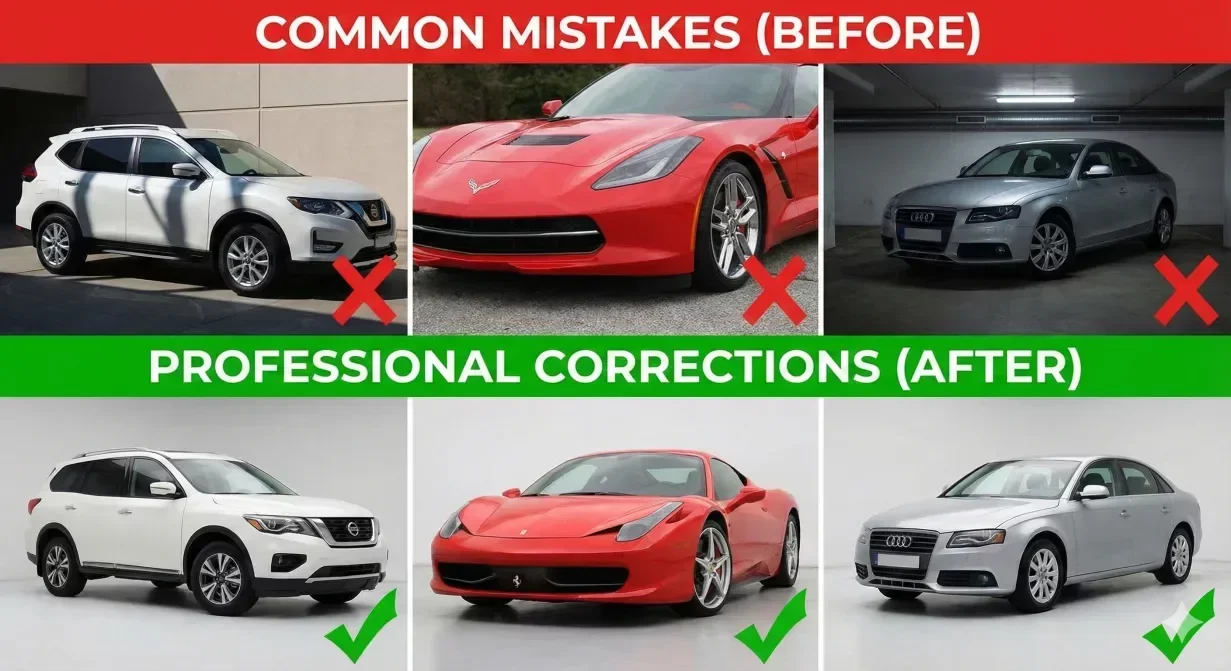
Some Car background photos for sale listings get clicks while others get scrolled past. The visual difference may seem subtle, but buyers make split-second decisions based on thumbnail impressions. This troubleshooting guide helps you diagnose why specific photos underperform and provides targeted fixes for the most common issues killing your click rates.
How to Identify Underperforming Photos
Before fixing problems, confirm that photos are the actual issue rather than other listing factors.
Compare Click Rates Across Similar Inventory
Look at click-through rates for vehicles of similar type, price, and condition. If one vehicle significantly underperforms peers, photo quality may be the differentiator.
Review Marketplace Position
Some positions in search results inherently get fewer clicks. Compare against vehicles in similar positions before attributing problems to photo quality.
Seven Visual Issues That Kill Clicks
Issue 1: Dark or Underexposed Photos
Symptoms: Photos appear muddy, details hide in shadows. Fix: Increase exposure during capture or apply brightness correction during processing.
Issue 2: Washed Out or Overexposed Photos
Symptoms: Photos appear hazy, white areas lack detail. Fix: Reduce exposure during capture or apply exposure correction during processing.
Issue 3: Inconsistent Color Across Angles
Symptoms: Paint color looks different in different photos. Fix: Apply consistent white balance and color correction across all photos in a vehicle set.
Issue 4: Cluttered or Distracting Background
Symptoms: Other vehicles visible, lot signage in frame. Fix: Apply background replacement to create clean, consistent presentation.
Issue 5: Poor Composition and Vehicle Positioning
Symptoms: Vehicle off-center, awkward angles. Fix: Establish and follow composition standards for each shot type.
Issue 6: Low Resolution or Visible Compression
Symptoms: Photos appear soft or pixelated. Fix: Capture at maximum device resolution, export at appropriate quality settings.
Issue 7: Unnatural or Over-Processed Appearance
Symptoms: Colors look artificial, HDR-like glow. Fix: Back off enhancement intensity. Target natural-looking optimization.
Quick Diagnostic Checklist
- Is the photo well-lit without being overexposed?
- Does color appear consistent across the vehicle set?
- Is the background clean and non-distracting?
- Is the vehicle properly centered and composed?
- Does the photo maintain quality at full size and zoom?
- Does the photo look natural rather than over-processed?
- Would you click on this thumbnail if you were shopping?
Prioritizing Fixes for Maximum Impact
- Hero shot quality: The first photo generates the click decision.
- Exposure problems: Dark or washed-out photos create strongest negative impressions.
- Background clutter: Clean backgrounds dramatically improve perceived professionalism.
- Color consistency: Inconsistent color raises accuracy concerns.
How CarBG Addresses Click-Killing Issues
CarBG addresses the most common photo issues through automated enhancement. Lighting optimization corrects exposure problems. Color enhancement ensures consistency. Background replacement eliminates clutter.
The platform template-based processing applies consistent treatment that avoids over-processing while achieving professional presentation.
Final Thoughts
Car photos for sale listings that underperform often have identifiable, fixable problems. Use this diagnostic framework to pinpoint which issues affect your inventory and prioritize fixes for maximum impact. Process your underperforming photos through CarBG and see the difference corrected presentation makes.
The CarBG Angle (FAQ Bits)
How do I know if my photos are causing low clicks?
Compare click rates for similar vehicles in your inventory and against competitor listings.
Which photo problem should I fix first?
Prioritize hero shot issues since the first photo drives click decisions.
Can better photos really improve click rates?
Yes. Professional presentation generates more clicks; poor photos create barriers that pricing cannot overcome.
How dark is too dark for car listing photos?
Compare against competitor listings. If yours appear noticeably darker, increase exposure.
Is background clutter really that important?
Yes. Clean backgrounds focus attention on the vehicle and signal professionalism.
How long does it take to see click rate improvement?
Allow one to two weeks of listing exposure for meaningful comparison.

Tamas Magda
Co-founder, Growth and Partnerships at Car Background AI
Tamas Magda is co-founder of Car Background AI (carbackground.ai, CarBG), an AI car photo editor that replaces backgrounds on dealership inventory photos. He leads partnerships, growth, and business architecture, working with the development team on the product roadmap and with dealers on what their online listings actually need. He brings a background in venture building across APAC and MENA, and writes about vehicle merchandising, dealer photo workflows, and using AI on listing images without altering the car itself.
Tamas is a co-founder of Car Background AI and has a financial interest in the company. Articles that mention Car Background AI reflect that relationship.