Car Background: How AI Creates Listing-Ready Backdrops
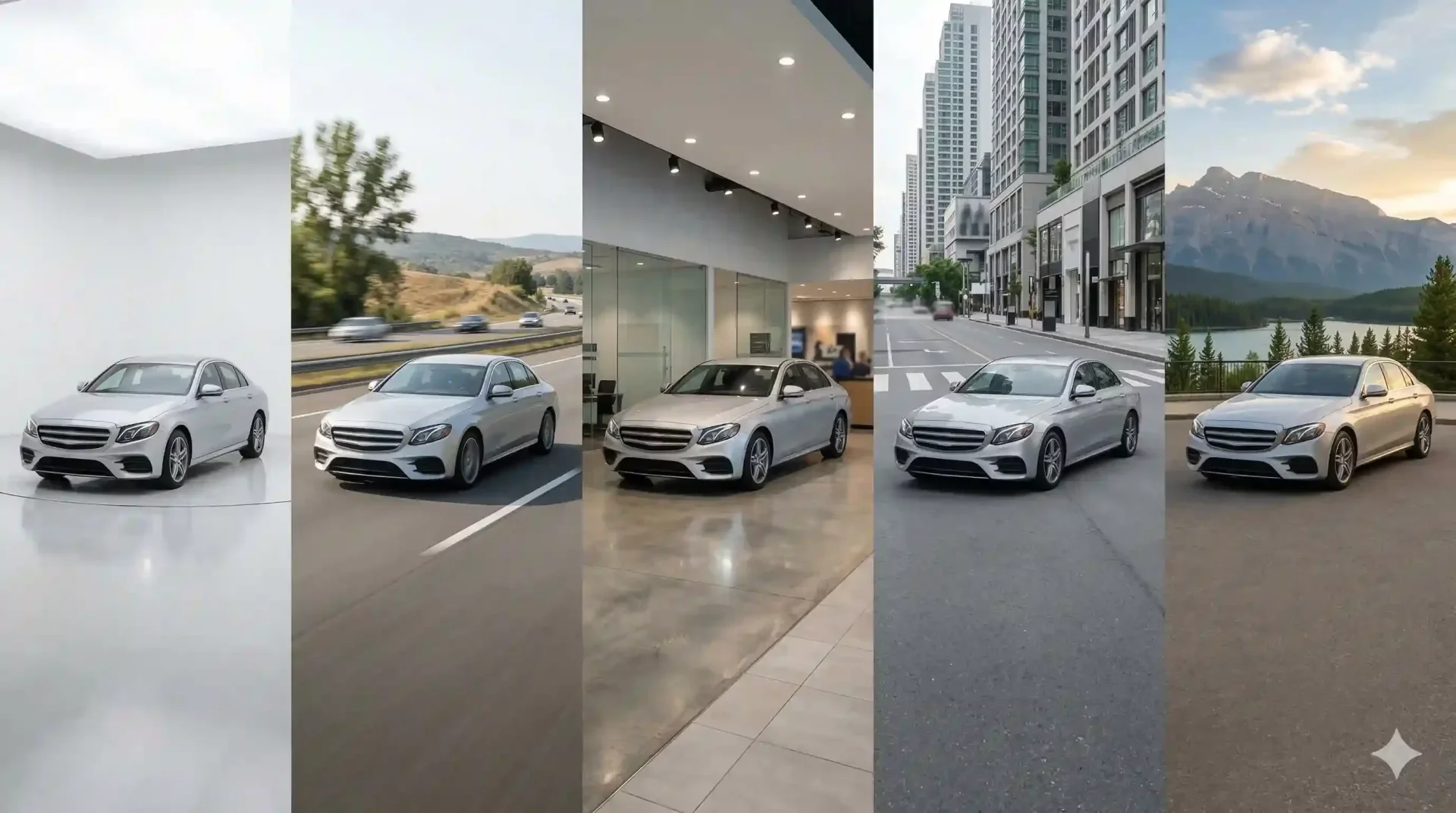
The car background behind your inventory photos shapes how buyers perceive every vehicle on your lot. A clean, professional backdrop signals credibility. A cluttered parking lot with stray shopping carts and dumpsters signals the opposite. Yet most dealers still publish listing images with whatever background happened to be there on shooting day. Replacing that inconsistency with a standardized car background is one of the fastest ways to improve listing performance across every marketplace.
This guide explains how modern AI tools create professional car backgrounds at scale, which backdrop styles work best for different platforms, and how to maintain visual consistency without slowing down your workflow.
What makes a great car background for online listings
A strong background for car listings does three things. It removes distractions, keeps the vehicle as the focal point, and creates a sense of professionalism that builds buyer trust. It does not need to be flashy or complex. In fact, the most effective car backgrounds are deliberately simple.
White and light gray studio backdrops dominate high-performing dealer listings because they work everywhere. They look clean on Cars.com grids, render well on mobile screens, and do not clash with any vehicle color. A red sports car on a white background pops. The same car on a busy street scene competes for attention.
The key principle is that the background should serve the car, never compete with it. If a buyer notices the backdrop before the vehicle, the background is doing too much.
Types of car backgrounds that build buyer trust
Different backgrounds serve different purposes. Here is a practical breakdown.
Background style | Trust signal | Best platform fit | Best vehicle fit |
|---|---|---|---|
White studio | Clinical precision, nothing to hide | Cars.com, CarGurus, dealer website | All vehicle types |
Gray gradient | Depth without distraction | AutoTrader, any marketplace | Sedans, coupes, luxury |
Showroom interior | Premium presentation | Dealer website, email campaigns | Luxury, certified pre-owned |
Outdoor scenic | Lifestyle aspiration | Facebook Marketplace, Instagram | Trucks, SUVs, Jeeps |
Urban street | Modern, approachable | Social media, classifieds | Compact cars, EVs |
Dealers who use awesome car backgrounds across their entire inventory rather than random lot shots see a consistent improvement in engagement. The visual uniformity itself becomes a brand asset.
Why car and background consistency matters across listings
A single well-edited photo impresses. Thirty well-edited photos with the same cars background style create a brand. When a buyer lands on your inventory page and every vehicle is presented against the same clean backdrop, the subconscious message is clear: this dealership is organized, meticulous, and professional.
Inconsistency sends the opposite signal. If five cars have studio backgrounds, three have lot shots, and two have someone's attempt at a Photoshop gradient, the buyer sees chaos. They may not articulate it, but they feel it. And feelings drive which dealer gets the inquiry.
Consistency also simplifies your internal workflow. When every vehicle gets the same background for car treatment, your team does not waste time debating backdrop choices. The decision is made once, at the template level, and then applied automatically to every image.
How AI creates professional backgrounds with cars at scale
Traditional background replacement requires a skilled designer to manually mask the vehicle, remove the original backdrop, place a new one, adjust lighting to match, and add realistic shadows. That process takes 15-30 minutes per image. For a dealer with 50 vehicles and 15 photos each, that is 750 images and hundreds of hours of editing labor.
AI background replacement compresses that into seconds per image. The process works in three stages. First, the AI identifies the vehicle silhouette using a model trained on thousands of car images. Second, it separates the vehicle from the original background with precise edge detection that handles mirrors, glass, wheels, and antennas. Third, it composites the car onto the selected template backdrop, adding shadow grounding and matching the lighting direction.
The result is a clean, realistic background car image that looks like it was shot in a studio. Multiply that across your full inventory and you have a professional catalog created in a fraction of the time.
Selecting the right car background for your dealership brand
Your background choice should align with your brand positioning and your primary sales channel.
If you sell primarily through your dealer website and Cars.com, invest in a branded template that includes a subtle floor reflection and your dealership's color palette. This reinforces brand recognition every time a buyer sees your listing.
If Facebook Marketplace and Craigslist drive most of your leads, stick with clean, simple backgrounds. These platforms display images at small sizes, and complex backdrops get lost in the thumbnail. A white or light gray backdrop reads as "professional" even at 200 pixels wide.
For multi-location dealer groups, standardization is the priority. Every location should use the same two to three templates so your brand looks identical whether a buyer is looking at inventory from your north or south location.
Measuring the impact of better car backgrounds on listings
Improving your backgrounds with cars across all listings is only valuable if you can measure the results. Here are the operational KPIs to track.
Background quality impact tracker
- Click-through rate on marketplace listings: compare the 30 days before and after standardizing your car background. Improvement in CTR indicates buyers find your listings more appealing.
- Time-to-first-inquiry: measure the average number of days between listing publication and first buyer contact. Shorter times indicate stronger visual appeal.
- Photo-related buyer questions: track how often buyers ask for "more photos" or "better pictures." A drop in these requests means your images are doing the job.
- Time-to-listing: measure the hours between vehicle arrival on lot and listing going live. AI-powered car background replacement should compress this significantly.
- Inventory page bounce rate: if buyers land on your inventory page and leave quickly, inconsistent visuals may be the cause. Standardized backgrounds often reduce bounce rates.
Track these for 60-90 days after implementing consistent background for car processing. The patterns will guide whether you need to adjust your template selection or shooting process.
Final thoughts
Your car background is not a cosmetic detail. It is a trust signal that shapes buyer perception across every listing, every marketplace, and every impression. Standardize your backdrops, match them to your brand and platform, and apply them consistently to every vehicle. The free image enhancer is a good starting point to test how AI-generated car backgrounds perform against your current lot photos.
Frequently asked questions
What is the best car background for marketplace listings?
A white or light gray studio background works best for most marketplaces. It eliminates distractions, renders well on mobile screens, and keeps the vehicle as the clear focal point. For social media platforms like Facebook Marketplace, clean outdoor or lifestyle backgrounds can also perform well because they match the platform's more casual browsing style.
Can I use the same cars background for every vehicle type?
You can, and for brand consistency it is often the best approach. However, some dealers see better engagement by using one primary background for sedans and coupes (white studio) and a secondary background for trucks and SUVs (outdoor scenic). The key is limiting your options to two or three templates, not using a different background for every car.
How does AI replace a car and background without looking fake?
Automotive-specific AI models are trained on thousands of vehicle images, so they understand complex edges like mirrors, wheel spokes, and glass transparency. After removing the original background, the AI composites the car onto the new backdrop, matches lighting direction, and adds shadow grounding to prevent the floating car effect. The result looks natural because the model accounts for vehicle-specific visual challenges that generic tools miss.
Do professional car backgrounds help with SEO?
Indirectly, yes. Higher-quality listing images increase click-through rates and reduce bounce rates, both of which are positive engagement signals. Marketplaces like Cars.com and CarGurus also prioritize well-photographed inventory in their search results. Better backgrounds with cars in your listings can improve your visibility within these platforms over time.
How many background for car templates should a dealership use?
Two to three active templates is the sweet spot. One primary (usually white studio or gray gradient), one secondary for lifestyle-oriented vehicles, and optionally one branded template for your dealer website. More templates create decision fatigue and inconsistency, while fewer may not cover all your use cases.
Can I use awesome car backgrounds on social media ads?
Yes, provided your editing tool grants full commercial rights on the output. CarBG includes commercial photography rights on all processed images, meaning you can use them across your website, marketplace listings, social media ads, email campaigns, and any other promotional channel without additional licensing costs or restrictions.

Tamas Magda
Co-founder, Growth and Partnerships at Car Background AI
Tamas Magda is co-founder of Car Background AI (carbackground.ai, CarBG), an AI car photo editor that replaces backgrounds on dealership inventory photos. He leads partnerships, growth, and business architecture, working with the development team on the product roadmap and with dealers on what their online listings actually need. He brings a background in venture building across APAC and MENA, and writes about vehicle merchandising, dealer photo workflows, and using AI on listing images without altering the car itself.
Tamas is a co-founder of Car Background AI and has a financial interest in the company. Articles that mention Car Background AI reflect that relationship.