Editing Full HD Car Backgrounds for Professional Listings
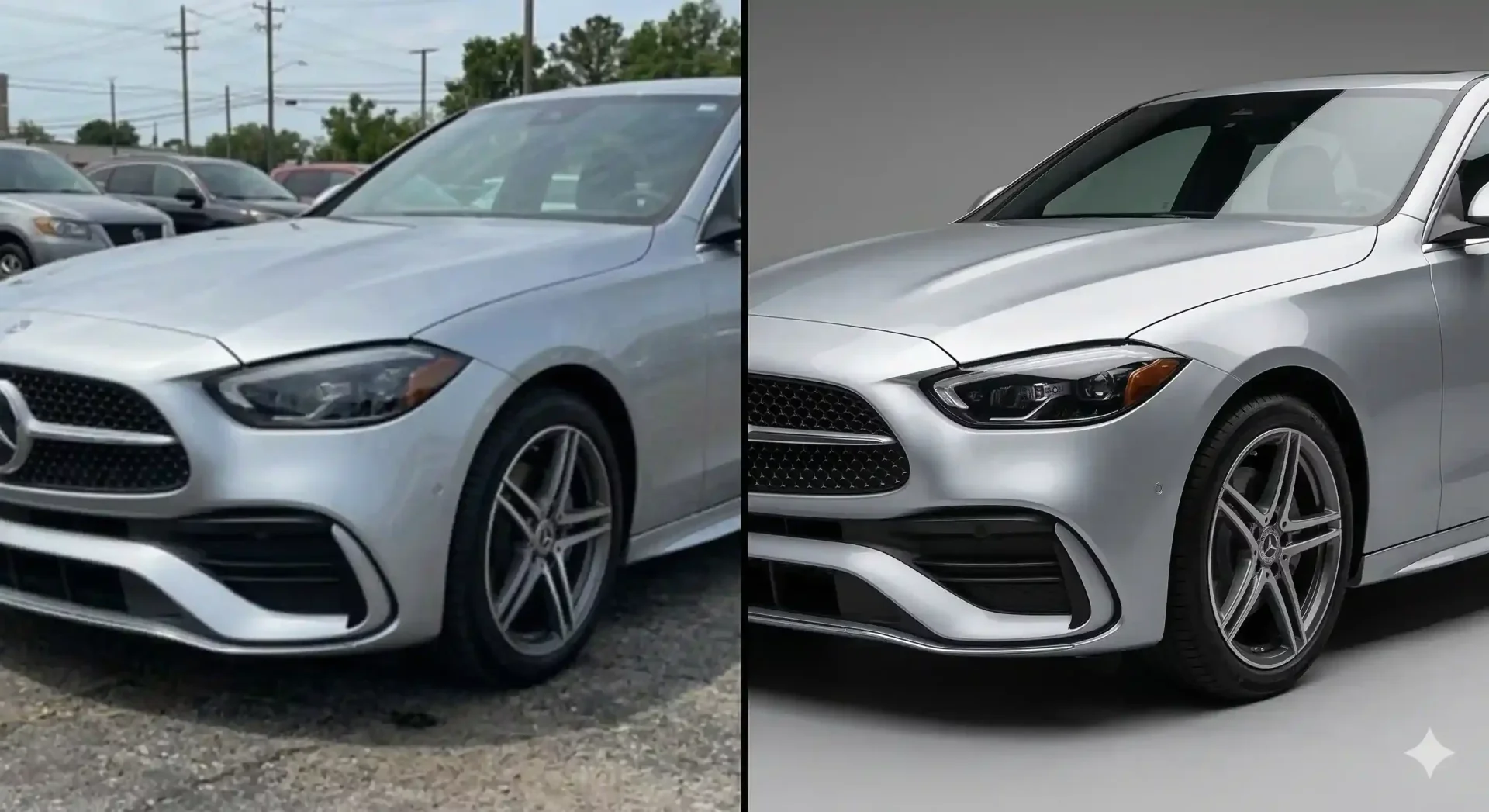
Editing full HD car backgrounds is the difference between a listing photo that looks sharp on every screen and one that appears blurry, cropped, or pixelated when a buyer pinches to zoom. Marketplaces like Cars.com, CarGurus, and AutoTrader display images at varying sizes depending on the device, and a background swap done at low resolution falls apart the moment someone views it on a tablet or desktop monitor.
This guide covers the resolution standards you should target, which car background images work best at full HD, and how to export files that stay crisp across every platform where your inventory appears.
Why resolution matters when editing full hd car backgrounds
Full HD means 1920 x 1080 pixels at minimum. At this resolution, a car background pic retains detail when displayed on desktop monitors, tablets, and high-resolution phone screens. Drop below that threshold and two things happen: the background looks grainy when buyers view the listing on a large screen, and marketplace algorithms may deprioritize your images in favor of higher-quality competitors.
The challenge for dealers is that many phones shoot at 12MP (4000 x 3000), which is well above HD, but the background replacement step can reduce quality if the tool compresses the output or processes at a lower internal resolution. Always verify that your car background editing tool exports at the same resolution as your input, or higher.
Car background images that work at full HD resolution
Not every backdrop template scales well to full HD. Here is a breakdown of which car background pictures hold up at high resolution and which break down.
Background type | HD performance | Common issues at high resolution |
|---|---|---|
Solid white/gray | Excellent | None. Clean at any resolution. |
Gradient (light to dark) | Excellent | Banding artifacts if gradient is too compressed |
Showroom interior (3D render) | Good | Low-quality renders show flat textures at full zoom |
Outdoor scenic (photograph) | Good if source is HD+ | Sub-HD source photos blur noticeably behind a sharp car |
Abstract/artistic | Variable | Pattern repetition and aliasing visible at full screen |
The safest choices for everyday dealer use are solid colors, gradients, and high-quality showroom renders. These car background images maintain clarity at any zoom level and do not distract from vehicle details.
Export settings for HD car background editing
Getting the resolution right at capture is only half the equation. Your export settings determine what the buyer actually sees. Here is a marketplace-ready export checklist.
HD export checklist for car background pictures
- Resolution: export at 1920 x 1080 minimum. For hero images on your dealer website, 2400 x 1600 is better.
- Format: WebP for web use (smallest file size at equivalent quality). JPEG as a universal fallback. PNG only if you need transparency.
- File size: target under 200KB per image. Larger files slow page loads and hurt your listing SEO.
- Aspect ratio: check your target marketplace. Cars.com uses 4:3. Facebook Marketplace crops to various ratios. Export at the widest ratio you need and let the platform crop.
- Color profile: sRGB for web display. Do not export in Adobe RGB or CMYK as colors will shift on most screens.
- File naming: use descriptive names like
STK4521-front-quarter-studio-hd.webprather thanIMG_4582.jpg.
These settings ensure your car background pic looks professional on every device without bloating your page load times.
Common mistakes when editing full hd car backgrounds
Resolution-related errors are among the most common quality problems in dealer inventory photos. Here are the ones to watch for.
Mistake 1: using a low-res background behind a high-res car. If your vehicle was shot at 12MP but your backdrop template is 800 x 600, the mismatch is immediately visible. The car looks sharp while the background looks like a blurred poster. Always use backdrop templates at 1920 x 1080 or higher.
Mistake 2: over-compressing the export. Aggressive JPEG compression saves file size but introduces visible artifacts around the vehicle edges, exactly where buyers look most closely. Keep JPEG quality at 80-85% minimum, or use WebP which achieves smaller files without the same artifact problems.
Mistake 3: ignoring aspect ratio differences across platforms. A background that looks perfect at 16:9 may crop awkwardly when a marketplace displays it at 4:3. Always preview your output at the target platform aspect ratio before publishing. If you sell on multiple platforms, export at the widest ratio needed.
Mistake 4: skipping the zoom test. View every processed image at 100% zoom before exporting. Edge artifacts, shadow inconsistencies, and resolution mismatches that are invisible at thumbnail size become obvious when a buyer pinches to zoom on a phone.
Building an hd car wallpapers and backdrop library
A well-organized template library saves time and prevents the resolution mistakes above. Structure yours by category and resolution tier.
Create three folders: Standard (1920 x 1080 for everyday listings), Premium (2400 x 1600+ for website hero images and marketing), and Social (1080 x 1080 square crops for Instagram and Facebook). Stock each folder with two to three tested templates in the styles that match your brand.
Label every template file with its resolution and style. For example: studio-white-1920x1080.webp and outdoor-scenic-2400x1600.webp. This prevents staff from accidentally using a low-res backdrop and lets anyone on your team select the right template without guessing.
Review and update your library quarterly. As marketplace display standards evolve and screen resolutions increase, your templates should keep pace. What looked sharp two years ago may already feel soft on current devices.
Marketplace-specific resolution requirements for car background images
Each major marketplace has different display behavior that affects how your HD backgrounds appear to buyers.
Cars.com displays inventory images at various sizes depending on the listing view. Grid thumbnails are small, but the detail view expands images significantly. If your car background pic was processed at low resolution, the detail view is where it falls apart. Export at 1920 x 1080 minimum to handle both views cleanly.
CarGurus uses a gallery-style viewer that allows buyers to swipe through images at near-full-screen size on mobile. Low-resolution backgrounds become noticeably blurry in this context, while the vehicle itself may still look sharp, creating an obvious mismatch.
Facebook Marketplace compresses uploaded images aggressively. Starting with a higher-resolution source helps offset this compression. A car background image uploaded at 1920 x 1080 will survive Facebook compression better than one uploaded at 1280 x 720.
How to verify your car background image quality before publishing
A 30-second QA check on every processed image prevents embarrassing quality issues from reaching buyers. Use this quick verification process.
Open the final export file at 100% zoom. Check three things. First, the edges around the vehicle, especially mirrors and wheel wells, should be clean without halos or fringing. Second, the shadow under the car should look natural on the new backdrop, not pasted or overly dark. Third, the car background image should be consistent in sharpness with the vehicle itself. If the car is crisp and the background is blurry, the resolution mismatch is obvious.
For batch processing, spot-check one image per vehicle rather than reviewing every single file. Focus on the front three-quarter view, which has the most complex edges and is typically the first image buyers see on marketplace listings.
Final thoughts
Editing full HD car backgrounds is not just a technical detail. It is the difference between listings that look professional on every device and ones that fall apart the moment a buyer zooms in. Lock your export settings to 1920 x 1080 minimum, match your backdrop resolution to your source images, and run a quick zoom check before publishing. Start with your next vehicle intake and try CarBG free to see how full HD background editing looks across your inventory.
Frequently asked questions
What resolution should I use when editing full hd car backgrounds?
Export at 1920 x 1080 pixels minimum for standard marketplace listings. For hero images on your dealer website or marketing materials, aim for 2400 x 1600 or higher. Always match or exceed the resolution of your source photo to avoid a visible mismatch between the sharp vehicle and a blurry backdrop.
Which file format is best for HD car background images?
WebP is the best format for web use because it achieves smaller file sizes than JPEG at equivalent quality. JPEG works as a universal fallback for platforms that do not support WebP. Use PNG only when you need transparency for cutout images. Keep file sizes under 200KB for fast page loads.
Why do some car background pictures look blurry after processing?
The most common cause is a resolution mismatch between the vehicle photo and the backdrop template. If your car was shot at 12MP but the background template is only 800 x 600 pixels, the backdrop will appear soft while the car looks sharp. Always use backdrop templates at 1920 x 1080 or higher to avoid this problem.
How do I prevent compression artifacts in my car background pic?
Keep JPEG quality at 80-85% minimum when exporting. Aggressive compression introduces visible blocky artifacts around vehicle edges, exactly where buyers look most closely. WebP format naturally handles compression better than JPEG at the same file size, making it the preferred choice for dealer listing photos.
Can I use hd car wallpapers as backdrop templates for listings?
Technically yes, but verify two things first. The wallpaper must be at least 1920 x 1080 resolution, and you must have commercial usage rights. Many wallpapers found online are copyrighted and cannot be used for commercial listings. Purpose-built backdrop templates from your car background editing tool are always the safer choice since they come with commercial rights included.
How many HD backdrop templates should a dealer maintain?
Two to three active templates in each resolution tier is sufficient. One primary studio-style backdrop, one lifestyle option for trucks and SUVs, and optionally one branded template for your website. Organize them by resolution (standard 1920x1080, premium 2400x1600+, social 1080x1080) so staff always pick the right file for the target platform.

Tamas Magda
Co-founder, Growth and Partnerships at Car Background AI
Tamas Magda is co-founder of Car Background AI (carbackground.ai, CarBG), an AI car photo editor that replaces backgrounds on dealership inventory photos. He leads partnerships, growth, and business architecture, working with the development team on the product roadmap and with dealers on what their online listings actually need. He brings a background in venture building across APAC and MENA, and writes about vehicle merchandising, dealer photo workflows, and using AI on listing images without altering the car itself.
Tamas is a co-founder of Car Background AI and has a financial interest in the company. Articles that mention Car Background AI reflect that relationship.